Anthropic - Claude.ai を接続する
DoiT の Anthropic Analytics API 連携は、Claude Enterprise Analytics API を使用して、Claude Enterprise 組織のエンゲージメント・採用状況・コストデータを Cloud Intelligence に取り込みます。コストおよび使用量データは 従量課金制の Enterprise プラン でのみ利用できます。シートベースのプランでは、追加の従量課金分のみデータが表示されます。
DoiT は、Claude Console 組織(platform.claude.com)向けに別の連携も提供しています。詳細は Anthropic connection types を参照してください。
必要な権限
-
お使いの DoiT アカウントに Billing Profiles Admin 権限が必要です。
-
Claude Enterprise 組織の
primary ownerである必要があります。
Analytics API キーを作成する
Claude Enterprise Analytics API を使用するには、claude.ai で作成された Analytics API キーが必要です。
-
Claude Enterprise 組織の Primary Owner として claude.ai にサインインします。
-
Claude API Docs に従い、Claude Enterprise 組織用の Analytics API キーを作成します。スコープに
read:analyticsを必ず選択してください。 -
ブラウザウィンドウを閉じる前に、表示されているシークレット(
sk-ant-api01-で始まる文字列)をコピーします。完全なシークレットが表示されるのはこの一度きりです。注意API キーはパスワードと同様に扱ってください。キーを知っている人は誰でも、あなたの組織の分析データを閲覧できます。
Anthropic アカウントを接続する
-
Cloud Intelligence にサインインし、上部ナビゲーションのメガメニューから データ取り込みとインテグレーション > 連携 を選択します。
-
Anthropic - Claude.ai の連携カードを探します。
-
最初のアカウントを追加する場合は Connect + を選択し、すでにアカウントがある場合は 管理 を選択してから Connect Anthropic (Analytics API) を選択します。
-
Organization Label と Analytics API Key の資格情報を入力します。
-
Organization Label: この Anthropic 組織を DoiT 内で識別するための任意のスラッグ(例:
my-org)。複数の接続を区別するために使用されます。任意の安定した識別子を選択できます。Anthropic 側での検証は行われません。 -
Analytics API Key: スコープ
read:analyticsを持つ API key。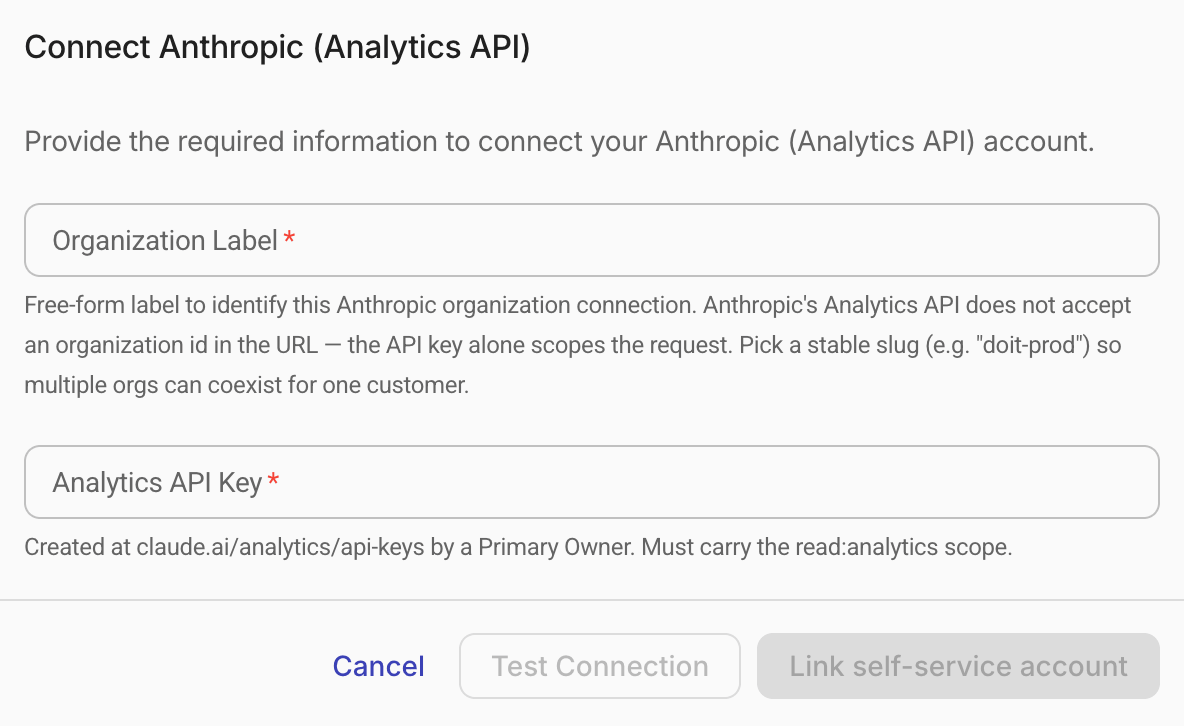
-
-
接続テスト を選択して、DoiT がデータにアクセスできることを確認してください。
-
テストが成功したら、保存 を選択して設定を完了してください。
テストが失敗した場合や追加のサポートが必要な場合は、エキスパートへ問い合わせ を行ってください。
初回接続時、DoiT は最大 90 日分の過去の使用量およびコストデータを取り込みます。取り込み処理には数時間かかる場合があります。
データの更新頻度
DoiT は Anthropic データを 6 時間ごとに更新します。コストおよび使用量データは通常 24 時間以内に利用可能になります。エンゲージメントメトリック(アクティブユーザー、プロジェクト使用状況、スキル)は日次で集計され、少なくとも 3 日前までの日付のデータが利用可能です。
GenAI Intelligence
Anthropic データが Cloud Intelligence に取り込まれると、自動的に GenAI Intelligence ダッシュボードに反映されます。これらのウィジェットにより、AI 支出、トークン消費量、アクティブユーザー数、モデル使用状況のトレンドをあらかじめ構成されたビューで確認できます。
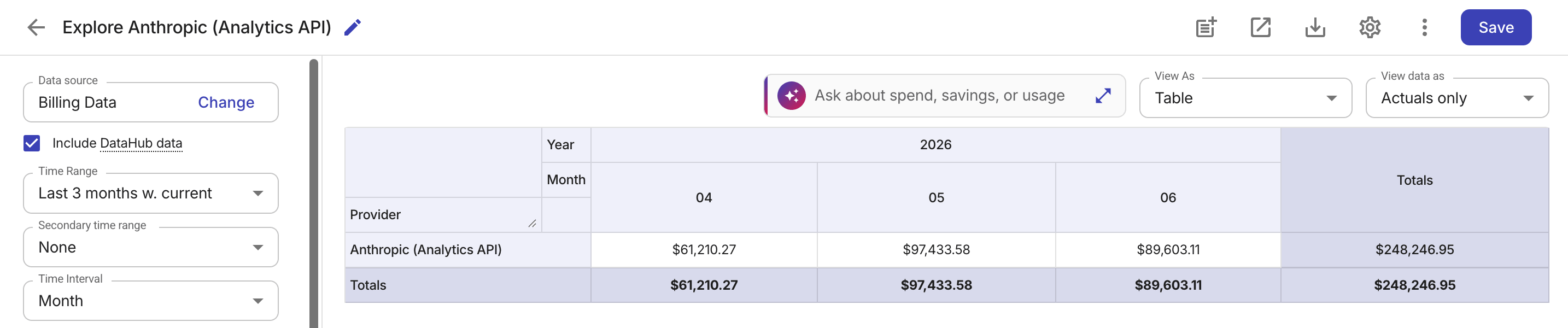
また、Anthropic - Claude.ai の連携カード、またはその詳細ページで Analyze を選択すると、Claude Enterprise 組織のデータセットに事前フィルターされた Cloud Analytics レポートを開くこともできます。
レポートディメンション
接続が完了すると、Anthropic のデータは次の標準的な Cloud Analytics ディメンション にマッピングされます。
| Cloud Analytics ディメンション | Anthropic の値 | 例 |
|---|---|---|
| Provider | Anthropic (Analytics API) | Anthropic (Analytics API) |
| Billing Account | Organization Label | my-org |
| Project/Account ID | User ID | user_abc123 |
| Service | Claude product | claude_code、chat、cowork |
| SKU | Model ID | claude-sonnet-4-6 |
Anthropic 固有のラベルは、Cloud Analytics の GenAI セクションで確認できます。
Anthropic 接続を削除する
-
Cloud Intelligence にサインインし、上部ナビゲーションのメガメニューから データ取り込みとインテグレーション > 連携 を選択します。
-
Anthropic - Claude.ai の連携カードを探します。
-
連携カードで 管理 を選択します。
-
削除したいアカウントの右端にあるケバブメニュー(⋮)を選択し、Disconnect を選択します。
-
再度ケバブメニュー(⋮)を選択し、削除 を選択して接続を完全に削除します。