AI データを扱う
DoiT は、次のプロバイダが提供する AI サービスに対応しています:AWS(Amazon Bedrock、Kiro)、Google Cloud(Vertex AI)、Microsoft Azure(Azure Machine Learning)、Databricks、Snowflake、Anthropic、OpenAI。
GenAI providers を接続すると、AI のコストと利用状況の分析・モニタリングを開始できます。
Cloud Analytics における AI データ
Cloud Analytics は、ほとんどの AI データを 1 時間ごとに更新します。Snowflake コネクタのデータは 12 時間ごとに同期されます。
制限事項
-
Amazon Bedrock:請求データには API キーやユーザーレベルのアトリビューションが含まれません。その結果、Cost by API key および GenAI spend - Top 15 users ダッシュボードウィジェットは、Bedrock のみの利用ではデータが表示されません。GenAI プロバイダを直接接続した場合(例:OpenAI や Anthropic)、これらのウィジェットは自動的にデータが表示されます。
-
Databricks:トークン利用データ(モデルごとの入力・出力トークン数)を取得するには、オプションの serving system tables へのアクセス権を DoiT service principal に付与する必要があります。詳細は、Enable token usage data を参照してください。
-
OpenAI:OpenAI のコストデータは最終的な請求額を反映しますが、利用データはアクティビティのモニタリング用です。つまり、レポートに表示されるコストが、必ずしも実際の利用状況と一致しない場合があります。より詳細が必要な場合は、OpenAI API Usage Dashboard を確認してください。
- OpenAI の音声入力トークン:OpenAI Costs API は、キャッシュあり・キャッシュなしの音声入力トークンのコストをまとめて集計します。このため、GenAI Intelligence では OpenAI の音声 SKU をキャッシュありとキャッシュなしに分割しません。音声入力トークンのコストは常に合算されます。
-
Anthropic - Claude.ai:コストと利用データは、利用量ベースの Enterprise プランでのみ利用可能です。Claude Enterprise Analytics API を参照してください。
-
Snowflake:Direct model inference、Cortex Agents、Snowflake Intelligence、Cortex Code の利用は含まれます。Cortex Search と、非推奨となった混在の
AI_SERVICES請求カテゴリは含まれません。AI SQL telemetry はクレジットベースのコストを割り当てます。REST API inference のコストは集計行AI_INFERENCEに残り、一方でモデル、ユーザー、リージョン、トークンの詳細は利用のみの行として記録されます。履歴の詳細は Snowflake の usage view の保持期間によって制限されます。標準の telemetry が利用できなくなった過去の請求行は分割されないまま残ります。オプションの user-directory 権限がない、または一致するユーザーレコードが存在しない場合、ユーザー名とメールアドレスは null のままです。
ディメンション と メトリクス を通じて AI データを取得できます。以下に、DoiT の用語と AI の用語の対応関係を示します。
基本メトリクス
| DoiT term | AI term | AI definition |
|---|---|---|
cost | cost | 特定のリソースまたは利用に対する合計コスト。 |
usage | usage | トークンの利用量。加えて、利用メトリックには、特定のサービス、モデル、または監視対象の操作に応じて、秒数、バイト数、文字数などに基づく消費も含まれます。 |
標準ディメンション
以下の表は、プラットフォームと統合されているすべての AI モデルで利用可能な標準ディメンションを示します。
| DoiT term | Description |
|---|---|
| Billing Account | AI アカウント内の特定の組織を示す一意の識別子。 |
| Project ID/Account ID | AI プロバイダのワークスペースを示す一意の識別子。 |
| Service/Service ID/SKU Description | 利用している AI プロダクトまたは機能の高レベルの説明。例:Completions API、Embeddings API、Claude haiku3.5 Usage - Input tokens、Web Search Usage。 |
| SKU ID/SKU description | 利用している AI サービス内の、より細かな課金単位。例:chatgpt-4o-latest, input、text-embedding-3-large、claude-3-5-haiku-20241022, input_tokens、claude-sonnet-4-20250514, output_tokens。 |
| Unit | 主な利用単位。多くのプロバイダでは主な単位は token ですが、利用している AI サービスに応じて他の単位も使用されます。 |
| Operation | AI サービスによって実行される、個別の課金対象アクション。例:input、cached input、web_search、image。 |
| Provider | AI プロバイダ名。Amazon Web Services、Anthropic、Anthropic (Analytics API)、Azure、Databricks、Google Cloud、OpenAI、Snowflake。 |
GenAI labels
以下は、プラットフォーム内で使用できる GenAI システムラベルです。GenAI システムラベルは GenAI セクションにグループ化されています。
| Label | Description | Provider |
|---|---|---|
| API Key ID | AI キーの一意の識別子 | Anthropic, OpenAI |
| API Key Name | AI API キーの名前 | Anthropic, OpenAI |
| Base Model | AI モデルのオファリングを表す識別子。例: gpt-4.1、claude-haiku-4.5 | Anthropic, Anthropic (Analytics API), OpenAI |
| Billing Category | リクエストが Cursor によってどのように請求されたかを示します。Usage-based、Included in Business、Free、Aborted, Not Charged、Errored, Not Charged のいずれか | Cursor |
| Cached | コスト最適化のためにキャッシュされたトークンを使用したかどうかを示します: true、false | Anthropic, Anthropic (Analytics API), Azure, OpenAI |
| Coding agent | Claude Code、Kiro、Snowflake Cortex Code (CoCo) などの AI コーディングエージェントによって使用量が生成されたかどうかを示します: true、false | Anthropic (Analytics API), AWS, Cursor, Snowflake |
| Consumption Model | AI サービスに使用された料金モデル。PAYG (Pay-As-You-Go) または Provisioned Throughput | Azure, GCP |
| Context Window | AI モデルに適用されるコンテキストウィンドウの制限。0-200k、200k-1M のいずれか | Anthropic, Anthropic (Analytics API) |
| Cost type | 利用が属する課金対象のコストコンポーネント。tokens (モデルのトークン使用量)、web_search (サーバーサイドの Web 検索)、code_execution (サーバーサイドのコード実行) のいずれか | Anthropic (Analytics API) |
| Feature | 使用されている AI 機能またはサービス機能の種別。Vertex AI の例: Model Serving、Model Serving via Model Garden、Vertex Colab、Metadata storage。Microsoft Azure の例: Model Serving、Audio Generation、Embeddings | Azure, GCP |
| GenAI Spend | AI プロバイダに関わらず、サポート対象の生成 AI ワークロードとして分類されたコスト | Anthropic, Anthropic (Analytics API), AWS, Azure, Cursor, Databricks, GCP, OpenAI, Snowflake |
| Inference Geo | 推論が処理された地理的リージョンで、データレジデンシー管理の追跡に使用されます。global、us、not_available (リージョン未設定) のいずれか | Anthropic (Analytics API) |
| Input Tokens | リクエスト時に AI モデルへ送信されたトークン数(プロンプトとコンテキスト) | Cursor |
| Invokation | 何がリクエストを開始したかを示します。たとえば、ユーザーが直接開始したアクティビティの場合は human | Anthropic (Analytics API), Cursor |
| Is Chargeable | リクエストに課金が発生したかどうかを示します: true (課金対象)、false (無料またはクオータ内) | Cursor |
| Is Headless | リクエストが対話型エディタセッションではなくバックグラウンド (ヘッドレス) エージェントから送信されたかどうかを示します: true、false | Cursor |
| Is Model Serving | サービスがモデルをアクティブに提供しているかどうかを示します: true、false。Vertex AI と Amazon Bedrock で利用可能 | Azure, GCP |
| Max Mode | リクエストに対して Cursor の Max モードが有効になっていたかどうかを示します: true、false | Cursor |
| Media Format | 複数のメディアタイプをサポートするモデルにおいて、サービスが音声・画像・テキストのどれを処理していたかを区別するメディア形式。例: audio | Anthropic, AWS, OpenAI |
| Model | AI モデルのオファリングを表す識別子。例: gpt-4o-audio-preview、claude-sonnet-4-6 | Anthropic, Anthropic (Analytics API), AWS, Azure, Cursor, Databricks, GCP, OpenAI, Snowflake |
| Model Family | 共通のアーキテクチャと学習手法を共有する関連 AI モデルのグループ。例: Claude、Gemini、Gemma、GPT-5、Kiro、Mistral | Anthropic, Anthropic (Analytics API), AWS, Azure, Databricks, GCP, OpenAI, Snowflake |
| Model Version | AI モデルオファリングのバージョン。例: 2024-12-17 | Anthropic, OpenAI |
| Organization Name | AI 組織の一意の識別子。Anthropic (Analytics API) の場合、接続の Organization Label に相当します | Anthropic, Anthropic (Analytics API), AWS, Azure, OpenAI |
| Output Tokens | AI モデルがレスポンスとして生成したトークン数 | Cursor |
| Pricing Unit | GenAI の消費量を測定する単位。tokens や pages など | Snowflake |
| Product | 使用量やコストを発生させた AI プロダクトの画面・機能。Anthropic (Analytics API) の場合: chat、claude_code、cowork、office_agent、claude_in_chrome、claude_design、または既知の画面にひもづけられない利用を表す other。Databricks の場合: Genie、Vector Search、Agent Evaluation | Anthropic (Analytics API), Databricks |
| Resolution | 単一の利用における画像の解像度。画像処理をサポートする OpenAI モデルで使用されます | OpenAI |
| Service Tier | 利用に関連付けられたサービス・ティアまたはサブスクリプションプラン。Anthropic の場合、API 利用優先度 (Priority、Standard、Batch) を表します。AWS Kiro の場合、Pro、ProPlus などのサブスクリプションプランを表します | Anthropic, Anthropic (Analytics API), AWS |
| Speed | リクエストを処理する際に使用された推論モード: standard、fast | Anthropic, Anthropic (Analytics API) |
| Token type | コストタイプが tokens の場合に、利用が該当するトークンのカテゴリ。uncached_input_tokens、output_tokens、cache_read_input_tokens、またはキャッシュ作成トークン (cache_creation.ephemeral_1h_input_tokens、cache_creation.ephemeral_5m_input_tokens) | Anthropic (Analytics API) |
| Unit Category | Azure AI サービスにおける課金単位タイプ。Commitment、Tokens、Batch、Time または Time Short、Period、Request など | Azure |
| Usage Type | AI モデルとのやり取りにおけるトークンフローの方向。Input (モデルに送信されたトークン) または Output (モデルが生成したトークン)。Snowflake では小文字の input および output としてレポートされます。Snowflake Cortex Agents では、cache_read_input と cache_write_input がキャッシュされたプロンプトトークンを表し、その他の Snowflake ソースは Snowflake のテレメトリで提供されるトークンメトリクス名 (total など、集計トークン数のみが利用可能な場合を含む) をレポートします | Anthropic, Anthropic (Analytics API), AWS, Azure, Databricks, GCP, OpenAI, Snowflake |
| User Email | 利用を発生させたユーザーのメールアドレス。利用できない場合やアカウントが削除された場合は Null | Anthropic (Analytics API), Cursor, OpenAI, Snowflake |
| User ID | AI 組織内の特定ユーザーの一意の識別子。AWS Kiro の場合は IAM Identity Center のユーザー ID、Databricks の場合はモデルサービングエンドポイントを呼び出したユーザーまたはサービスプリンシパルの ID | Anthropic, Anthropic (Analytics API), AWS, Databricks, OpenAI, Snowflake |
| User Name | AI 組織内の特定ユーザーの名前。設定されていない場合は Null | Anthropic, Anthropic (Analytics API), Cursor, OpenAI, Snowflake |
| User Role | AI プロバイダ組織内でユーザーに割り当てられたロール。OpenAI のロールには owner と reader があります | OpenAI |
| Workspace | Anthropic コンソール内の Workspace 名 | Anthropic |
| Workspace ID | Anthropic コンソール内の Workspace の ID | Anthropic |
Model ディメンションにおける Vertex AI Claude モデルラベルが、Anthropic の公式命名規則に準拠するようになりました。以前のラベル Claude 4 Sonnet、Claude 4.5 Sonnet、Claude 4.6 Sonnet、Claude 4.5 Haiku は、それぞれ Claude Sonnet 4、Claude Sonnet 4.5、Claude Sonnet 4.6、Claude Haiku 4.5 に変更されました。この変更はすべての履歴データに遡って適用されるため、以前のラベル文字列を参照している保存済みレポート、ダッシュボードウィジェット、フィルターは、新しい名前を使用するよう更新する必要があります。
2026 年 8 月 25 日以降、Model ディメンションにおける Databricks Claude モデルラベルは、Anthropic の公式命名規則を使用します。Claude 4 Sonnet、Claude 4.5 Sonnet、Claude 4.6 Sonnet、Claude 4.5 Haiku は、それぞれ Claude Sonnet 4、Claude Sonnet 4.5、Claude Sonnet 4.6、Claude Haiku 4.5 に変更されました。この変更は同日以降に処理されたデータに適用され、それ以前の履歴データは従来のラベルのまま保持されます。変更日をまたぐレポートでは同じモデルに対して両方の表記が表示されるため、これらのモデルを参照する保存済みレポート、ダッシュボードウィジェット、フィルターには、旧名称と新名称の両方を含める必要があります。
Example reports
GenAI Intelligence ダッシュボード には、GenAI のコストおよび使用状況分析をすぐに開始できるよう、いくつかのプリセットレポートウィジェットが用意されています。プリセットレポートの設定を調整するか、新規レポートを一から作成して、GenAI データをより詳細に分析できます。
Cost by usage type
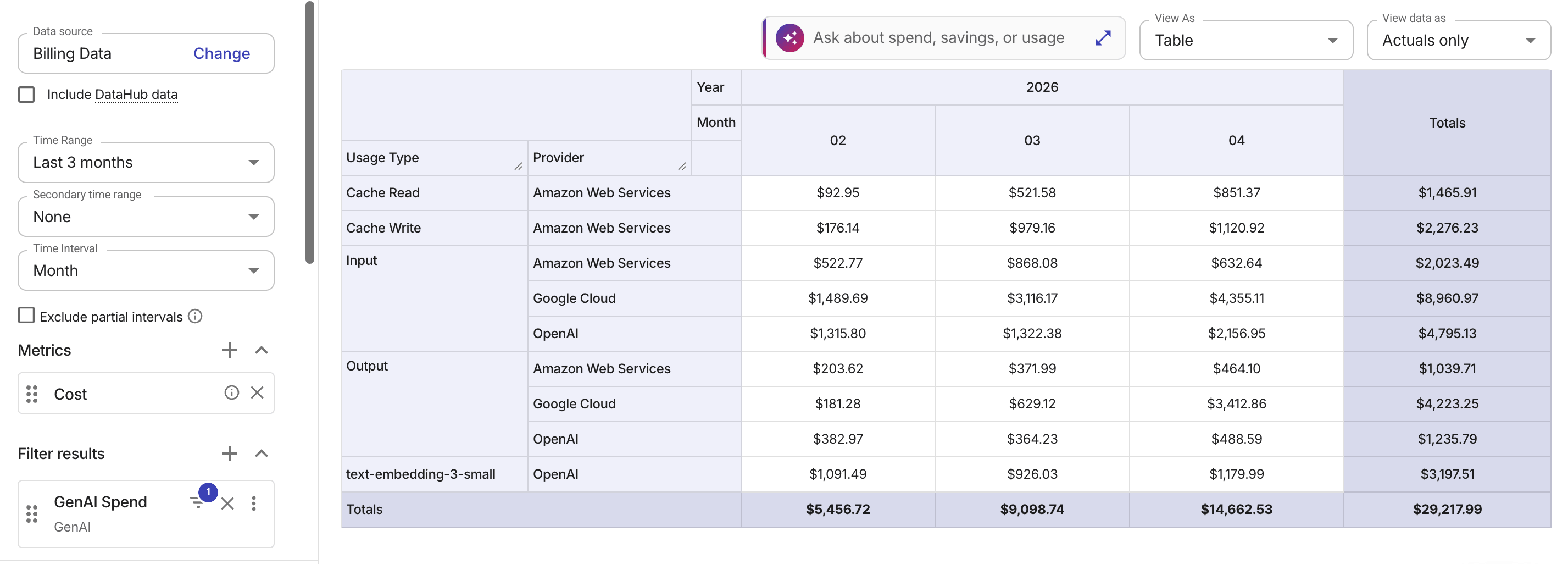
以下の例では、正規化された Usage Type ディメンションで AI プロバイダ横断のコストをグループ化しています。
ユーザー別の Amazon Bedrock コスト
標準的な AWS の請求では、Bedrock のコストはモデルと地域ごとに集計されます。より詳細なコストトラッキングとアロケーションのために、AWS は Application Inference Profiles(AIP)の利用を推奨しています(AWS re:Post 記事:How to Track and Limit Amazon Bedrock Usage by User を参照してください)。
プラットフォーム上でユーザー別に Bedrock 利用状況をトラッキングするには、次の手順に従ってください。
-
Bedrock コンソールまたは API を使用して、ユーザーごとに AIP を作成します。
-
カスタムコストアロケーションタグを適用し、推論用 API コールではベースモデルの ARN の代わりに AIP の ARN を使用します。
-
プラットフォームで AWS コストアロケーションタグをアクティベートします。アカウントタイプによっては、タグを再有効化する 必要がある場合があります。
タグが AWS の請求データに現れてから Cloud Analytics(クラウド分析)のレポートにタグが表示されるまで、6–8 時間かかる場合があります。新しいタグの場合は最大 24 時間かかることがあります。レイテンシーやその他の制限については、制限事項 を参照してください。
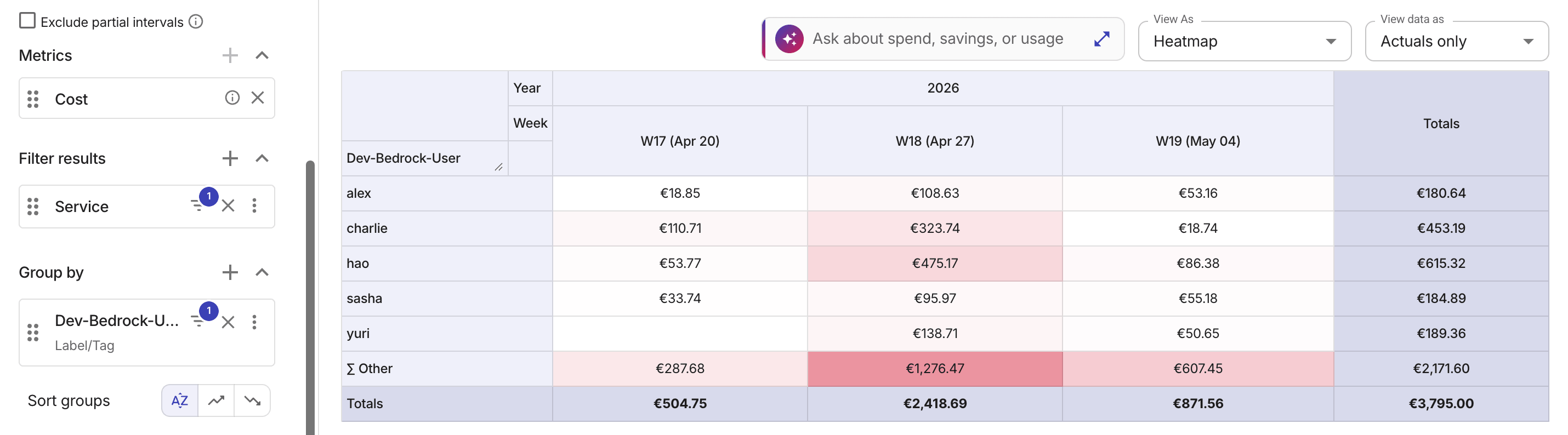
以下の例は、過去 3 週間における Amazon Bedrock コストの上位 5 人のユーザーを、カスタムコストアロケーションタグでグループ化して表示したものです。