Anthropic node
An Anthropic node lets your flow call Anthropic Admin API operations — for example, listing organization API keys, users, or workspaces, and reading analytics when an Enterprise Analytics credential is configured. These actions use an Anthropic Admin API connection, not the Anthropic billing integration.
Anthropic Admin API actions are available under early preview. To request access, submit a support request.
Before you begin
Create an Anthropic Admin API connection with a Claude Code / Admin API key (required for API key management operations) and make sure your DoiT account can use it in CloudFlow.
Find an action
-
In the flow editor, select the plus icon (+) and choose Anthropic.
-
Search or browse for an Admin API operation. Action labels use the operation ID (for example,
listApiKeys).
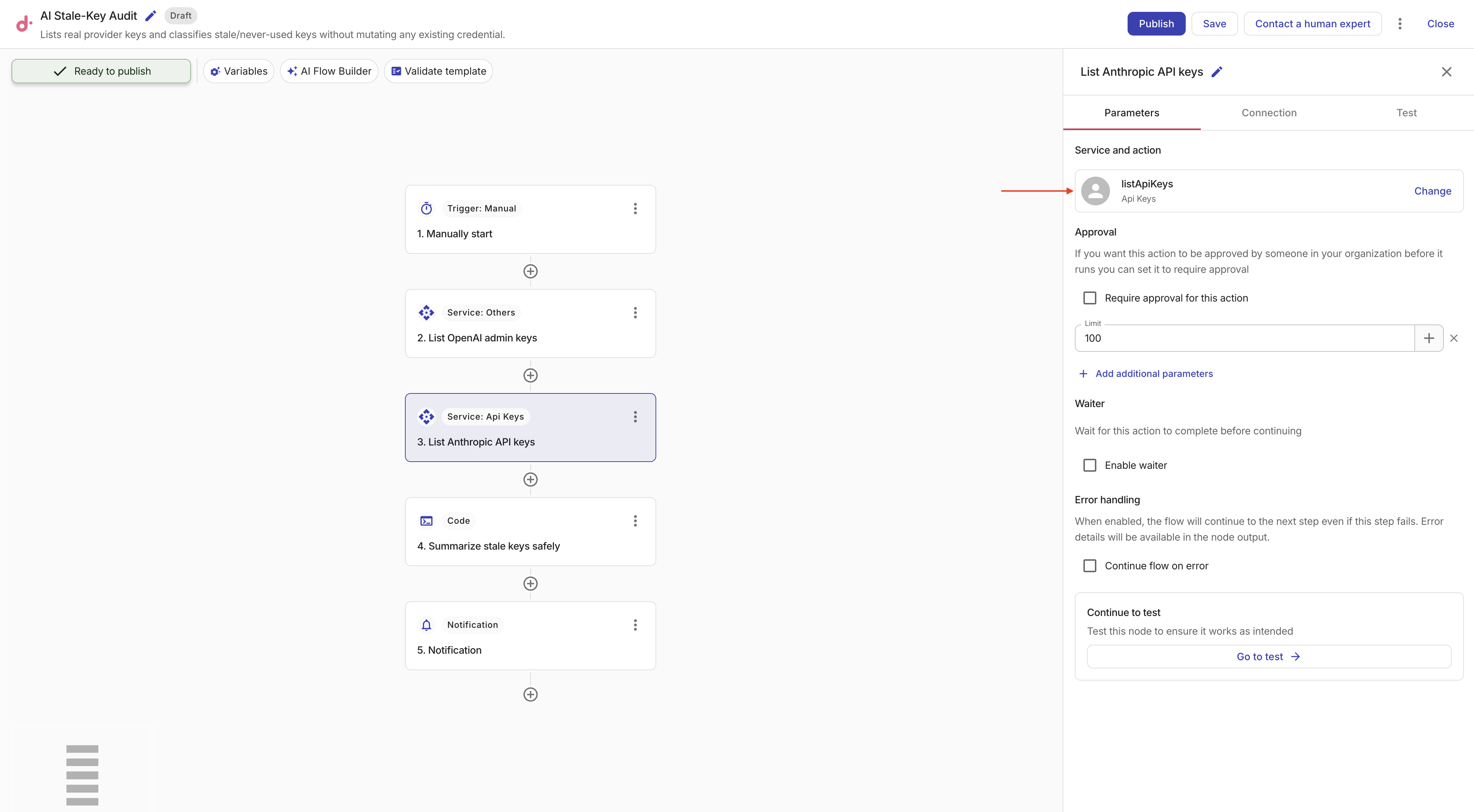
Example: List API keys
This example adds an Anthropic node that lists organization API keys. The operation is read-only and works with a valid Admin API connection that includes an Admin API key.
-
Add an Anthropic node and select
listApiKeys(List Api Keys). -
On the Connection tab, select your Anthropic Admin API connection.
-
On the Parameters tab, optionally set:
-
limit: Maximum number of keys to return.
-
status: Filter by key status (
active,inactive, orarchived). -
workspace_id: Limit results to a specific workspace.
-
before_id / after_id: Cursor values for pagination.
-
-
Select Test to run the action. The result includes a
dataarray of API keys that downstream nodes can reference.
You can chain this node with a Filter, Transform, or Notification node — for example, to find inactive keys or notify when a key should be reviewed. The Audit AI API keys tutorial builds a read-only audit flow around listApiKeys. The Disable Anthropic API keys over spend threshold tutorial combines Cost, Usage, and updateApiKey actions with Datastore thresholds.