Node parameters
Most nodes in a flow can reference fields from previous nodes — including AWS, Azure, Google Cloud, and Cloud Intelligence action nodes, and many others. This page describes the kinds of parameters you configure on a node, the field types you may see, and how to reference values from previous nodes in the flow.
Parameter types
Parameters can be one of the following:
-
Single value: One value per field — string, number (integer or float), boolean, or timestamp. You enter a value or reference one from a previous node.
-
List: An array of items, such as tags, regions, or filters. You can reference an entire list from another node or add items individually (or both).
-
Map: Key-value pairs (for example, tags or labels). You can reference a full map or structure from another node or add entries manually (or both).
-
Structure: A nested object with fixed field names (for example, a resource with name, id, and tag). You must configure each field separately. For each one you can enter a value or use the + button to reference a value from a previous node. In other words, you cannot reference the whole structure, you must reference individual fields.
Timestamp parameters
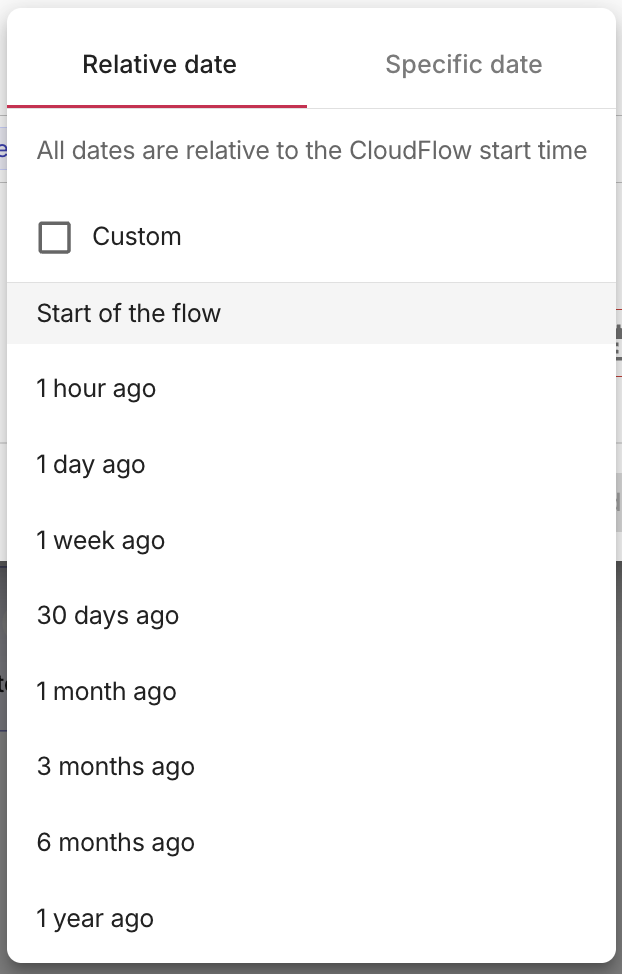
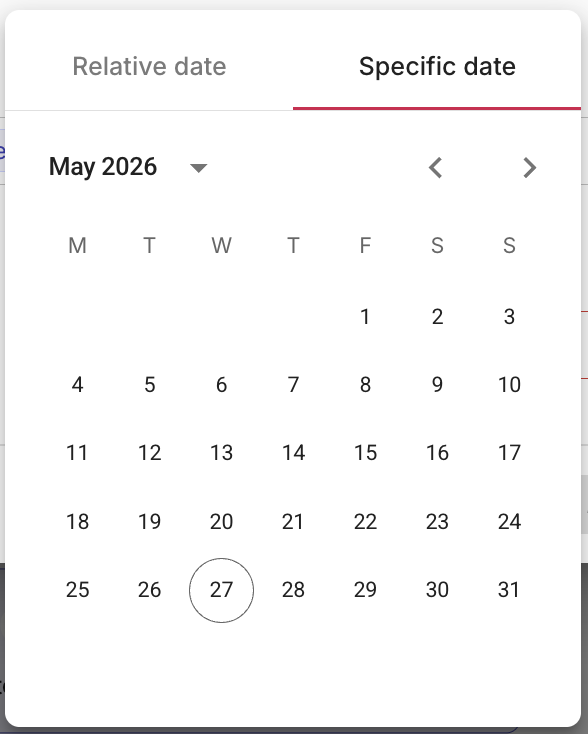
When a node parameter or filter value expects a timestamp, you can set either a relative date that is resolved when the flow runs, or a specific date and time. Select the timestamp field to open the picker, which includes two tabs: Relative date and Specific date.
Relative date
The Relative date tab lets you set a timestamp relative to when the flow runs. You can either:
-
Select the Custom checkbox to enter any combination of a numeric value, time unit (seconds, minutes, hours, days, weeks, months, or years), and direction (ago or from now). For example, you can specify 5 Days ago or 45 Minutes from now. When Custom is selected, the preset options below are deselected.
-
Select one of the following preset relative dates:
- Start of the flow — the moment the current run began
- 1 hour ago
- 1 day ago
- 1 week ago
- 30 days ago
- 1 month ago
- 3 months ago
- 6 months ago
- 1 year ago
Selecting a preset deselects the Custom checkbox. The selected relative date is shown as a label in the field (for example, 5 Days ago) and in any filter conditions that reference the timestamp.
Specific date
The Specific date tab opens a date-time picker where you choose an exact date and time.
Referencing fields
Many nodes can use parameter values from elsewhere in the flow. Use the + button or @ to open the picker and browse or search to find the field you need.
Referencing a field means choosing a path into data from the trigger node, variables, or upstream nodes. At run time, CloudFlow replaces each reference with the live value from that path.
Depending on the parameter type, you may reference a single value, a whole list or map, or one entry at a time. Inserted references appear as highlighted references. You can use a node's Output (what it produced) or its Input (what it was given). See Output vs input.
Reference a single value
Use the + button next to a parameter to pick a field from a previous node's output or input. The selected value is used when the flow runs. This works for single-value fields and for individual items or entries inside list, map, and structure parameters.
In parameters that accept both text and references (for example, a notification message, HTTP request body, or email subject), you can also type @ to open the reference picker and insert a reference. References are inserted inline. You can continue adding text and further references to the same field.
Reference a whole list
When a parameter expects a list, you have two options: reference the entire list from a previous node, or reference individual items from the list.
-
In the field where you want to reference a list from a previous node, select the + button.
-
Choose where the list comes from: Variables (if your flow has variables), the trigger (e.g. Schedule or Manual trigger), or a node earlier in the flow (by its node name).
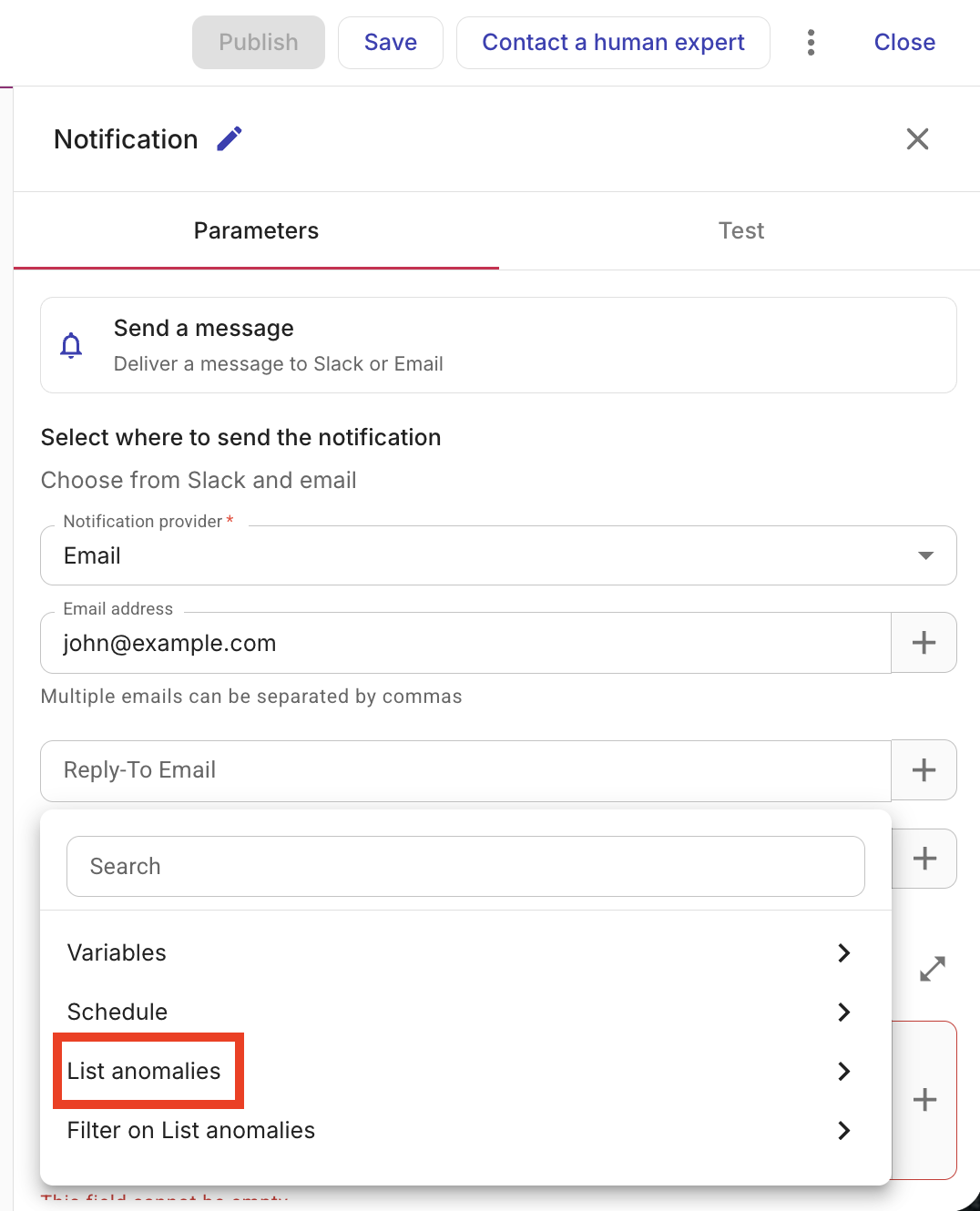
If you want to reference the entire list, no additional mapping is required.
-
Select the list.
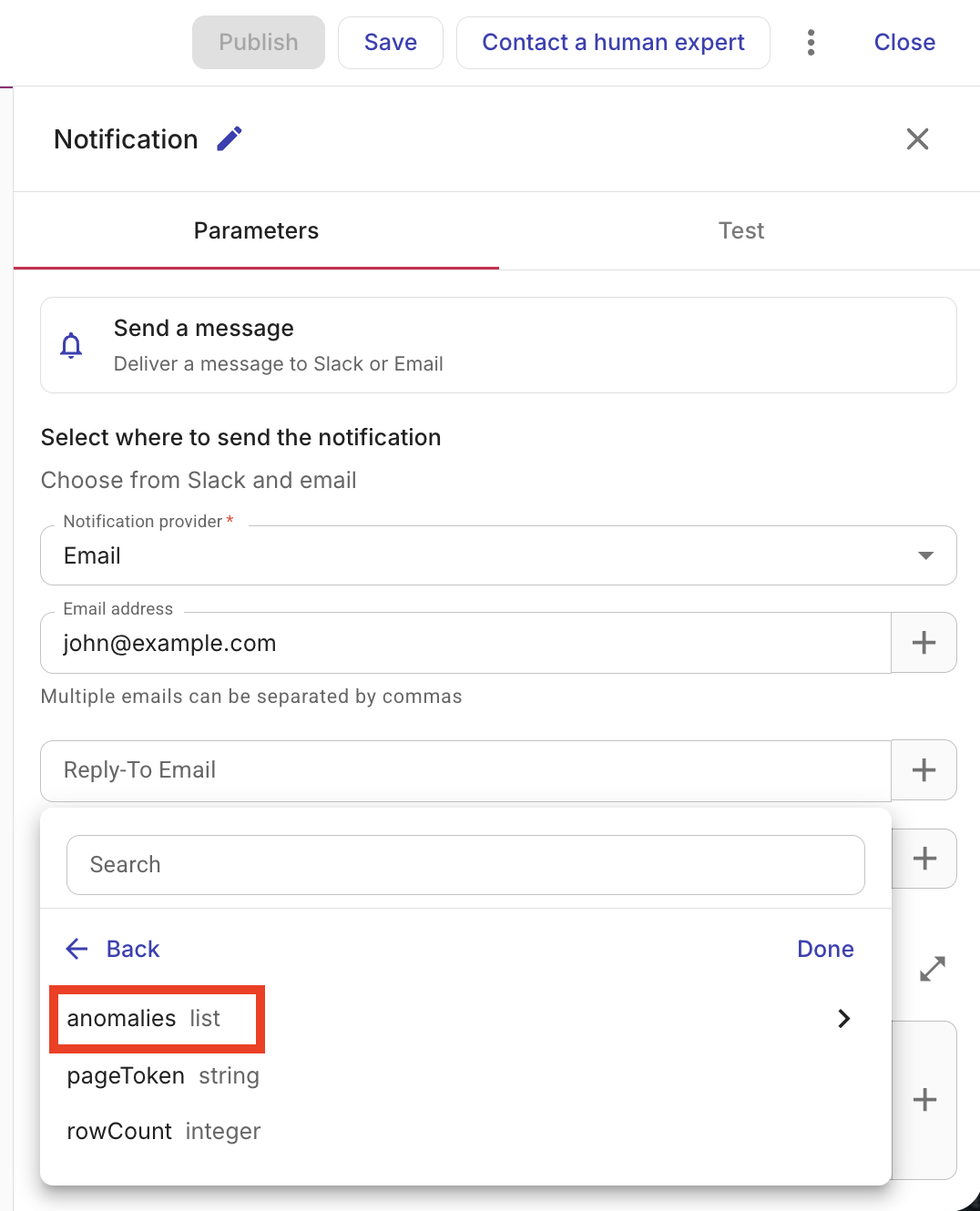
If you want to reference the entire list, no additional mapping is required.
If you want to reference individual items, expand the list and then choose the individual items you wish to include.
-
(Optional) Add more items manually below. At runtime, those items are appended after the referenced list.
Reference a whole map or structure
When a parameter expects a map (key-value pairs), you can reference a full map or structure from a previous node, or add key-value entries and reference or enter each value. The map parameter shows a first entry at the top for the whole-map reference; below it you can add more key-value entries.
-
In the field where you want to reference a map or structure from a previous node, select the + button.
-
Choose where the map or structure comes from: Variables (if your flow has variables), the trigger (e.g. Schedule or Manual trigger), or a node earlier in the flow (by its node name) and then, select the map or structure field to reference.
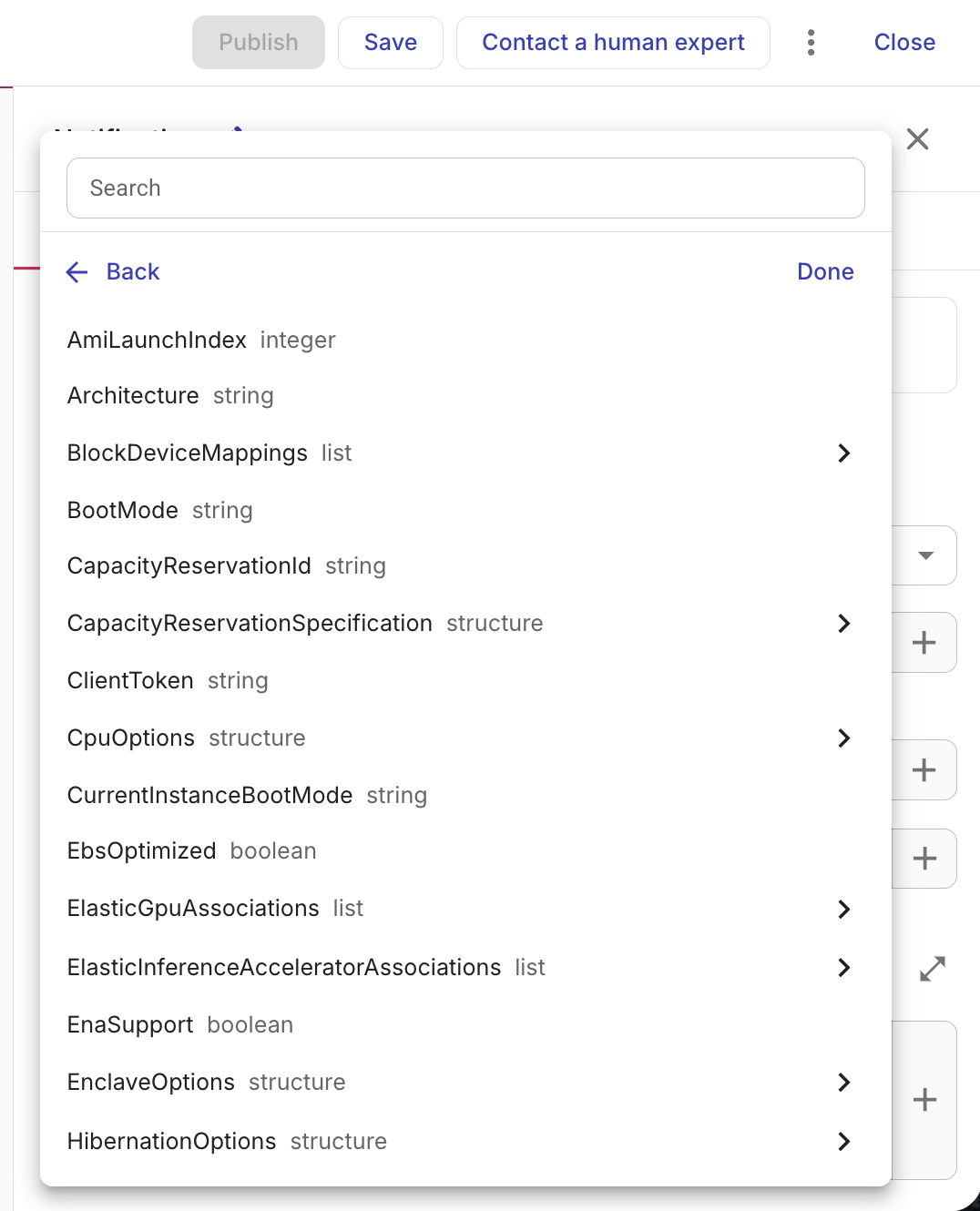
-
(Optional) If the parameter allows it, you can add more key-value pairs in addition to the referenced map. At runtime, the referenced map or structure is merged with any manual entries you add. If the same key exists in both, the manually added key-value pair overrides the referenced value.
Highlighted references
When you insert a reference to a field with the + button or @, the referenced field appears as a highlighted reference with a label such as the upstream node's step and name and a field path (nested fields are separated by dots).
These are dynamic references. When the flow runs, each reference is resolved to the value from the path shown, for example, data from the trigger, a variable, or a previous node's output or input (see Output vs input). Plain text in the same field is left as you typed it.
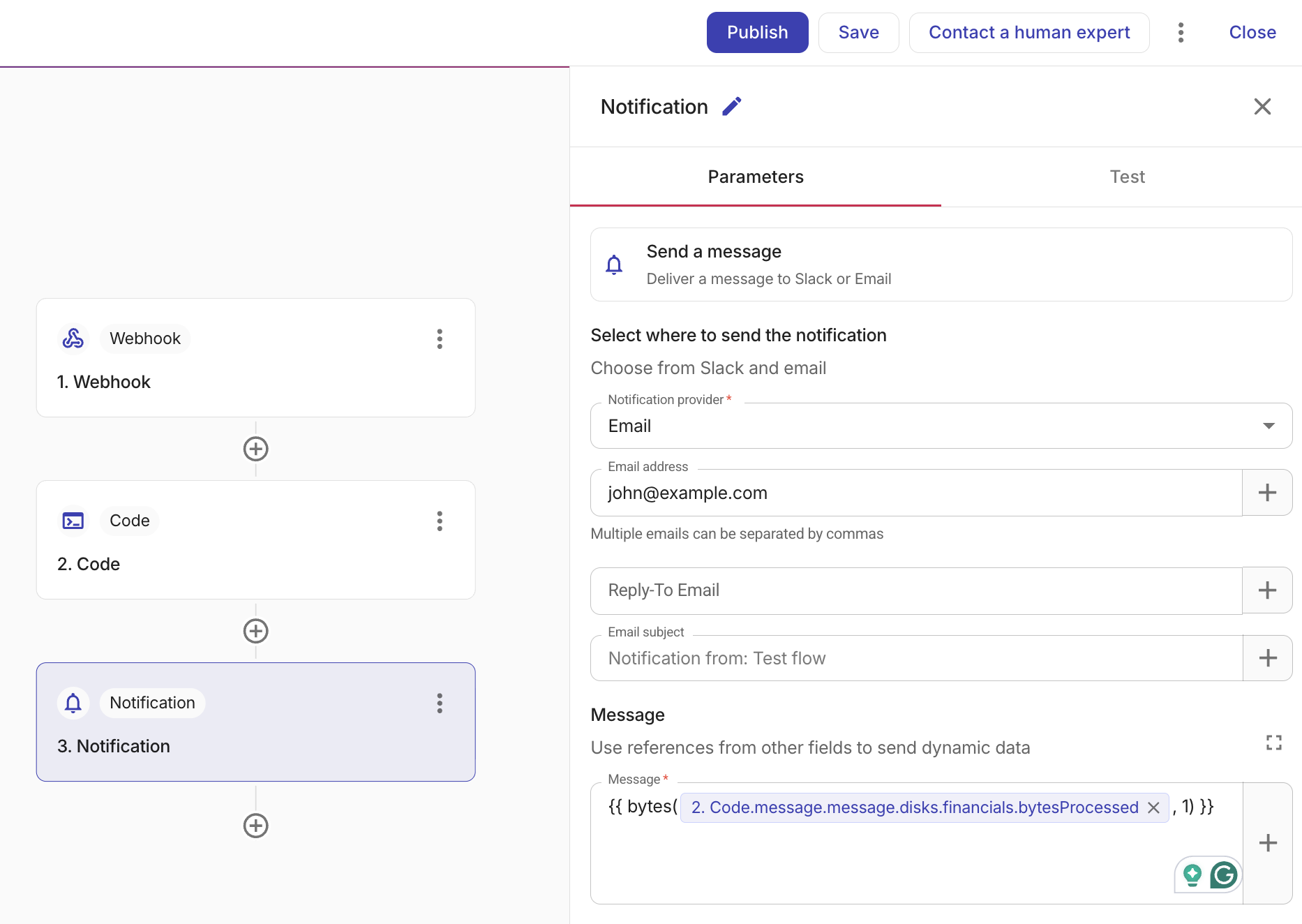
-
Tooltips: If the label is truncated, hover the reference to see the full path. For some variable references, hover may show the variable's current value.
-
Removing a reference: Use X to remove a reference without affecting surrounding text.
-
Lists: In parameters that expect lists, referenced list items may appear in a bracketed form. See HTTP node.
Inline transformations
You can apply a data transformation directly on a reference without adding a separate Transform node. This is useful when you need a simple conversion, for example, converting a string value to an integer, before it reaches a downstream parameter.
To apply a transformation, right-click a highlighted reference. The transformation options available for that reference's data type are displayed. Select a transformation to apply it. The following table lists the inline transformations available for each source data type. The Source types column shows which data types support each transformation.
| Transformation | Description | Source types |
|---|---|---|
| Transform to integer | Converts the value to a whole number | string |
| Transform to float | Converts the value to a decimal number | string, integer |
| Transform to string | Converts the value to text | integer, float, boolean |
| Transform to formatted date | Formats a timestamp as a date string | timestamp |
| Transform to human-readable bytes | Formats a numeric value as a human-readable byte size | integer, float |
| Round to integer | Rounds to the nearest whole number | float |
| Round to 2 decimal places | Rounds to two decimal places | float |
| Trim whitespace | Removes leading and trailing whitespace | string |
| Capitalize first letter | Capitalizes the first letter | string |
| Transform to uppercase | Converts all characters to uppercase | string |
| Transform to lowercase | Converts all characters to lowercase | string |
| Transform to Unix seconds | Converts a timestamp or timestamp string to Unix epoch seconds | timestamp, string |
| Transform to Unix milliseconds | Converts a timestamp or timestamp string to Unix epoch milliseconds | timestamp, string |
| Join to comma-separated string | Joins list items into a single comma-separated string | list |
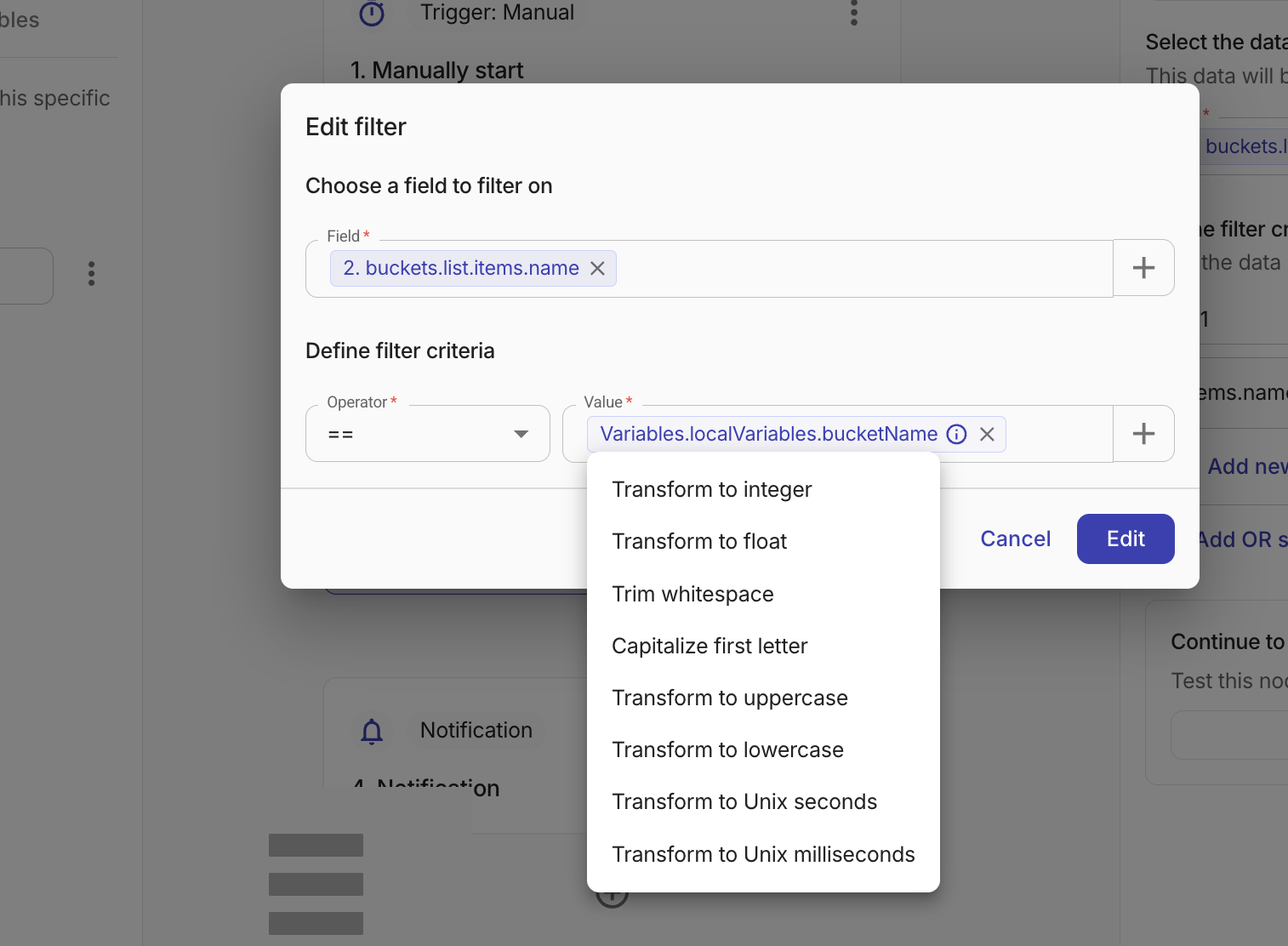
After you apply a transformation, the reference updates to indicate that a transformation is active. Hover over a reference to display a tooltip that describes the transformation. For variable references, the tooltip also shows a preview of the original and transformed values.
To remove an inline transformation, right-click the transformed reference and select Remove transform. The reference reverts to its original, untransformed state.
If you replace a reference (by selecting a different field with the + button), any previously applied transformation is automatically cleared.
If the upstream node's output type changes and the saved transformation is no longer compatible, the reference displays an error. Right-click the reference to remove the incompatible transformation, or update the upstream node to restore a compatible type.
For more complex transformations, such as concatenation, extraction with regular expressions, or aggregations like sum and average, use a Transform node.
Output vs input
When you reference a previous node, you choose whether to use that node's output or its input:
-
Output: The result that the node produced when it ran, for example, the API response (IDs, lists, status, and so on). Use this when you need data that came from running the node.
-
Input: The exact values the node sent when it ran. These are the final resolved parameter values from the node's Parameters tab after references are evaluated. Use this when you need to reuse what another node actually received (for example, the list of regions that the previous node used).
Both options appear when you pick a source node with the + button. Choose the one that holds the data you need.
See also
- Nodes — Overview of all node types
- AWS node — AWS-specific configuration such as waiters and regions
- Azure node — Azure Resource Manager configuration, connections, and limitations
- Google Cloud node — GCP-specific configuration
- Cloud Intelligence node — Cloud Intelligence actions such as Create a thread
- Composer Insights — List Composer recipes and findings
- HTTP node — HTTP requests to external APIs
- Filter node — Evaluate conditions against fields from previous nodes
- Branch node — If/else branching logic
- Transform node — Reshape or reformat data between nodes
- Date/time node — Date and time calculations on timestamp fields
- Notification node — Send data to email or Slack
- Threads node — Create issues in ITSM tools such as Jira or Linear
- LLM node — Process data using large language models
- Policy node — Evaluate resources against compliance policies
- SQL node — Run SQL queries against billing data
- Datastore node — Store and retrieve structured data
- Code node — Run custom JavaScript or Python code
- CLI node — Run shell scripts in a sandbox
- Sub Flow node — Call another flow from within your flow
- Sleep node — Pause the flow for a specified duration
- Test — Test a node