Nodes
Nodes are the building blocks of a flow. Each node performs a specific task — such as calling a cloud API, transforming data, or sending a notification — and passes its output to the next node in the sequence.
After adding a trigger to start your flow, use the plus icon (+) to add nodes. You can chain as many nodes as needed to build your automation. For field types and how to reference values from previous nodes, see Node parameters.
In the flow editor, each node's menu (⋮) offers actions such as Edit, Duplicate, Disable step, and Delete; see Manage nodes.
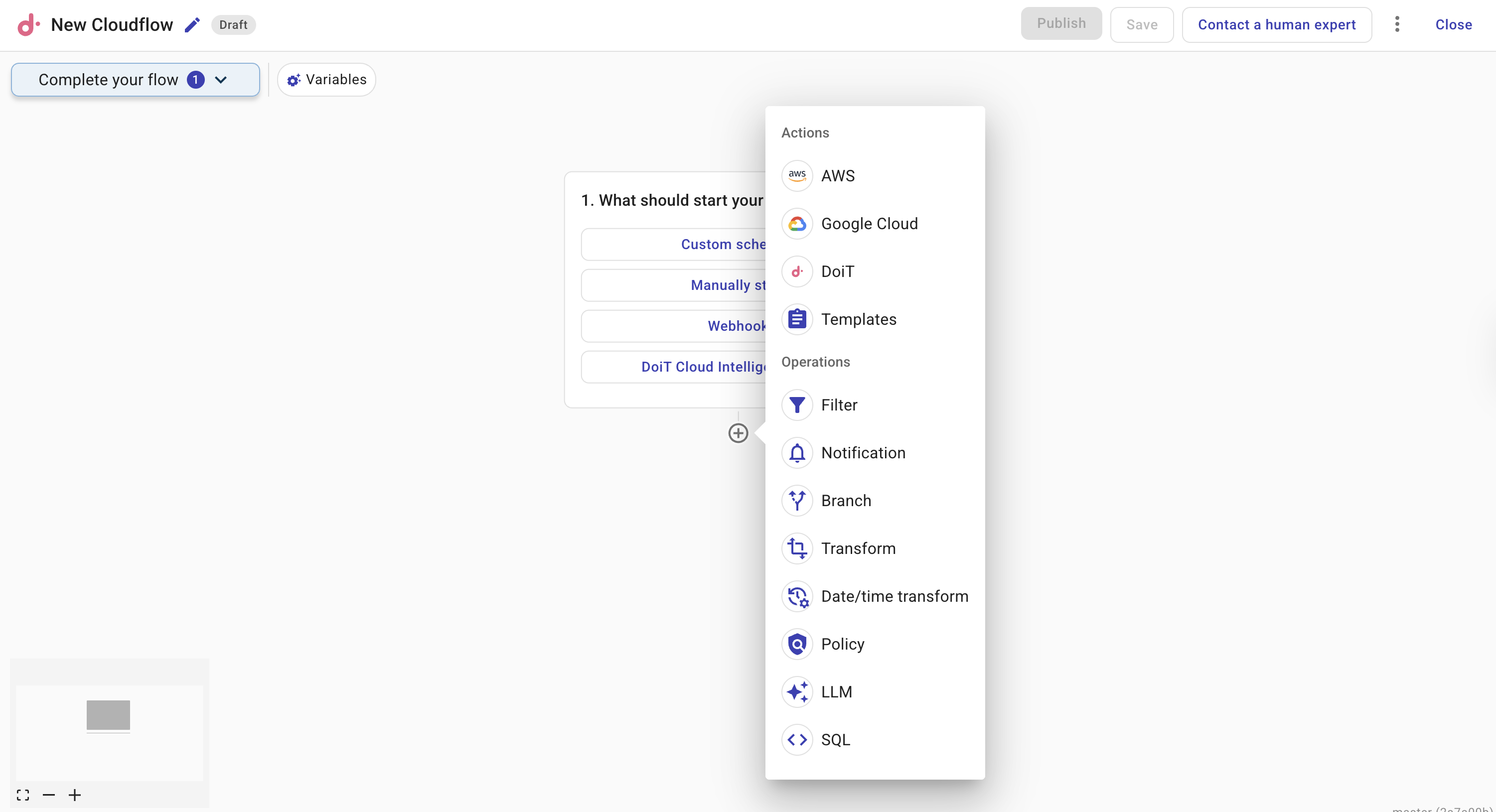
The provider nodes shown (such as AWS, Azure, GCP, Oracle Cloud, OpenAI, and Anthropic) depend on which providers your organization has access to. If your organization doesn't have access to a particular provider, its node type doesn't appear in the menu.
AWS node Interacts with AWS services directly from your flow. Browse or search for actions across AWS services, configure parameters, require manual approval before execution, and add waiters to pause until a resource reaches a desired state.
Azure node Interacts with Azure Resource Manager services directly from your flow. Browse or search for actions across Azure services, configure parameters, reuse permissions from Azure Cloud Connect, and require manual approval before execution. CloudFlow follows paginated responses and waits for supported long-running Azure operations to finish.
GCP node Interacts with Google Cloud services directly from your flow. Browse or search for actions across Google Cloud services, configure parameters, and require manual approval before execution.
Oracle Cloud node Interacts with OCI services directly from your flow. Reuse an existing OCI Asset, configure the compartment and region, and require approval before destructive actions. Available to customers enrolled in Early Access.
OpenAI node Calls OpenAI Admin API operations from your flow — for example, listing organization admin API keys. Requires an OpenAI Admin API connection. Available under early preview.
Anthropic node Calls Anthropic Admin API operations from your flow — for example, listing organization API keys. Requires an Anthropic Admin API connection. Available under early preview.
Cloud Intelligence node Runs Cloud Intelligence actions in your flow. Use it to call Composer Insights, Threads, and other DoiT APIs, and chain them with AWS, Azure, and GCP nodes.
Composer Insights Lists Composer recipes and findings from a Cloud Intelligence node so you can filter open insights and pass them to later steps such as an LLM or the Terraform PR agent.
HTTP node Makes HTTP requests to external APIs or services. Use it to integrate with third-party systems, fetch data from REST endpoints, or send data to webhooks. Supports custom headers, query parameters, and request bodies.
Filter node Controls which data continues through the flow by evaluating conditions against fields from previous nodes. Use filters to narrow down results — for example, keeping only EC2 instances in a specific region.
Branch node Implements if/else branching logic in a flow. Evaluates a condition and routes execution down different paths based on whether the condition is true or false.
Switch node Partitions each result into a matching case path using an exact string, number, or boolean value. Use it to route mixed batches among several paths, with optional case-insensitive string matching and a Default path for unmatched results.
Parallel paths node Runs two or more independent paths from the same input. Use it when tasks do not depend on each other and their results do not need to be combined.
Transform node Reshapes or reformats data between nodes. Use it to rename fields, extract nested values, combine fields, or restructure data to match what the next node expects.
Date/time node
Performs date and time calculations on timestamp fields. Add or subtract time intervals, convert between formats, or compute differences — useful for scheduling, filtering by time windows, or normalizing timestamps across APIs.
Notification node Sends data from your flow to email or Slack. Use it to alert stakeholders about cost anomalies, share scheduled reports, or deliver summaries of flow results to the relevant team.
Threads node Creates issues in your configured ITSM tool — such as Jira or Linear — directly from your flow. Automatically log tickets with relevant details when your flow detects an event that needs attention.
LLM node Processes data using large language models powered by OpenAI and AWS Bedrock. Provide a natural-language prompt to interpret, summarize, classify, or transform data from previous nodes — without writing complex flow logic.
Policy node Evaluates resources against a policy — a set of compliance rules for a specific resource type. Use it in scheduled flows to check whether resources (for example, S3 buckets or VMs) meet your organization's standards, and take action if they don't.
SQL node Runs SQL queries against your billing data in Cloud Intelligence. Useful for data-driven decisions like identifying expensive resources, finding cost trends, or building custom reporting logic within your flow.
Datastore node Stores, retrieves, and updates structured data in a managed data store. Use it to persist data across flow executions, build lookup tables, or track resource state over time — without connecting to an external database.
Code node Runs custom JavaScript or Python code in a secure sandboxed environment. Use it for complex transformations, calculations, or logic that goes beyond what other nodes offer.
CLI node
Runs a shell script in a sandbox. Optionally attach an AWS or GCP connection when the script uses gcloud or aws commands. Use $nodes in the script to reference output from previous nodes.
Sub Flow node Calls another flow from within your flow. Configure execution parameters from the subflow's local variables, link to subflow run history from the parent run, and surface subflow failures in the parent.
Sleep node Pauses the flow for a specified duration (minutes, hours, or days). Use it to add a delay before a retry, space out API calls, or wait until a later time in a scheduled flow.
You can also add a template — a pre-built group of nodes — to quickly set up common patterns.