Switch ノード
Switch ノードは、結果を複数のパスに分割します。各結果について、選択したフィールドをケース値と比較し、一致したケースパスに結果を送信します。
1 つのフィールドに複数の既知の値が入り得て、それぞれの値に異なるアクションが必要な場合に Switch ノードを使用します。CloudFlow は各結果を個別に評価してルーティングするため、混在したバッチでは複数のケースパスがアクティベートされることがあります。
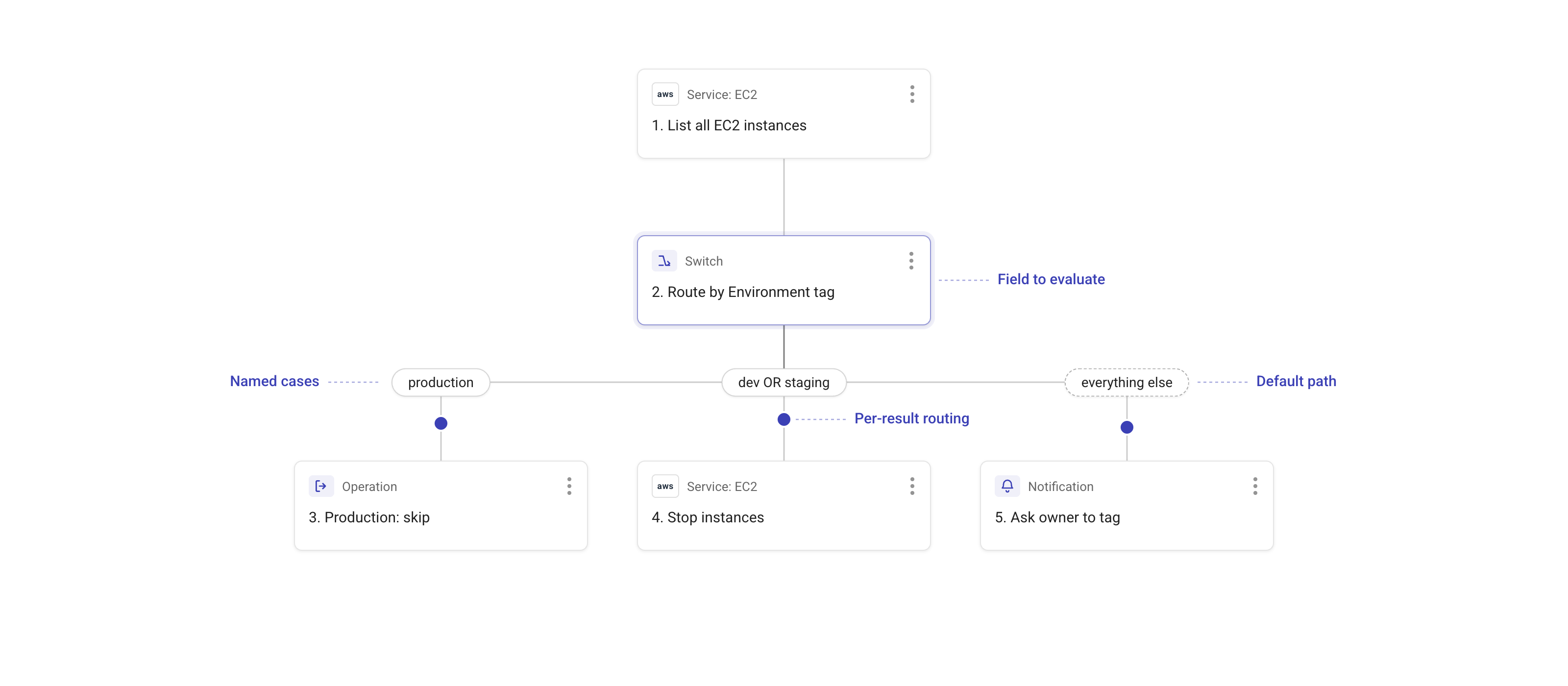
上記のフロー例では、すべての EC2 インスタンスを一覧表示し、Switch ノードを使用して各インスタンスを Environment タグの値に基づいてルーティングしています。
-
productionタグが付いたインスタンスは production ケースパスに送られ、そこでフローはそれらをスキップします。 -
devまたはstagingタグが付いたインスタンスは dev OR staging ケースパスに送られ、そこでフローはそれらを停止します。 -
いずれのケースにも一致しないタグを持つインスタンスは、Default パス(このフローでは everything else とラベル付け)に送られ、そこでフローは所有者にインスタンスへタグ付けを依頼する通知を送信します。
フローエディタでは、各ケースは Switch ノードの下にラベル付きパスとして表示され、有効な場合はその後に Default パスが続きます。各パスの下に追加したノードは、そのパスにルーティングされた結果に対してのみ実行されます。
Switch ノードを追加して設定する
-
フローエディタで、結果をルーティングしたい位置のプラスアイコン(+)を選択します。
-
Operations の下で Switch を選択します。
-
どのパスに進むかを決定する値を持つフィールドを選択します。前のノードのフィールドを参照できます。詳細は Node parameters を参照してください。
-
個別のパスが必要な値ごとにケースを追加します。
-
(任意)文字列ケースについては、同じ値の大文字・小文字の違いを無視して一致させるには Ignore case を有効にします。
-
(任意)Default path を有効にして、いずれのケースにも一致しない結果をルーティングします。
-
各ケースパスおよび、有効にしている場合は Default パスの下で実行するノードを追加します。
マッチングとルーティングの動作
ケースのマッチングは厳密かつ型に依存します。ケース値は文字列、数値、ブール値をサポートします。CloudFlow はマッチング前に結果を別の型に変換しません。
| Case value | 一致する値 | 一致しない値 |
|---|---|---|
"1" | 文字列 "1" | 数値 1 |
1 | 数値 1 | 文字列 "1" |
true | ブール true | 文字列 "true" |
"production" | 文字列 "production" | Ignore case が有効でない限り、文字列 "Production" |
Ignore case は文字列のマッチングにのみ適用されます。数値およびブール値のマッチングは引き続き厳密に行われます。
CloudFlow はバッチを結果単位で分割します。
-
ケースに一致した結果は、そのケースパスに送られます。
-
一致しなかった結果は、Default path が有効な場合は Default パスに送られます。
-
Default path が有効でない場合、一致しなかった結果は破棄されますが、Switch ノード自体は正常に完了します。
-
結果を受け取ったパスのみがアクティベートされます。同じバッチ内の結果が異なるケースに一致する可能性があるため、1 回のフロー実行で複数のケースパスが実行されることがあります。
ルーティングノードの比較
-
Branch: 条件を評価し、各結果を True パスと False パスに分割します。1 つのフィールドを複数の厳密な値の間でルーティングする必要がある場合は、Branch ではなく Switch を使用します。
-
Filter: 条件を評価し、一致した結果のみを 1 つの出力に残し、それ以外を破棄します。異なる一致値ごとに異なる後続アクションが必要な場合は Switch を使用します。
-
Parallel paths: 入力全体をすべてのパスに送信します。各結果を、すべてのパスに複製するのではなく、一致するケースまたは Default パスのみに送る必要がある場合は Switch を使用します。