Manage OCI assets
OCI assets are OCI tenancies. This page explains the available assets management options for OCI.
Access OCI assets
To access the OCI assets list:
-
Navigate to the integrations catalog dashboard.
-
On the Oracle Cloud Infrastructure integration card, select Assets.
You can download the full list as CSV or perform the following management tasks on individual assets.
Change asset name
To change the asset name, you need the Assets Manager permission.
-
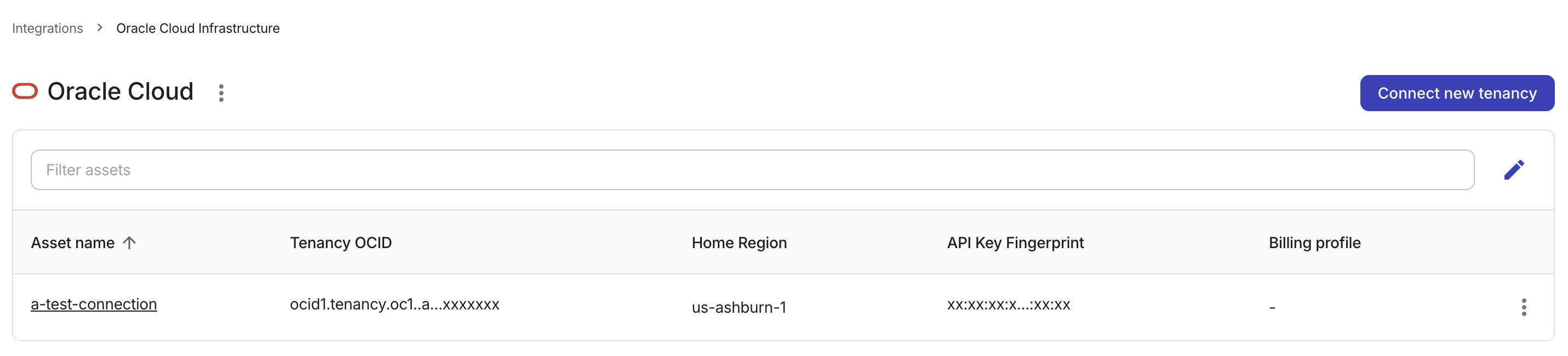
On the Oracle Cloud Assets page, locate the OCI tenancy of interest.
-
Select the asset name to open its details page.
-
Update the connection name.
-
Save your change.
Assign a billing profile
To assign an asset to a billing profile, you must have Assets Manager and Billing Profile Admin permissions.
-
On the Oracle Cloud Assets page, locate the OCI tenancy of interest.
-
Assign a billing profile using either of the following approaches:
-
Select the asset name to open its details page, and then select a billing profile from the list.
-
Select the kebab menu (⋮) at the rightmost end of the asset entry, select Billing Profile Assignment, and then select a billing profile from the list.
-
-
Save your change.
Add a tag
To tag an OCI asset, you need the Assets Manager permission:
-
On the Oracle Cloud Assets page, locate the OCI tenancy of interest.
-
Select the asset name to open its details page.
-
In the Tag field at the bottom of the page, enter a new tag or select an existing one from the list.
-
Save your change.
Export OCI assets
You can export the list of your OCI assets to a CSV file for custom analysis.
-
On the Oracle Cloud Assets page, select the kebab menu (⋮) next to the Oracle Cloud page header.

-
Select Download as CSV.