Work with remediations
Once you have connected the Terraform PR agent, the agent creates pull requests in response to actionable DoiT signals. Remediation pull requests are created and reviewed in GitHub, not in the console.
(Recommended) Commit the Terraform dependency lock file
The agent uses your Terraform dependency lock file (.terraform.lock.hcl) and any required_providers version constraints to tailor remediations to the provider versions in your repository. That helps it choose supported resource fields and apply known workarounds for version-specific bugs and gotchas.
Commit .terraform.lock.hcl to your repositories so the agent can resolve exact provider versions and produce more accurate changes.
Trigger the agent
You can trigger the Terraform PR agent from the Insights page in the console, or through a custom CloudFlow.
From Insights
You can start a remediation run from the Insights list or from an insight detail page:
The Remediate with Terraform PR agent option appears only for specific supported insights.
-
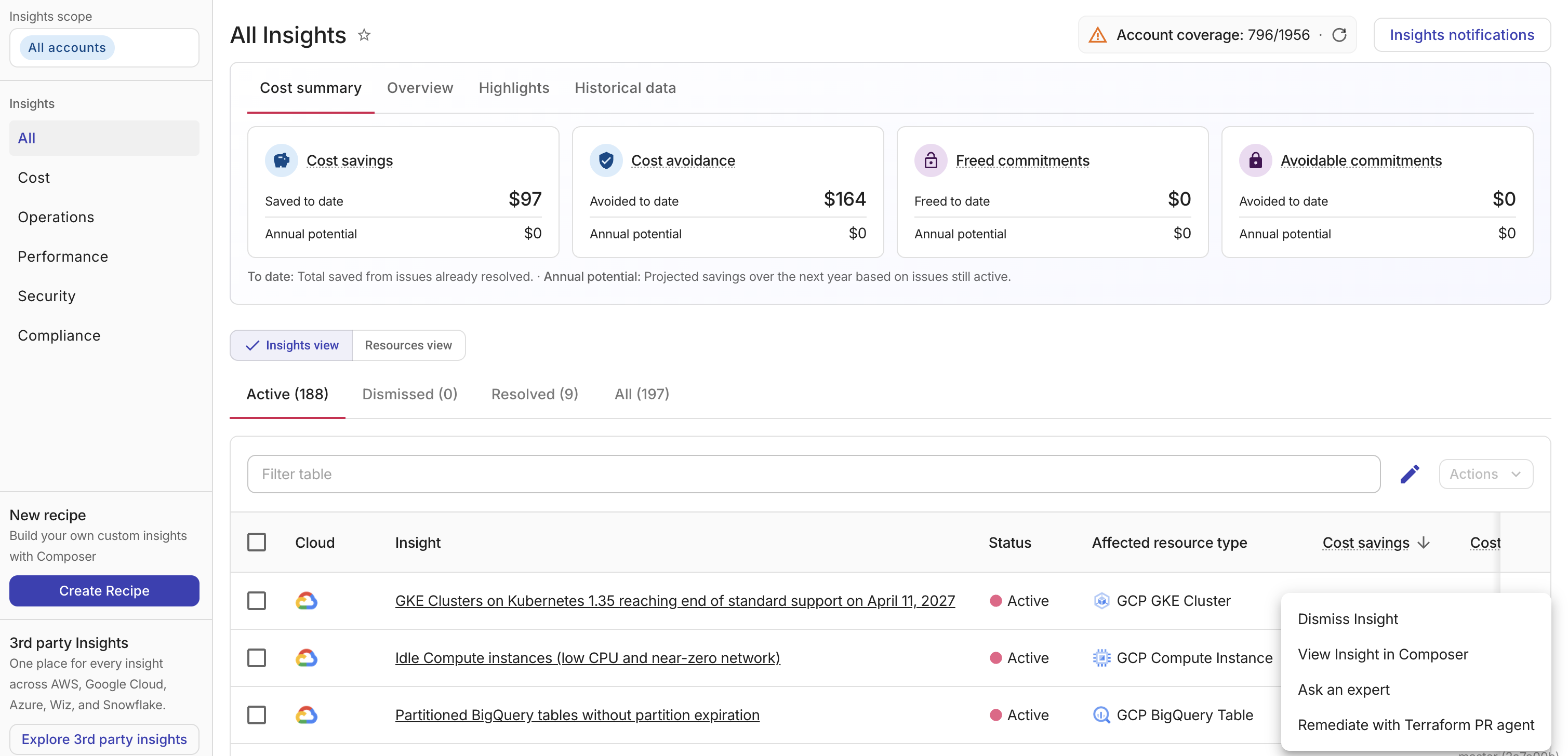
From the Insights list: Select the kebab menu (⋮) on the insight row, then select Remediate with Terraform PR agent. The console fetches the insight's active resources and opens a remediation dialog.
-
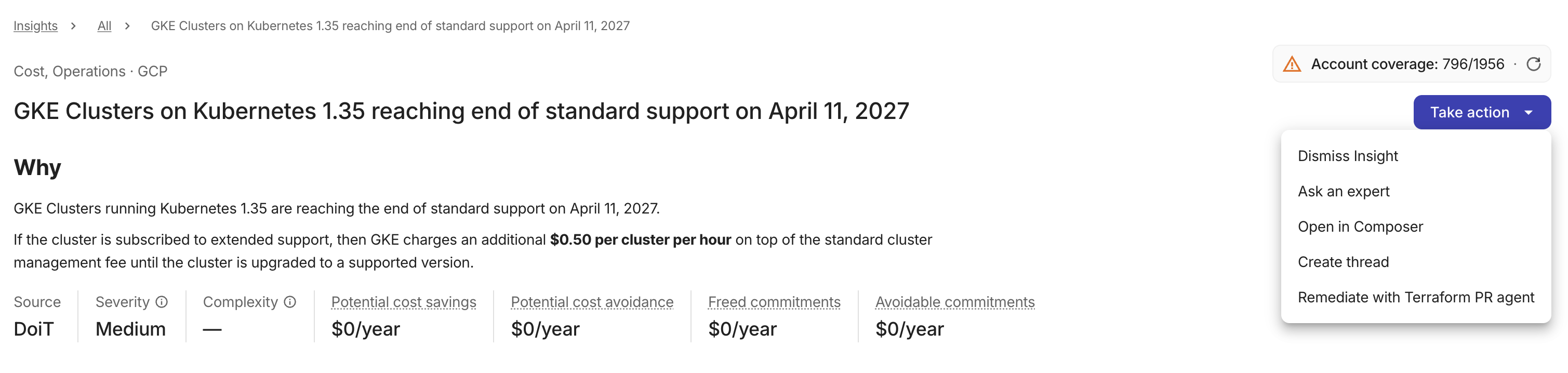
From the insight detail header: Open the insight, select Take action, then select Remediate with Terraform PR agent. This opens a remediation dialog for all of the insight's active resources.
-
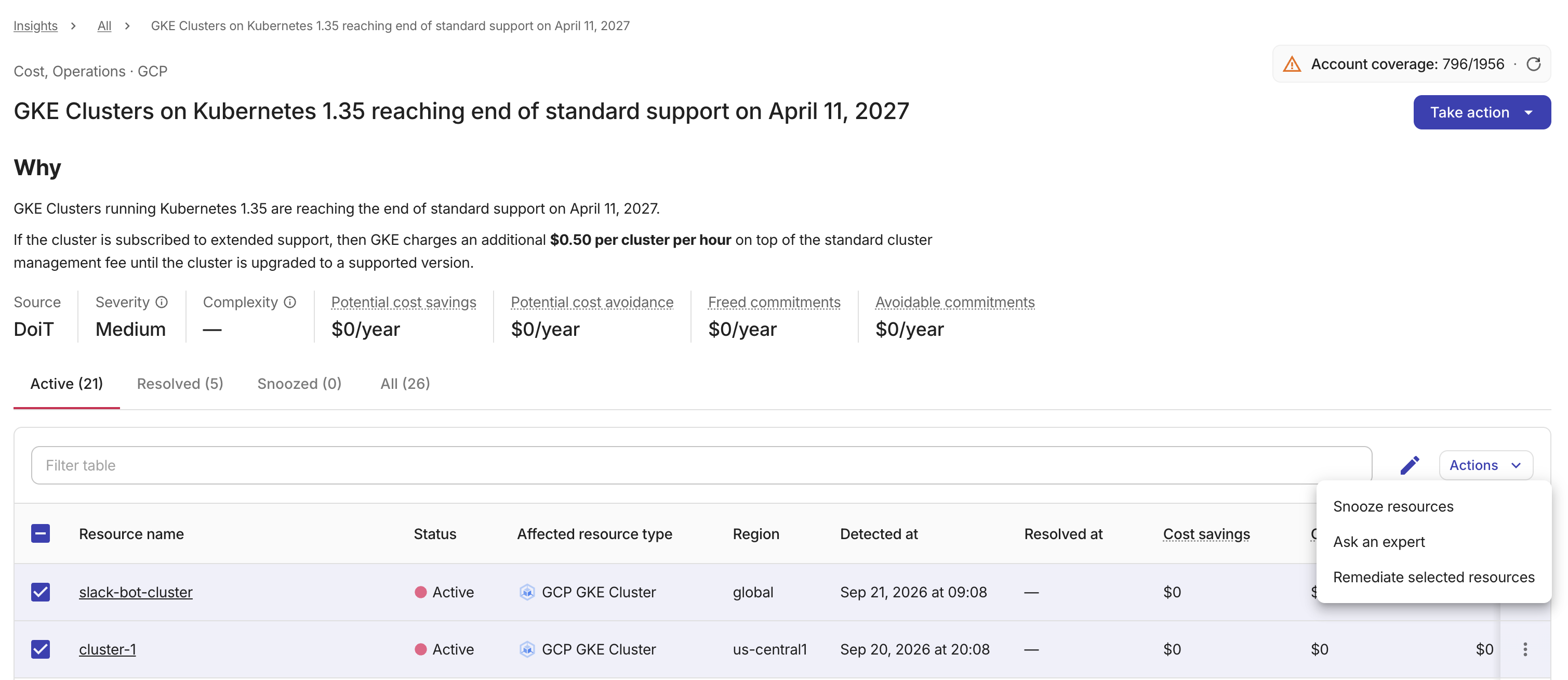
From the insight detail table: Open the insight, select the checkboxes next to the resources you want to include, select Actions, then select Remediate selected resources.
After selecting a trigger method:
-
Review the resources and estimated savings (when applicable). The dialog shows how many resources are selected. Expand Resource details to see per-resource estimated monthly savings and a total.
If no GitHub repository is connected, the Remediate button is disabled. Select Connect repositories in the dialog to onboard a repository, or see Connect and disconnect for setup instructions.
-
Select Remediate to start the run.
The agent receives the insight data — cloud provider, pillar, the selected resource IDs, and remediation guidance — and begins working on pull requests for the matching Terraform code in your connected repositories.
Only one run can be active for a given insight at a time. While a run is in progress, you cannot start another run for the same insight.
Each run can include up to 100 resources. If you need to remediate more, split them across multiple runs. When the resources exceed this limit, the Remediate button is disabled.
Run history
After you trigger a run, a Remediation history section on the insight details page lists past automated remediation runs for the insight.
Each row displays the following information:
-
Remediation: Links to the pull requests the agent opened for that run. If no pull request was opened, the row displays
Running…while the run is in progress, or an error description if the run failed. -
Time triggered: The date and time the run was started.
-
Triggered by: The email address of the user who triggered the run.
-
Status: A chip indicating the current status of the run or its pull requests. Possible values include
Remediation in progress,Pull request opened,Pull request merged,Pull request closed,Already remediated,No change needed,Resource not found in repository,Remediation failed, orRemediation timed out. After a run completes, the status updates to reflect the pull request lifecycle: it showsPull request mergedwhen every pull request in the run has been merged, orPull request closedwhen every pull request has been closed without merging. When pull requests are in mixed states (for example, one merged and one closed), the row continues to show the run-level status. -
Resources: The column indicates when remediation is in progress. When a run finishes, the column shows how many of the requested resources were successfully remediated (for example,
3 of 5).
From CloudFlow
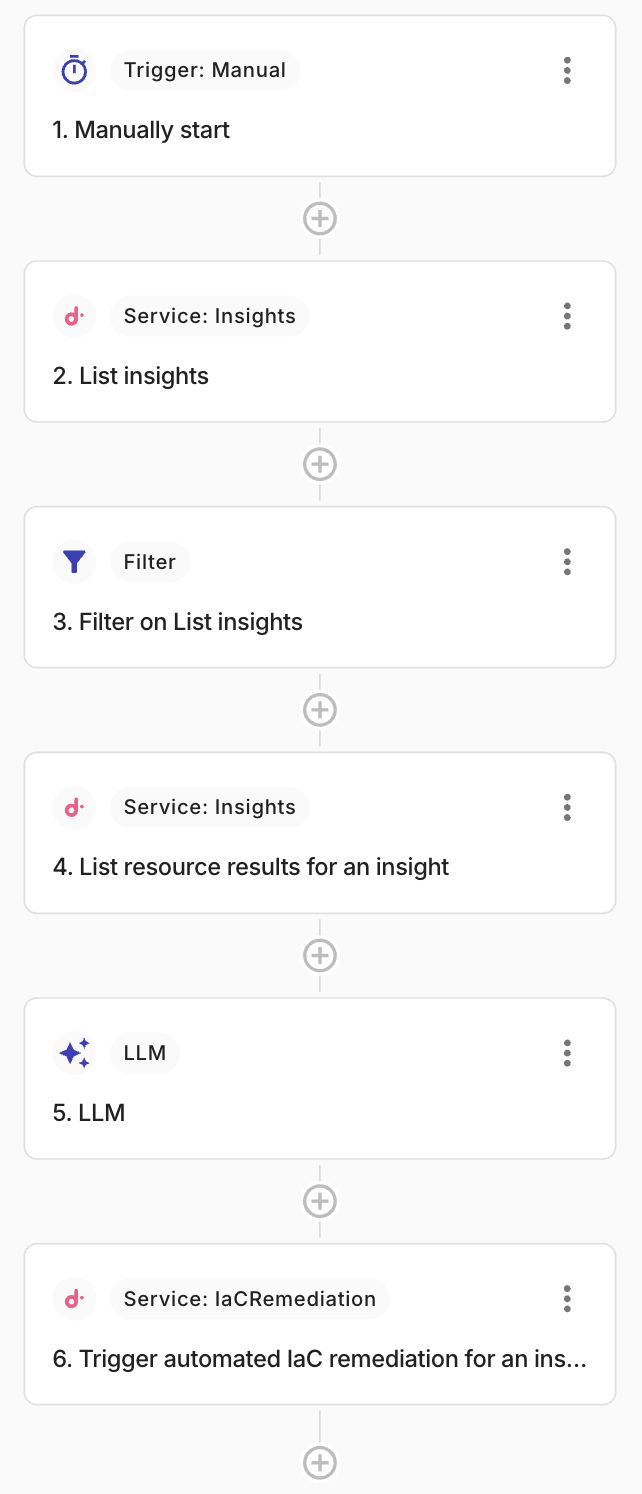
DoiT provides a CloudFlow that selects an actionable Composer Insight and calls the DoiT Trigger automated IaC remediation for an insight action. The agent does not run on a schedule or on demand from the Integrations catalog.
A typical provided flow:
-
Starts (for example, with a Manually start trigger).
-
Runs List insights, then Filter on List insights, to choose which Insights to remediate.
-
Runs List resource results for an insight to collect the affected cloud resource IDs.
-
Uses an LLM node to shape the remediation guidance for the agent.
-
Calls Trigger automated IaC remediation for an insight on a Cloud Intelligence node to start the agent.
You can use the same last two steps with Composer Insights: List recipes, optionally filter to recipes with active results, then List recipe findings to collect affected resources.
That final action requires a trigger source (the CloudFlow and Insight) and a signal payload that includes the cloud provider, Insight pillar (for example, cost or security), the affected resource IDs, the remediation text, and optionally per-resource estimated savings. In the provided flow, upstream nodes supply those values.
If the agent cannot map a target resource to Terraform code in your connected GitHub repositories, it skips that resource. If no target resources can be mapped, no pull request is created.
End-to-end flow
-
Signal detected: An Insight with affected cloud resources is passed to the agent from the Insights page or through a CloudFlow.
-
Resource mapping: The agent searches your connected Terraform (HCL) codebase to find where those resources are defined.
-
Code generation: The agent generates minimal Terraform changes that implement the recommended remediation, respecting your existing code style and any configured guardrails.
-
Local validation: Before opening a pull request, the agent runs local checks on the proposed changes, including
terraform fmt,tflint,trivy, andcheckovwhen a Checkov config is present in the repository. -
Pull request created: The agent opens a pull request on a dedicated branch in the target repository (or updates an existing remediation branch for the same Insight when one already exists). When a remediation spans multiple repositories, the agent opens one pull request per repository. If Terraform module dependencies exist between those repositories, the agent creates pull requests in dependency order, provider repositories first, then repositories that consume those modules, and includes a merge-order note in each PR.
-
Review and merge: Your team reviews the pull request in GitHub and merges it through your normal change-management process. Your usual deployment pipeline applies the Terraform changes after merge.
Find remediation pull requests
Look for pull requests that:
- Target your repository's default branch
- Originate from a
doit/iac-remediation/branch - Use a title that starts with
[IaC]
Review the pull request
Each remediation pull request includes context to help your review:
| Section | What to check |
|---|---|
| Rationale ("Why") | Describes the signal, and explains why these changes address the signal. |
| Proposed changes ("What changed") | Summarizes the HCL code changes the agent made. For multi-repo remediations, each pull request contains an AI-generated summary scoped to that repository's changes rather than a batch-level overview. |
| Implementation justification ("Why this way") | Explains why the agent favored one possible implementation way over another. To help PR reviewers. |
| Merge order | When Terraform module dependencies exist between repositories in the same remediation, notes this pull request's position in the recommended merge sequence. Appears only in multi-repo remediations with detected dependencies. |
| Target resources ("Scope") | References the resources modified by the PR. |
| Sibling PRs ("Part of remediation") | Lists the other pull requests in the same remediation batch with links, so you can navigate the full set of changes across repositories. Appears only in multi-repo remediations. |
| Cost context & risk assessment ("Tradeoffs and impact") | Highlights dependency impact and potential downtime. When savings data is available, shows the total estimated savings for the remediation. If the trigger includes per-resource estimated savings, also shows the savings covered by this pull request and a per-resource breakdown of the highest-impact resources (up to five). For multi-repo remediations, each pull request shows only the resources and savings that it covers. |
Remediation code is generated by AI. Always verify that the proposed changes are correct and safe for your environment before you merge.
After the agent opens a remediation pull request, you can guide a later iteration by leaving review comments that include @doit. Comments without @doit are not picked up.
When the agent re-runs on the same remediation branch, it collects your @doit comments, filters out automated bot messages and short reactions, and uses the remaining feedback in its remediation plan. You can request adjustments (for example, limit a change to a specific environment), ask clarifying questions, or flag issues with the proposed changes.
After it processes a @doit comment, the agent posts a reply in the pull request thread summarizing what it did. For inline review comments, the reply appears directly in the review thread. For other comments, the reply appears in the pull request conversation with a link back to the triggering comment. If the agent cannot act on a comment — for example, if the request is not actionable or the mentioned resources are not found in the repository — it replies with a short explanation.
Approve, merge, or dismiss
Merge remediation pull requests through your standard GitHub review process, including any required approvals and status checks configured on the repository. The agent does not merge pull requests automatically.
-
Merged: Your normal deployment pipeline applies the Terraform changes after merge. The agent does not manage rollbacks.
-
Closed without merge: No infrastructure changes are applied. The originating Insight remains available in DoiT for your team to investigate or address through other means.
When a remediation spans multiple repositories with module dependencies, merge provider-repository pull requests before consumer-repository pull requests. The merge-order note in each pull request indicates the recommended sequence.
What the agent does not do
-
Access your cloud environment or run
terraform apply. -
Read or write Terraform state backends.
-
Force-push or bypass branch protection rules.
-
Create a duplicate pull request for the same Insight and resources when an open remediation branch already exists (the existing branch is updated instead).
-
Remediate resources that are not managed by Terraform in your connected repositories