CUR 2.0
AWS recommends Cost and Usage Report 2.0 (CUR 2.0) as the new way to receive detailed AWS cost and usage data. For the differences between CUR 2.0 and Legacy CUR (CUR 1.0), see Migrating from CUR to Data Exports CUR 2.0.
Support in DoiT
Starting June 2026, the platform defaults to CUR 2.0 when onboarding new AWS accounts. Existing accounts currently using CUR 1.0 are expected to be fully migrated by July 1, 2026:
-
If you're on a DoiT reseller payer account, your DoiT Account Manager will communicate with you about the migration.
-
Cloud Intelligence standalone customers and PartnerOps end customers can either grant DoiT a one-time permission (
"bcm-data-exports:ListExports", "bcm-data-exports:GetExport") or run the upgrade via the DoiT console.
Upgrade via the DoiT console
We recommend performing the upgrade after the previous month’s billing data is finalized to avoid affecting the monthly reconciliation work.
Prerequisites
-
Your AWS account is either a Cloud Intelligence standalone or a PartnerOps end customer account.
-
Your AWS account is currently using CUR 1.0.
-
You have created a CUR 2.0 export for your AWS management payer account (see Create an export of CUR 2.0).
-
Your DoiT account has the Manage Settings permission.
Run the upgrade
-
In the DoiT console, select Data ingestion and integrations > Integrations from the top navigation mega menu.
-
On the Amazon Web Services integration card, select Assets.
-
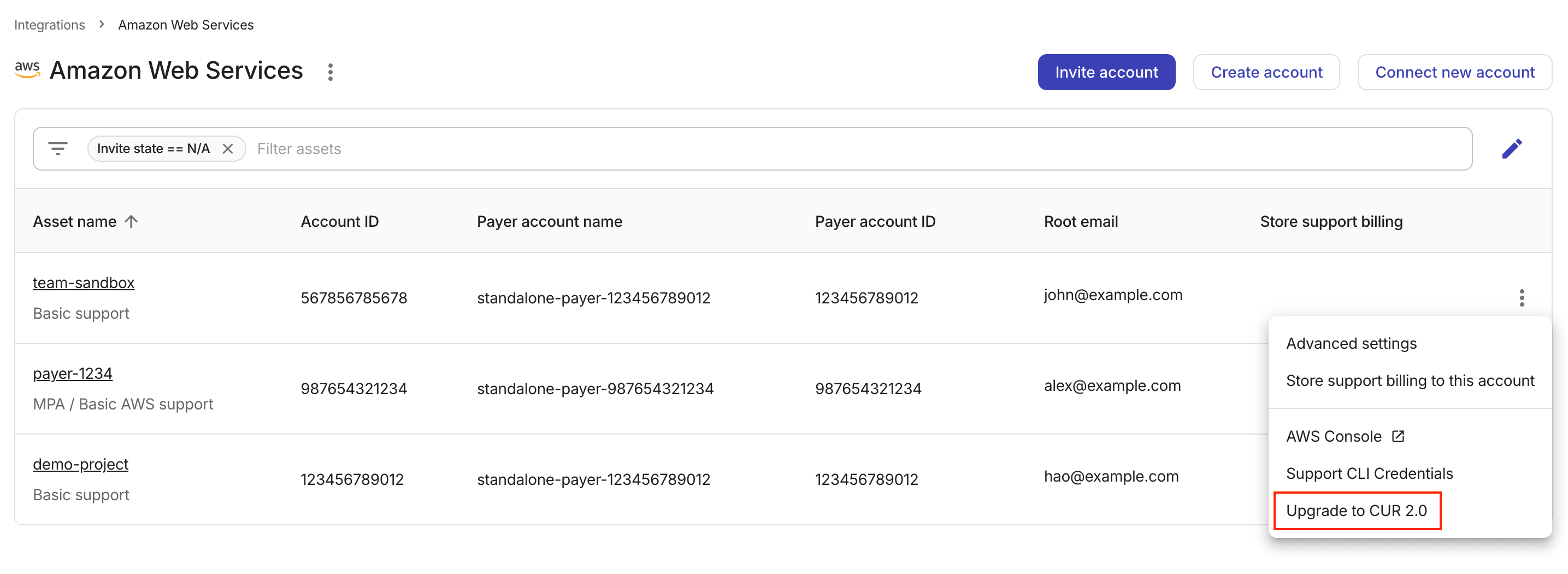
Locate the AWS account of interest, select the kebab menu (⋮) at the rightmost end of the entry, and select Upgrade to CUR 2.0.
-
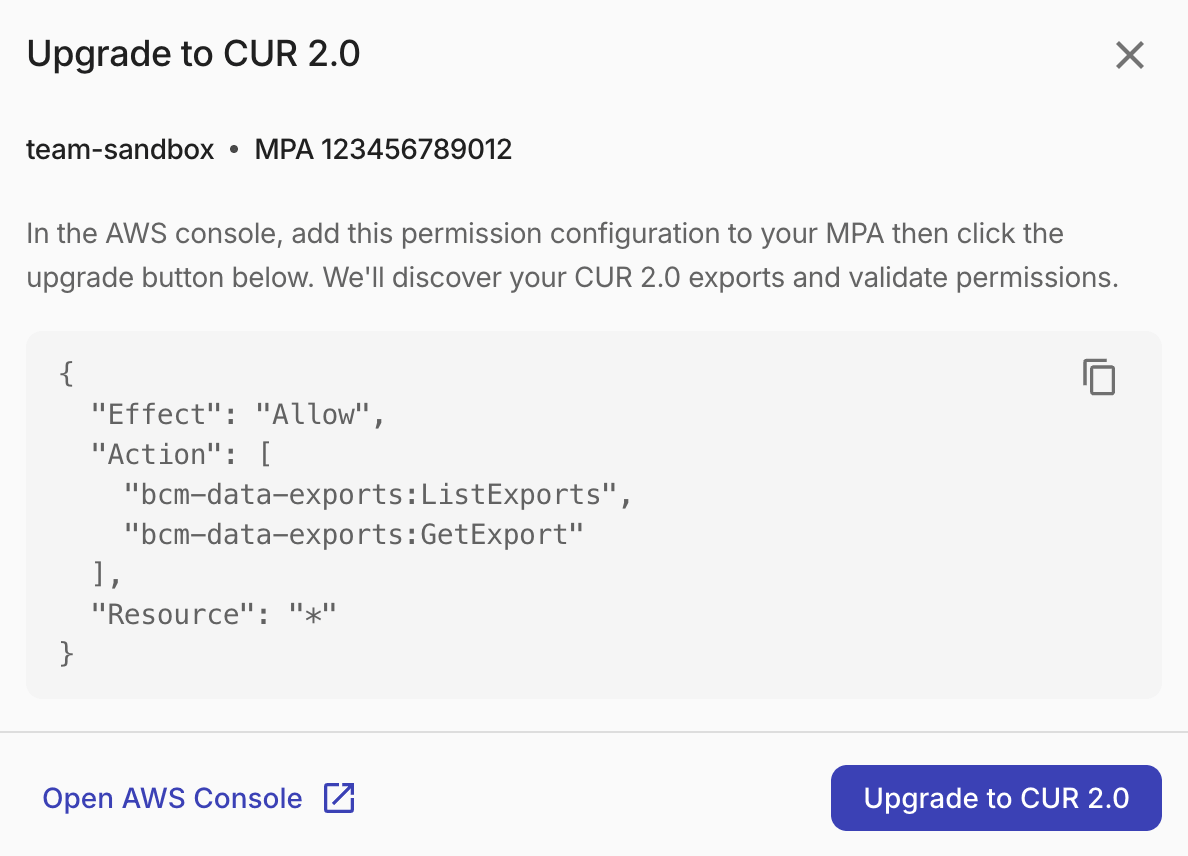
Review the information in the upgrade dialog.
-
Copy the permission block and add it to the DoiT role on your AWS management account (MPA) in the AWS console.
{"Effect": "Allow","Action": ["bcm-data-exports:ListExports","bcm-data-exports:GetExport"],"Resource": "*"}These permissions allow the DoiT console to discover and read CUR 2.0 exports in your account.
-
Select Upgrade to CUR 2.0.
DoiT will start validating your IAM permissions and discovering CUR 2.0 exports in your account.
If the upgrade is successful, billing data from CUR 2.0 will be pulled at the beginning of the next billing month.
Contact support if validation continues to fail, if no billing data appears after the expected AWS export delay, or if you see discrepancies in billing data after migration.
FAQ
Do I need to migrate to CUR 2.0?
For new AWS accounts, CUR 2.0 is the default option. For existing accounts, migration is encouraged so you can benefit from improved billing accuracy and access to newer AWS billing capabilities.
Will my historical billing data change?
No. Historical data remains available. The migration changes the source format only for newly delivered billing data.
Will my reports, budgets, and alerts still work?
Yes. DoiT continues to normalize billing data, so existing reports, budgets, and alerts keep working after the upgrade.
Be aware that you may need to adjust your configurations if you're using the following:
-
Project/Account name: CUR 2.0 fills Project/Account name with the AWS account name (
line_item_usage_account_name); CUR 1.0 uses the 12-digit account ID (line_item_usage_account_id). Filters or groupings that match only the account name can omit earlier months. Use Project/Account ID if you need a complete history across the upgrade. -
AWS cost allocation tags: Tag keys are converted following different conventions based on the format of the billing data. See Tag keys in Cloud Analytics for details.
Can I use the same S3 bucket?
In most cases, yes. A separate path or prefix may be used for the CUR 2.0 export, depending on how your AWS environment is configured.
Each AWS management payer account can have only one billing export path at a time. If you manage multiple payer accounts, some can remain on CUR 1.0 while others use CUR 2.0 during your transition.
Are all AWS regions and partitions supported?
Availability of AWS Data Exports depends on AWS. Some partitions may continue using legacy CUR where CUR 2.0 is not available.
Can I move back to CUR 1.0 later?
Though DoiT still supports CUR 1.0, moving back is not recommended because AWS has stopped building new features on CUR 1.0 and will not fix known accuracy issues.