機能
コンソールのエキスパートである AI アシスタントは、クラウド支出に関する新たなインサイトの取得、クラウドについての理解の深化、クラウド環境およびコンソール全体にわたるデータの最適化を支援します。
コンソールを開かなくても、Slack の AI アシスタントを使って同様の操作を実行できます。
以下のセクションでは、AI アシスタントを活用できる代表的な方法を説明します。
利用可能な機能は、ご利用の契約プランによって異なります。プランで利用できない機能は、AI アシスタントの会話には表示されません。
アラート
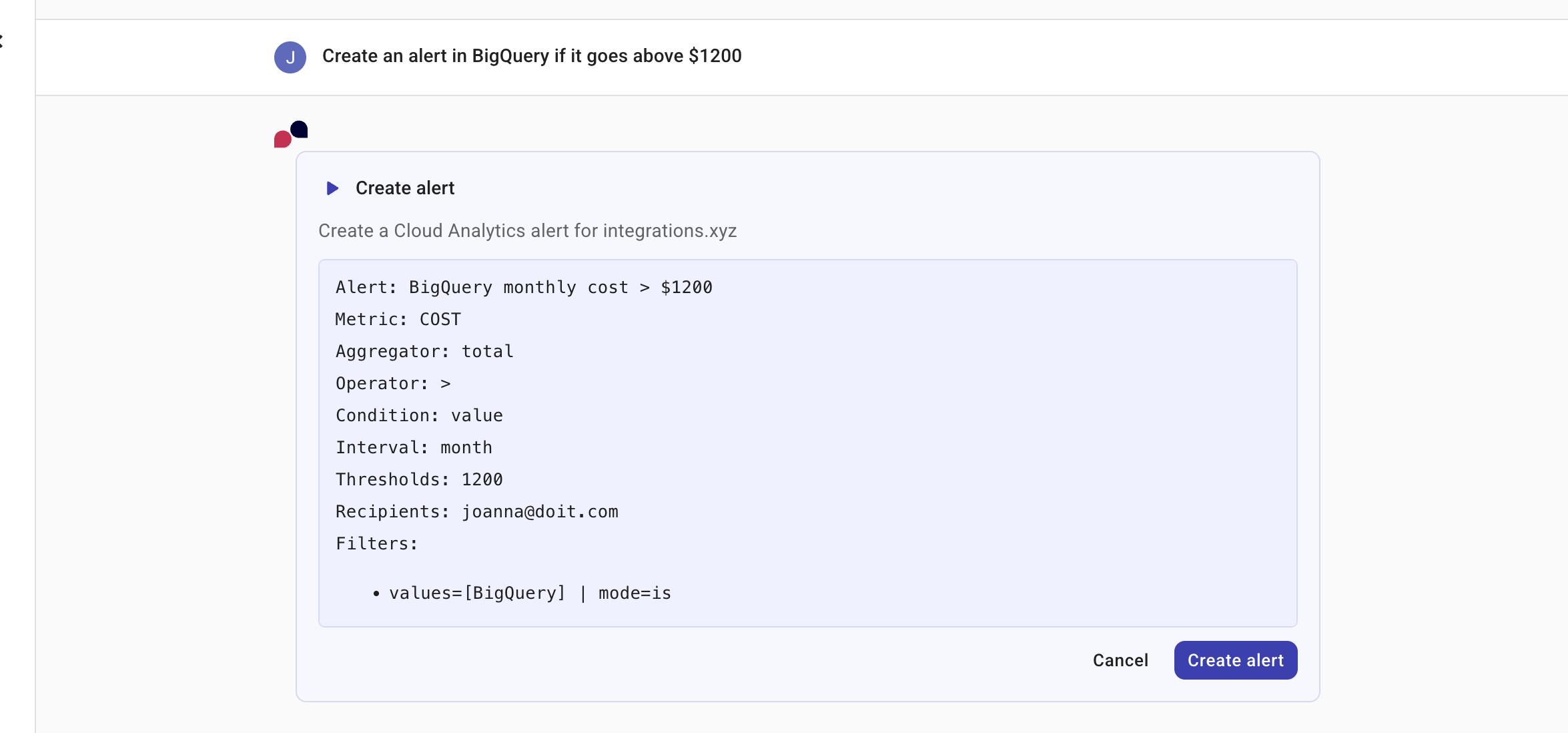
DoiT のアラートについて、AI アシスタントはクラウド環境内の問題をフラグ付けするために使用されるユーザー定義のイベントや条件を理解し、参照できます。AI アシスタントに、アラートの一覧表示、分析、会話内容に基づくアラートの生成を依頼でき、分析からアクションまでシームレスなワークフローを実現します。
例
List my alerts
Create an alert in BigQuery if it goes above $1200
アロケーション
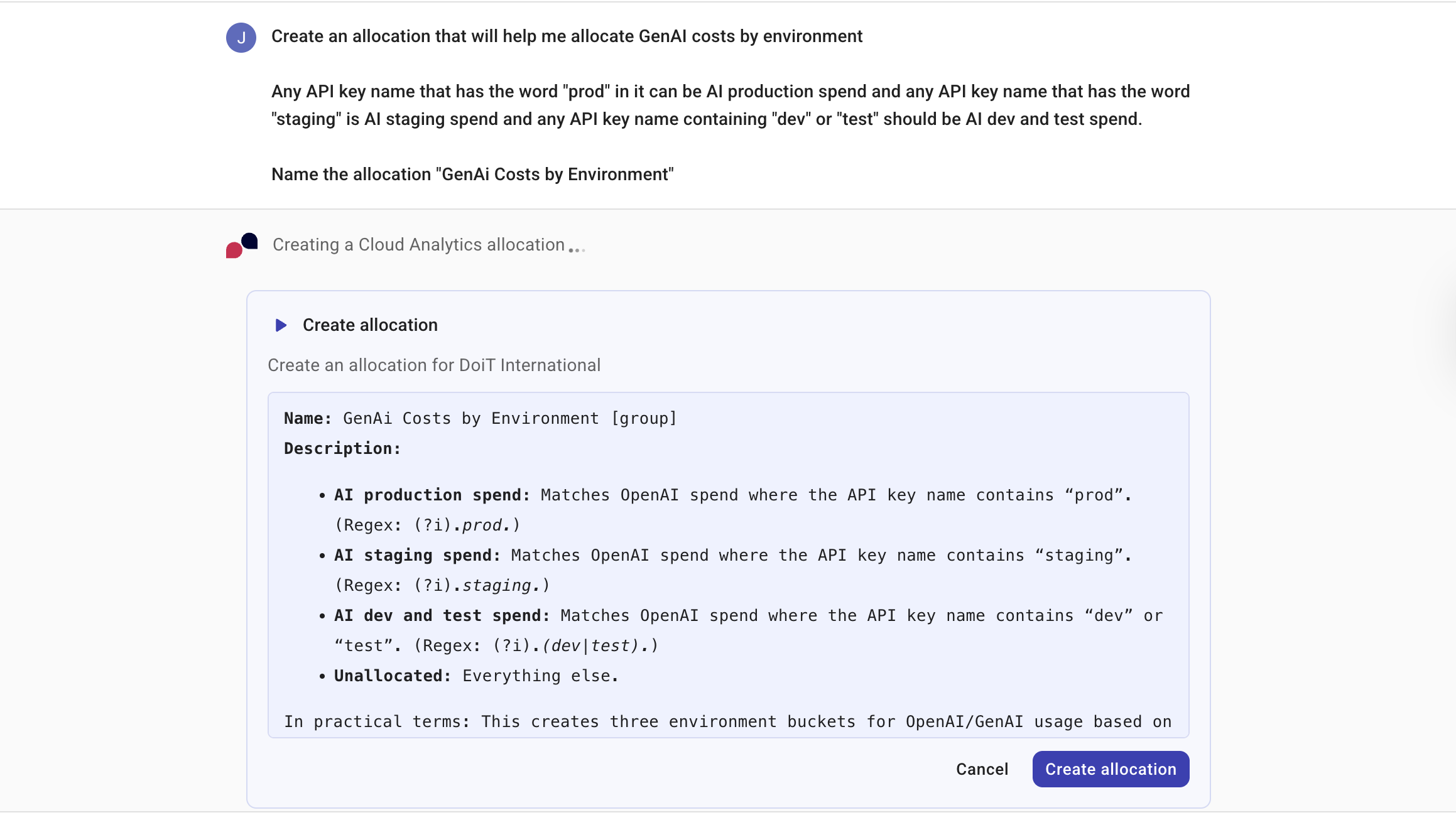
DoiT のアロケーションについて、AI アシスタントはコストが関連するビジネスユニット、アプリケーション、プロジェクトにどのようにアトリビュートされているかを理解できます。AI アシスタントに、アロケーション戦略のあらゆる側面、つまり会話に基づいたアロケーションの作成、編集、共有、管理の支援を依頼でき、分析からアクションまでシームレスなワークフローを実現します。
例
How much of my spend is unallocated this month, and what are the biggest drivers of it?
Create a rule that allocates anything with label/tag 'app=*' into app buckets; keep the rest in Shared.
Why is project/account x not landing in the Production bucket even though it has the right tags?
アノマリー
DoiT のコストのアノマリーについて、AI アシスタントはクラウド環境で検出されたアノマリーを一覧表示したり、影響を受けたサービスや時間範囲を含めて特定のアノマリーを詳細に調査したりできます。また、アノマリーから調査を開始することもできます。アノマリーの詳細ページで Get deeper insights を選択すると、アノマリーのコンテキストが AI アシスタントに引き渡されます。アノマリーを調査するを参照してください。
例
List my cost anomalies from the last month
What caused yesterday's anomaly in my AWS account?
予算
DoiT の予算について、AI アシスタントは、実際のクラウド支出を計画支出に対してどのようにトラッキングしているかを理解できます。AI アシスタントに、会話内容に基づいた予算の作成、編集、共有、管理など、予算策定のあらゆる側面の支援を依頼でき、分析からアクションまでシームレスなワークフローを実現します。
例
How much of my Q1 budget have I already consumed?
Why is my BigQuery usage 20% higher than the amount I budgeted for?
Which projects are predicted to exceed their budgets in the next 30 days?
Cloud Diagrams
Cloud Diagramsを閲覧している際に、AI アシスタントが支援します。たとえば、次のようなことを AI アシスタントに依頼できます。
-
自然言語でダイアグラムのレイヤーをオンまたはオフに切り替える。サポートされるレイヤーは Security と Cost です。AI アシスタントにレイヤーの切り替えを依頼すると、ダイアグラムはリアルタイムで更新され、どのレイヤーが有効または無効になったかを AI アシスタントが通知します。現在のダイアグラムでレイヤーが利用できない場合 (例: Azure ダイアグラム上の Security レイヤーや、グローバルネットワークビュー上のすべてのレイヤー)、AI アシスタントがその旨を知らせます。例: Show the security layer、Hide the security layer、Turn on the cost overlay、Turn off the cost overlay。
-
ダイアグラムフィルターの適用、変更、クリア。AI アシスタントは、サービス種別、リージョン、リソースタイプ、タグでフィルターできます。フィルターを適用した後、AI アシスタントは実行内容を確認し、表示されているリソース数を報告します。ダイアグラムには、AI アシスタントが適用したフィルターが反映されます。Cloud Diagrams のフィルタリングの詳細は、Filter Cloud Diagramsを参照してください。例: Show only EC2 instances in us-east-1、Remove the Lambda filter from this diagram、Clear all filters。
-
アクティブなダイアグラム上のリソースを、名前、タイプ、タグ、プロパティで検索、フォーカス、ズームする。1 つのリソースのみが一致する場合、AI アシスタントはそのリソースを選択し、ダイアグラムの中心に配置してリソースのサイドパネルを開きます。複数のリソースが一致する場合、AI アシスタントはそれらをハイライト表示し、一致するリソースが表示されるようにダイアグラム全体を調整します。例: Find prod-db、Show me all Lambda functions、Where are the S3 buckets?、Find resources with tag env:prod。
-
アクティブなダイアグラム上のリソース間の関係を探索する。AI アシスタントは、選択したリソースまたはリソース名を起点として、直接または推移的な接続、上流または下流の依存関係、グループメンバーシップに関する質問に回答できます。AI アシスタントは関連するリソースをハイライト表示し、結果が見えるようにダイアグラム全体を調整します。例: What is prod-db connected to?、Show me everything connected to the load balancer、Which subnets are in this VPC?、What depends on this RDS?。
-
cost overlayを制御し、ダイアグラムに関するコスト関連の質問に回答する。AI アシスタントに、コストヒートマップのオン/オフ、時間範囲やインターバルの変更、ダイアグラム上のリソースのコストクエリを依頼できます。AI アシスタントが cost overlay をオンにすると、ヒートマップ付きのコスト詳細パネルが開きます。AI アシスタントの回答はダイアグラムの実際のコストデータに基づくため、数値は実際のインフラ支出を反映します。例: Turn on the cost overlay for the last 7 days with daily intervals、Switch to weekly intervals、Report total spend for the diagram、List the most expensive resources、Break down costs by service、Show cost trends over time。
注意AI アシスタントを通じたコストクエリは、ネットワークダイアグラムでは利用できません。ネットワークダイアグラム上でコストに関する質問をした場合、AI アシスタントはそのダイアグラムタイプではコストデータが利用できないことを通知します。
クラウドサービスクォータ
AI アシスタントは、Google Cloud と AWS のサービスクォータを確認し、リミットに近づいているクォータを報告できます。AI アシスタントは DoiT の内部クォータ監視ストアから読み取るため、ライブのクラウド API をクエリせずに結果を迅速に返します。結果は利用率のパーセンテージでソートされ、リミットに最も近いクォータが最初に表示されます。
AI アシスタントに特定のクラウドプラットフォームのクォータについて尋ねることも、一般的な質問をして接続されているすべてのクラウドをまとめて確認することもできます。各結果には、アクションが必要な場所を正確に特定できるよう、サービス名、リージョン、アカウントまたはプロジェクトが含まれます。
クラウドサービスクォータデータは、クォータ監視が有効になっている組織スコープのクラウド接続を持つお客様のみが利用できます。
例
Which of my cloud service quotas are near their limits?
Show me Google Cloud quotas that are above 90% utilization.
Are any of my AWS service limits close to being exceeded?
Commitment Manager
DoiT のCommitment Managerについて、AI アシスタントは AWS および Google Cloud における支出ベースのコミットメント割引をどのようにトラッキングしているかを理解できます。AI アシスタントに、コミット目標に対する進捗の理解や、キャパシティプランニングの可能性の把握を依頼できます。
AI アシスタントはコミットメントの作成、編集、管理は行えません。これらの操作には、DoiT のCommitment Managerを使用する必要があります。
例
What percentage of my compute spend is currently covered by commitments?
Show me a timeline of all commitment expirations for the upcoming year.
What is the total effective savings I've gained from commitments year-to-date?
Composer
DoiT のComposerについて、AI アシスタントは Recipe builder でレシピを自然言語で作成、変更、説明できます。必要なチェック内容を説明すると、AI アシスタントがリソース、フィルター、クラウドプロバイダを含めてレシピをキャンバスに適用します。Build recipes with the AI assistantを参照してください。
この機能は、早期アクセス機能として提供されています。Composer AI assistant の早期アクセス機能を有効にするには、DoiT アカウントに Admin ロールが付与されている必要があります。
例
Build a recipe to find idle EC2 instances
Find S3 buckets missing the Environment tag
Explain this recipe
ダッシュボード
AI アシスタントは、ダッシュボードの内容を理解できます。ダッシュボードと対話する方法は 2 つあります。
-
AI アシスタントを使ってチャートデータを直接探索する。右上のケバブメニュー (⋮) を選択し、AI insights & next steps を選択します。または、Sankey チャートでは、データポイントにカーソルを合わせ、ツールチップで Select to explore with the AI assistant を選択します。treemap チャートでは、同じ探索フローを開始するためにダブルクリックします。プロンプトにはチャートのデータがあらかじめ入力されるため、選択した値の要因の調査をすぐに開始できます。
-
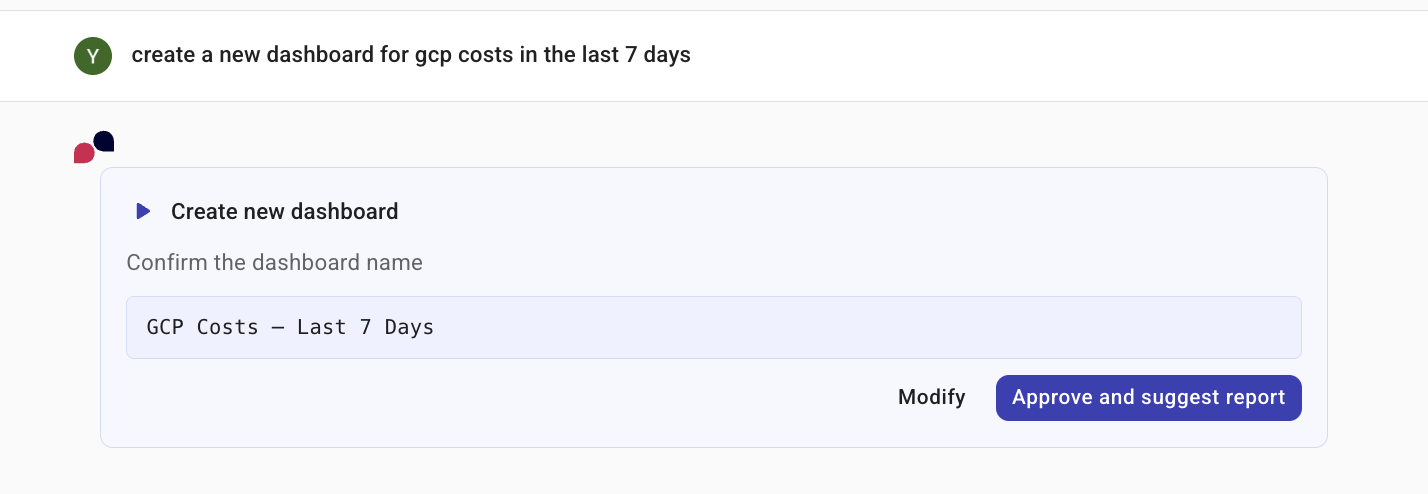
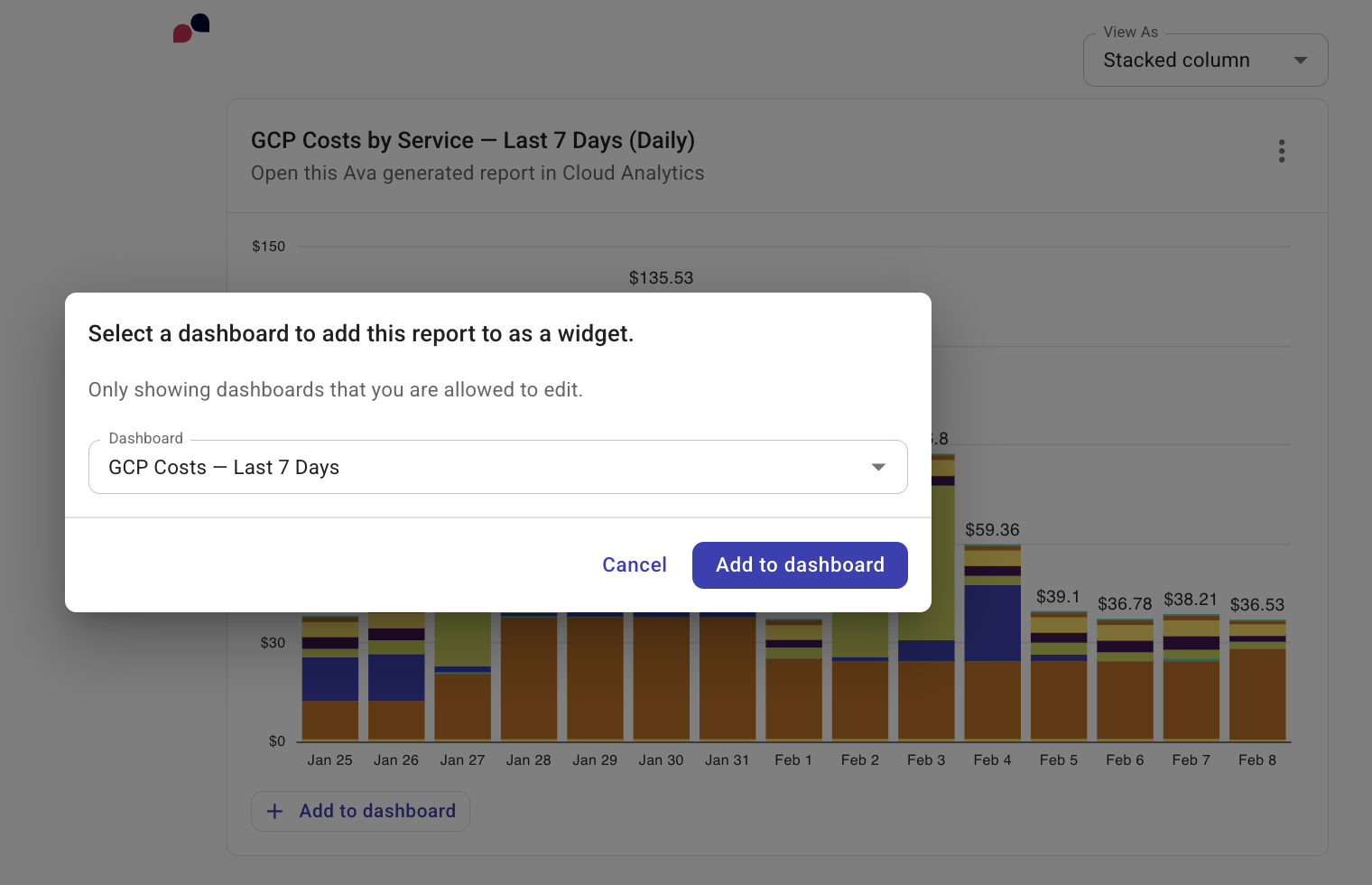
AI アシスタントにダッシュボードの作成を依頼する。新しいダッシュボードを生成するには、AI アシスタントで新しい会話を開始し、必要なレポートを説明します。AI アシスタントは、ダッシュボードの作成と各ウィジェットの追加を行う際に、入力を求めながらステップバイステップで案内します。ダッシュボードが作成されると、AI アシスタントはそれらのダッシュボードを認識するため、ウィジェットを素早く簡単に追加できます。
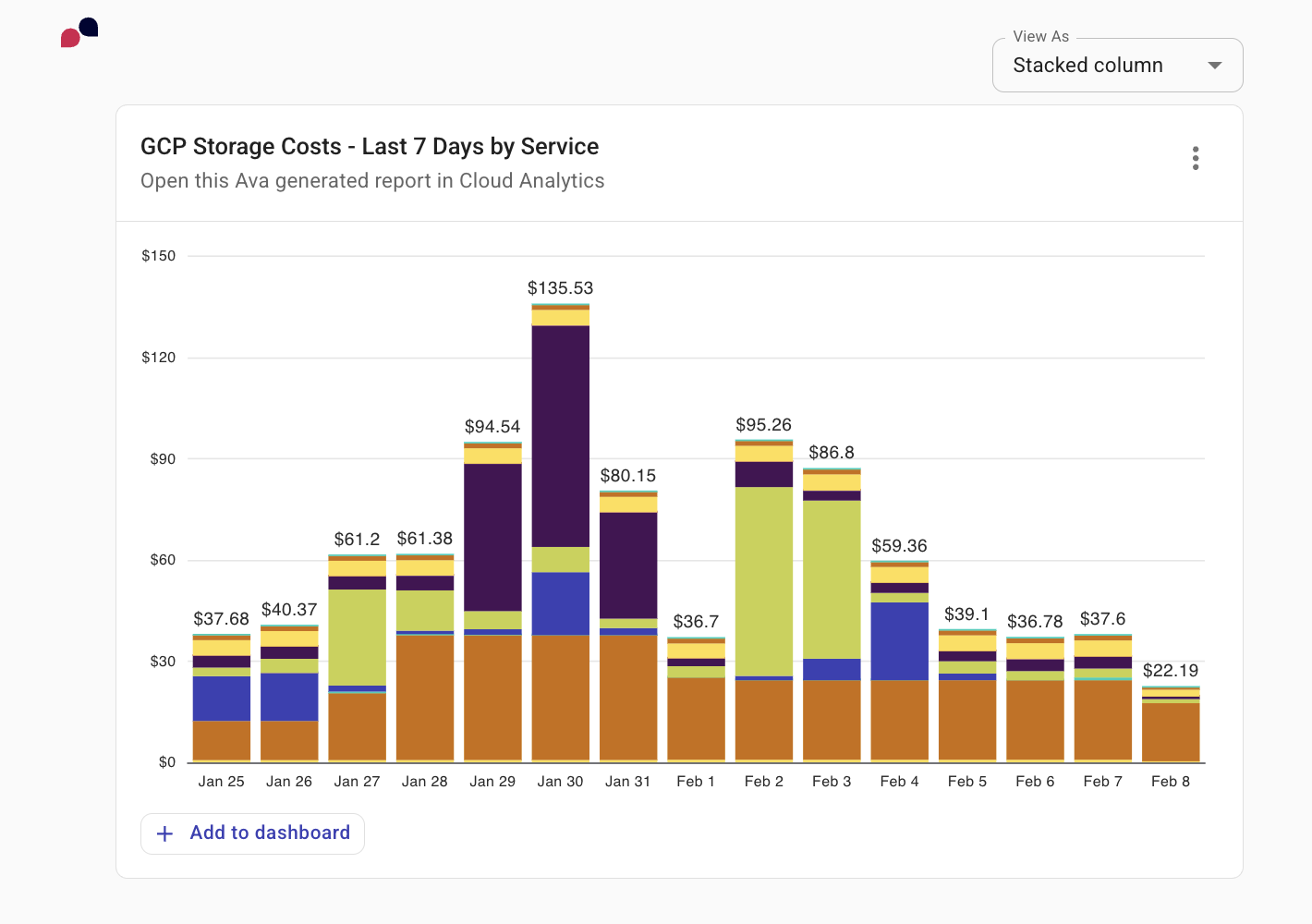
さらに、AI アシスタントはレポートとダッシュボード間の関連性も認識します。AI アシスタントにレポートの生成を依頼し、その結果をウィジェットとしてダッシュボードに追加するよう指示でき、分析からアクションまでシームレスなワークフローを実現します。
ダッシュボードから AI を使ってレポートを作成するオプションは、組織が利用している DoiT のプランで AI アシスタントへのアクセスが有効になっている場合にのみ使用できます。
例
Create a dashboard showing GCP storage costs over the last 7 days.
Add a widget to this dashboard showing costs grouped by GCP project.
Create a report showing GCP storage costs over the last 7 days.
このダッシュボードを今作成したばかりの場合、AI アシスタントが自動的にそれを認識し、このダッシュボードがデフォルトとして選択されます。
エキスパートへ問い合わせ
AI アシスタントは、進行中のエキスパートへの問い合わせを会話内に直接表示できます。問い合わせの一覧を依頼すると、AI アシスタントは各問い合わせについて、件名・ステータス・依頼者のメールアドレス・クラウドプラットフォーム・最後のやり取りの日付を含むカードを表示します。問い合わせの件名を選択すると、コンソール内でその問い合わせ全体が開きます。
アクティブな問い合わせとは、クローズまたは解決とマークされていないエキスパートへ問い合わせです。アクティブな問い合わせがない場合、AI アシスタントはステータスに関わらず、過去 30 日間の最近の問い合わせを自動的に表示します。
問い合わせカードの下には、会話を続けるために選択できるフォローアップアクションを AI アシスタントが提案します。例えば、特定の問い合わせの最新状況を尋ねたり、その週の問い合わせ状況を要約したりすることができます。
AI アシスタントが表示する問い合わせは、エキスパートへ問い合わせページでアクセスできるものと同じです。組織で問い合わせ共有が有効になっている場合は、他のユーザーが送信した問い合わせも表示されます。
例
Show me my expert inquiries
Any updates on inquiry #12345?
Summarize my expert inquiries this week
コストに関するインサイトを得る
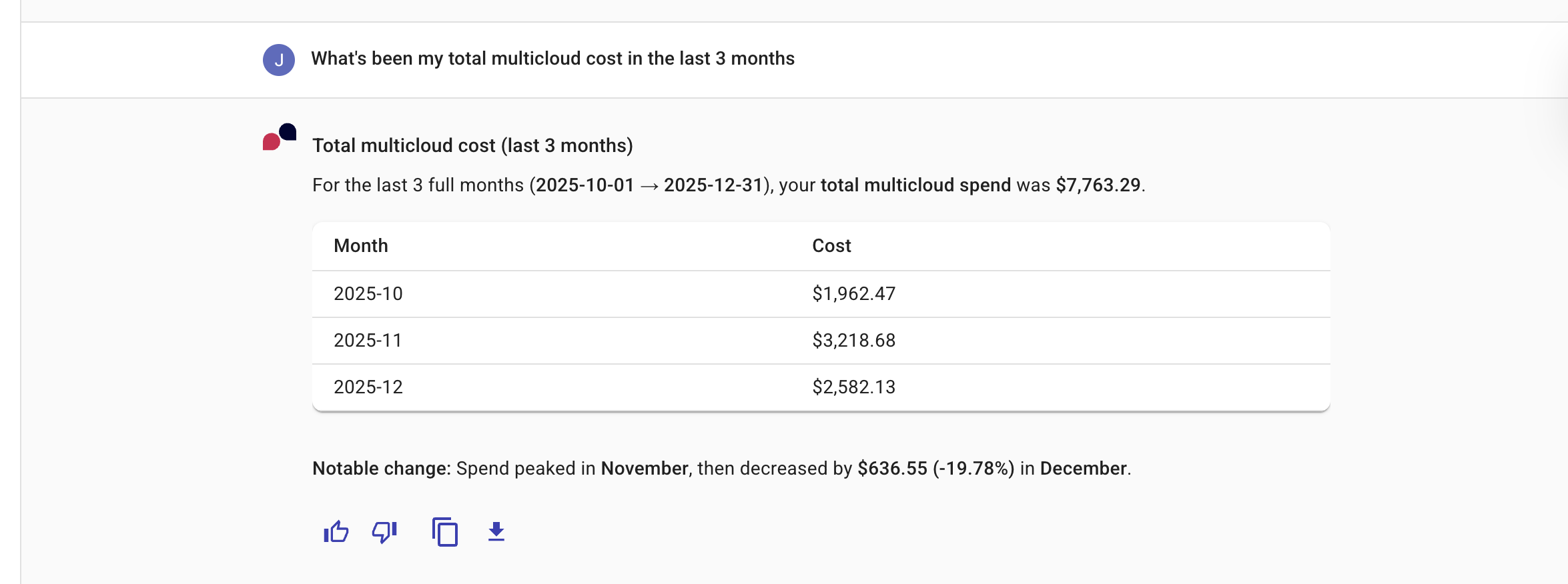
AI アシスタントとの会話を通じて、クラウド支出に関するインサイトを素早く得て、必要に応じてさらに深掘りすることができます。
例
What's been my total multicloud cost in the last 3 months?
新しいユーザーを招待する
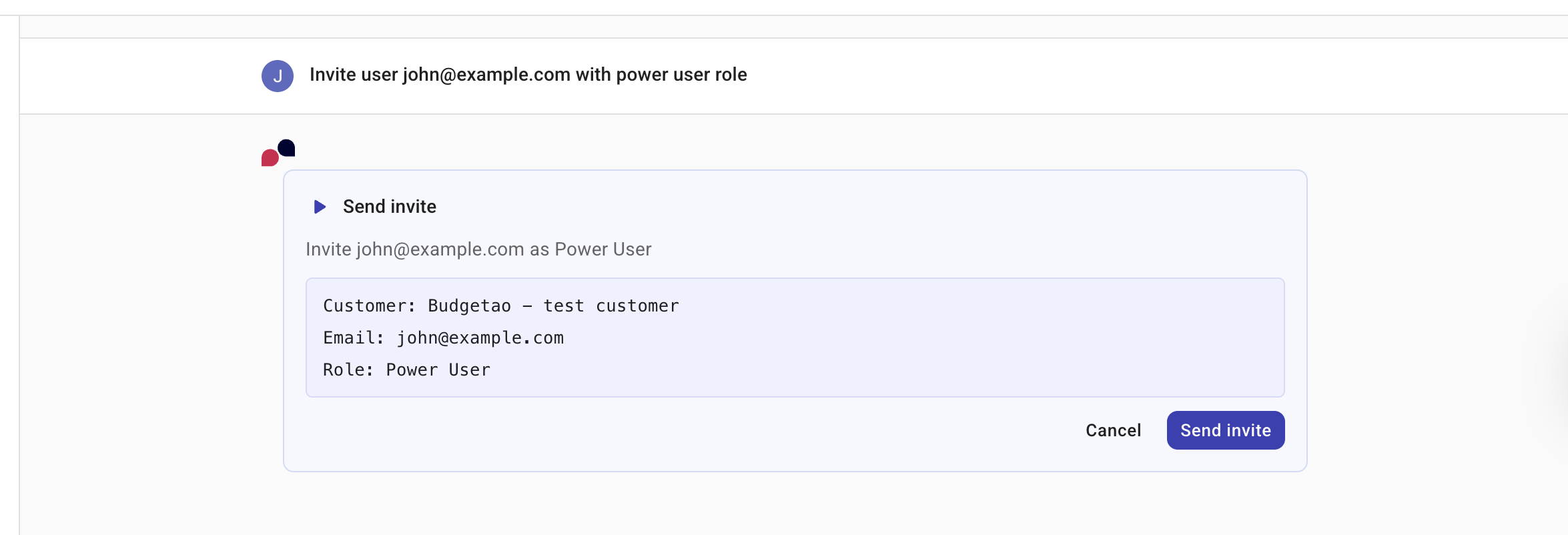
AI アシスタントを使用して、Cloud Intelligence へのアクセスが必要な新しいユーザーを招待できます。招待したいユーザーのメールアドレスを指定する必要があります。必要に応じて、新しいユーザーのロールを指定することもできます。招待された受信者には、Cloud Intelligence アカウントへの新規登録を完了するために使用すべきリンクを含むメールが送信されます。
お使いの DoiT アカウントには User Manager 権限が必要です。
例
Invite user [email protected] with admin role.
ラベル
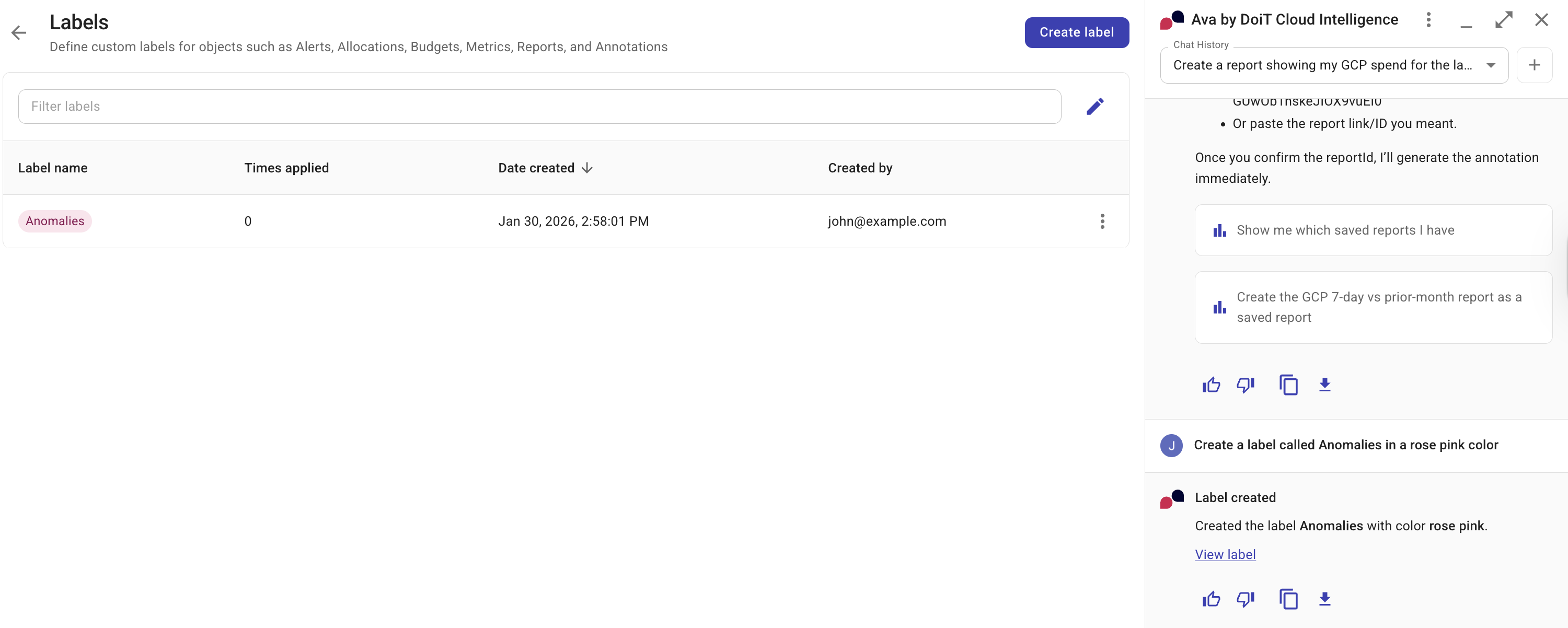
AI アシスタントは、アラート・アロケーション・予算・メトリクス・レポートなどの Cloud Intelligence 機能向けにカスタムラベルを定義できます。
例
Create a label called Anomalies with a rose-pink color.
レポート
AI アシスタントを使用して、レポートをさらに詳しく分析できます。レポートと対話する方法は 2 通りあります。
-
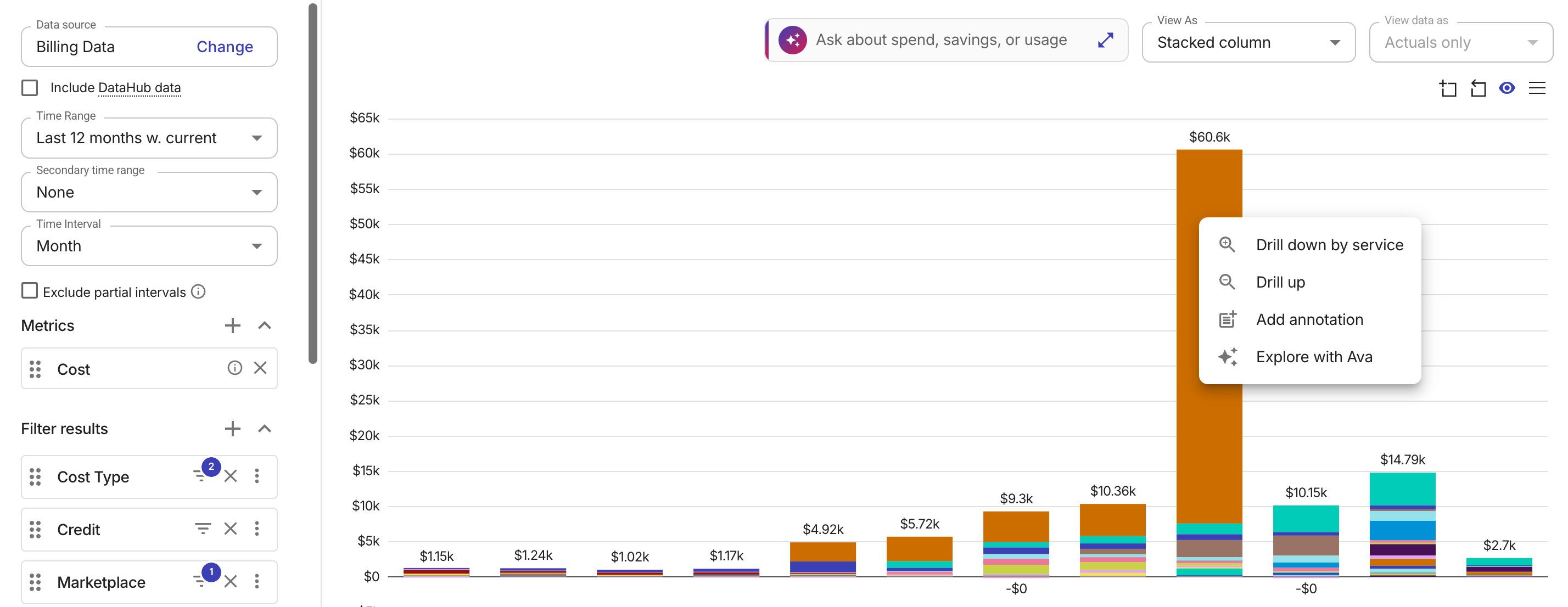
レポートのチャートデータを AI アシスタントで直接探索します。line チャートと bar チャートでは、データポイントまたはカラムを右クリックしてコンテキストメニューを開き、Explore with the AI assistant を選択して新しい会話を開始します。Sankey チャートでは、データポイントにカーソルを合わせるとツールチップに Select to explore with the AI assistant が表示されるので、そのオプションを選択して新しい会話を開きます。treemap チャートでは、同じ探索フローを開始するために代わりにダブルクリックします。プロンプトにはチャートのデータがあらかじめ入力されるため、選択した値の要因の調査をすぐに始めることができます。
-
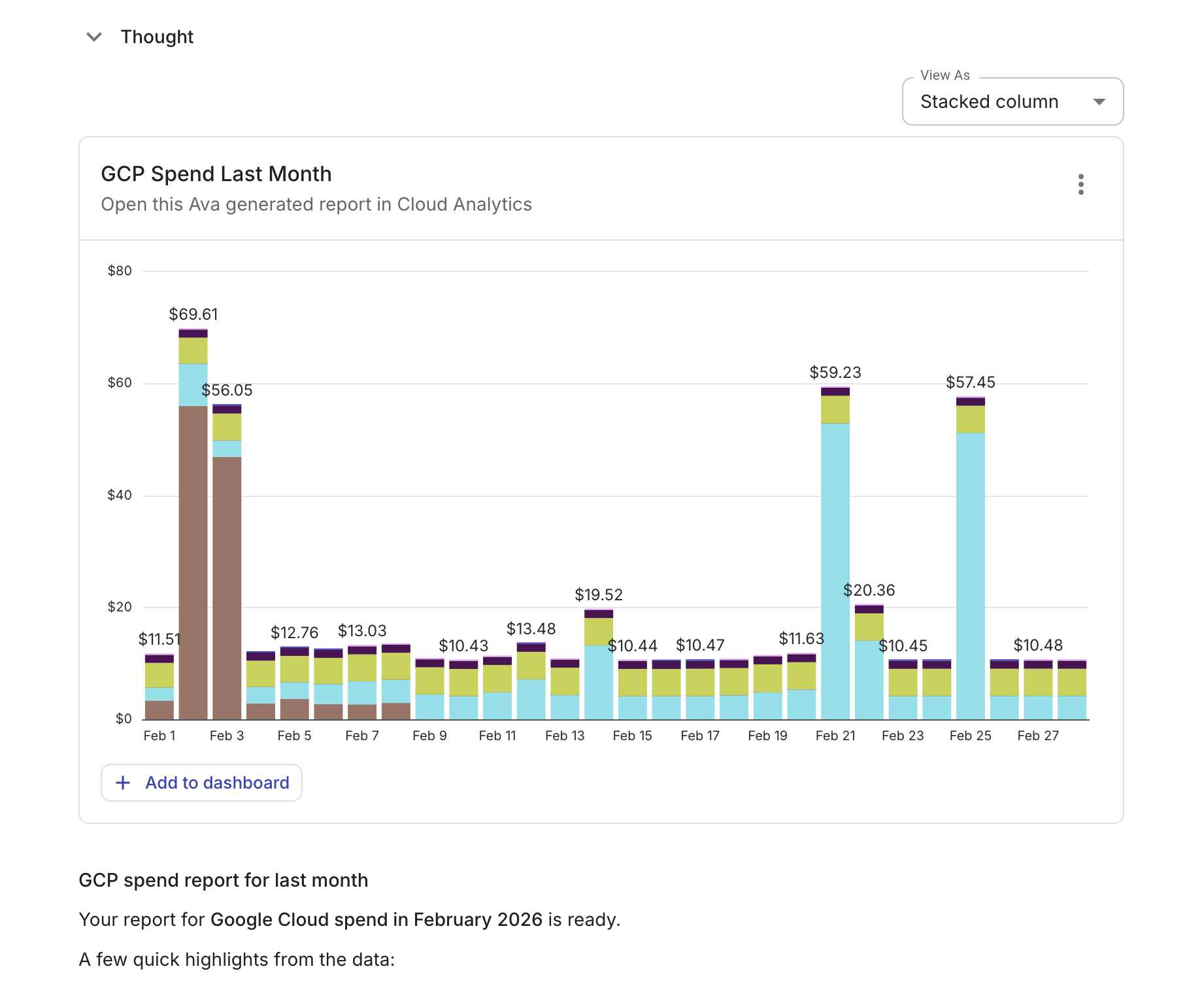
AI アシスタントに新しいレポートの生成を依頼します。新しいレポートを生成するには、AI アシスタントで新しい会話を開始し、必要なレポートについて説明してください。これは将来の見通しに関する質問も含みます。例えば
Forecast my AWS spend for the next 3 monthsのように予測を依頼すると、AI アシスタントはレポートの予測設定を自動的に構成します。AI アシスタントがレポートを生成すると、最も関連性の高い結果の要約を含む説明を提供します。また、次のことも可能です。-
View as ドロップダウンを使用してレポートの可視化を変更。
-
レポートをダッシュボードに追加。
-
右上のケバブメニュー(⋮)を選択し、次のオプションから選択。
-
Cloud Analytics で Open full report。
-
Copy CSV to clipboard:コンソールに表示されているピボット済みデータをクリップボードにエクスポート。
-
Export as CSV:コンソールに表示されているピボット済みデータを CSV にエクスポート。
-
Export as PNG:コンソールに表示されているチャートを PNG ファイルとしてエクスポート。
-
さらに、AI アシスタントに、保存済みレポート向けのレポート注釈の作成を依頼できます。例えば、
Create an annotation for 23/1/2026 entitled Secondary time range for the reportのように依頼できます。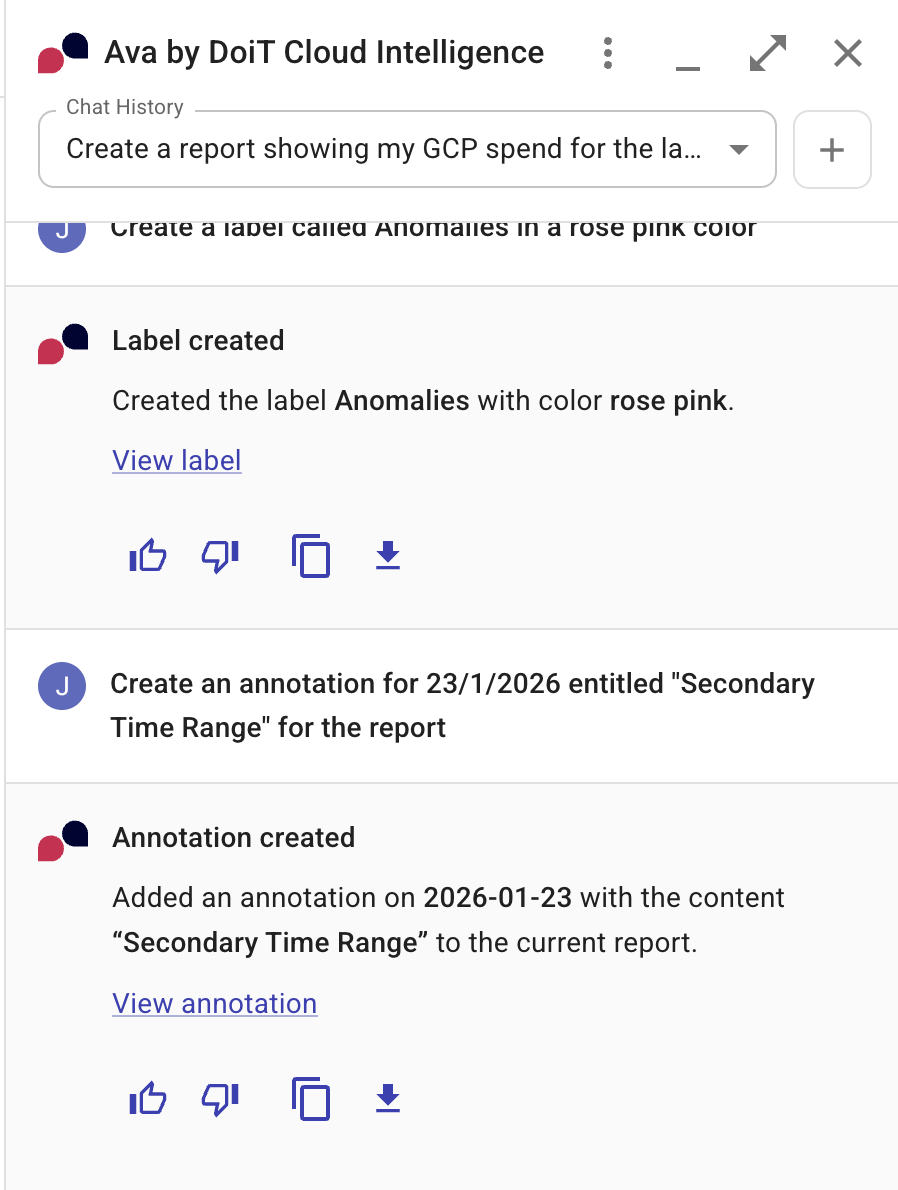
-