Azure amortized cost
DoiT Cloud Analytics provides an extended metric—Amortized Cost—for Azure. It uses the FOCUS (FinOps Open Cost and Usage Specification) EffectiveCost field, which represents the amortized cost of a resource after commitment-based discounts (Reservations and Savings Plans) have been applied.
Unlike the Cost metric that shows billed (cash-basis) costs as they appear on your Azure invoice, the Amortized Cost metric shows costs on an accrual basis, distributing commitment fees across the resources and time periods they cover.
Reports built with Amortized Cost include all Azure services in your environment, regardless of whether they benefit from Reservations or Savings Plans.
Prerequisites
To use the Amortized Cost metric for Azure, you must enable Azure amortized cost on a connected Azure standalone account.
Unblended and amortized metrics
Cloud Analytics reports built with the Cost metric use unblended costs, which are usage costs on the day they are charged; reports built with the Amortized cost metric use amortized data.
| Scenario | Cost | Amortized cost |
|---|---|---|
| On-demand usage | Full pay-as-you-go charge | Same as billed cost |
| Usage covered by a Reservation or Savings Plan | $0 (covered by the commitment) | Effective cost of the commitment spread over covered usage |
| Reservation or Savings Plan fee (upfront or recurring) | Full charge in the billing period | Spread proportionally across covered usage and time |
| Unused commitment (waste) | Included in the fee line | Attributed to the commitment holder |
Example report
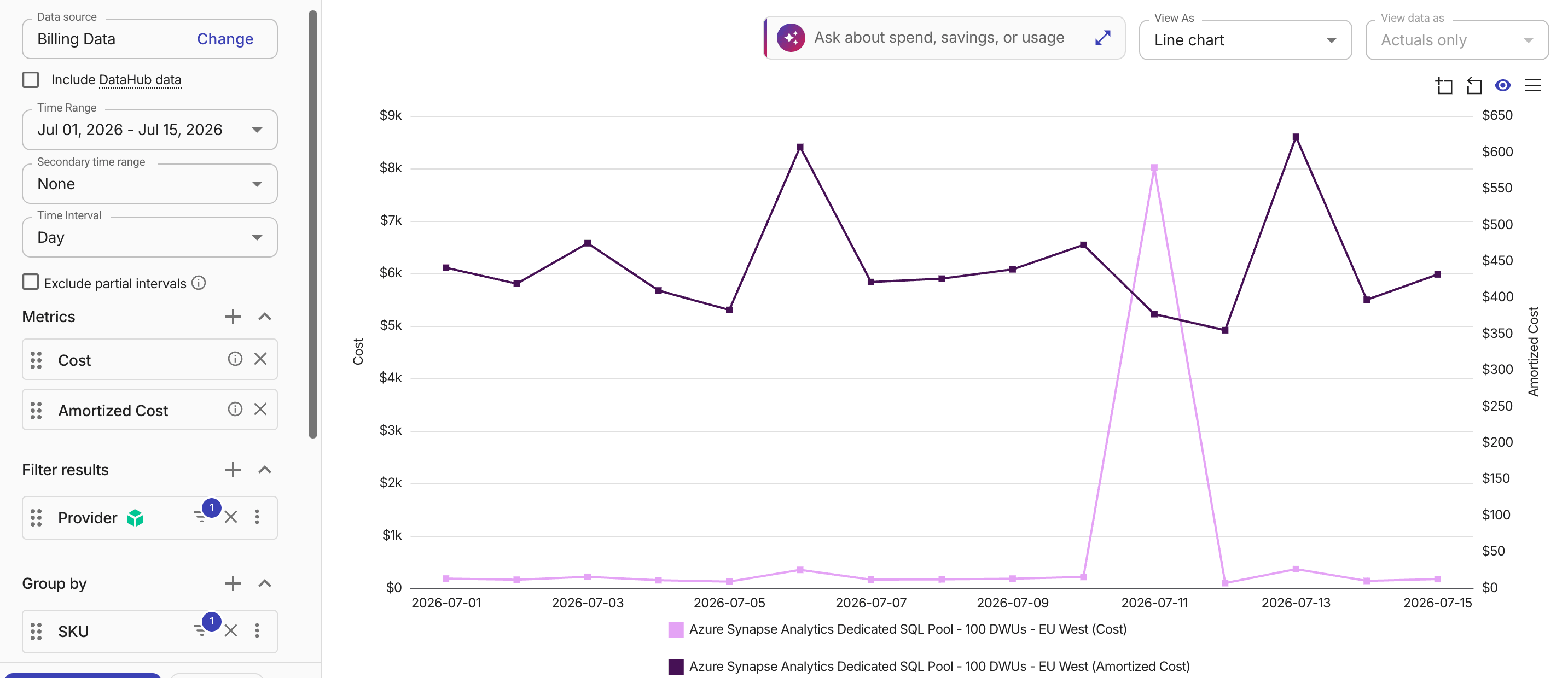
The example below compares daily Azure service expenses using the Cost and Amortized cost metrics.
While the Cost line shows a single spike from purchasing Azure Synapse Analytics reserved capacity, the Amortized cost line spreads that upfront fee evenly over time alongside on-demand usage, reflecting a clearer picture of actual operational costs.
See also
-
Microsoft documentation: View Azure savings plan cost and usage details