Azure 償却原価
DoiT Cloud Analytics は、Azure 向けの拡張メトリックである Amortized Cost(償却原価)を提供します。これは FOCUS(FinOps Open Cost and Usage Specification)の EffectiveCost フィールドを使用しており、コミットメントベースのディスカウント(Reservations および Savings Plans)が適用された後のリソースの償却原価を表します。
Azure の請求書に記載される請求ベース(現金主義)のコストを示す Cost メトリックとは異なり、Amortized Cost メトリックは 発生主義 ベースでコストを表示し、コミットメント料金を対象リソースと対象期間にわたって按分します。
Amortized Cost を使用して作成されたレポートには、Reservations や Savings Plans の恩恵を受けているかどうかに関わらず、環境内のすべての Azure サービスが含まれます。
前提条件
Azure で Amortized Cost メトリックを使用するには、接続済みの Azure スタンドアロンアカウントで Azure amortized cost を有効にする 必要があります。
アンブレンデッドメトリクスと償却メトリクス
Cost メトリックを使用して作成された Cloud Analytics レポートは、料金が発生した日の利用コストであるアンブレンデッドコストを使用します。一方、Amortized cost メトリックを使用して作成されたレポートは、償却データを使用します。
| シナリオ | Cost | Amortized cost |
|---|---|---|
| オンデマンド利用 | 従量課金の料金全額 | 請求額と同じ |
| Reservation または Savings Plan でカバーされる利用 | コミットメントでカバーされるため $0 | コミットメントの実効コストをカバーされた利用に按分 |
| Reservation または Savings Plan の料金(前払いまたは継続) | 請求期間に料金全額を計上 | カバーされた利用量と期間に比例して按分 |
| 未使用コミットメント(無駄) | 手数料行に含まれる | コミットメント保有者にアトリビューション |
レポート例
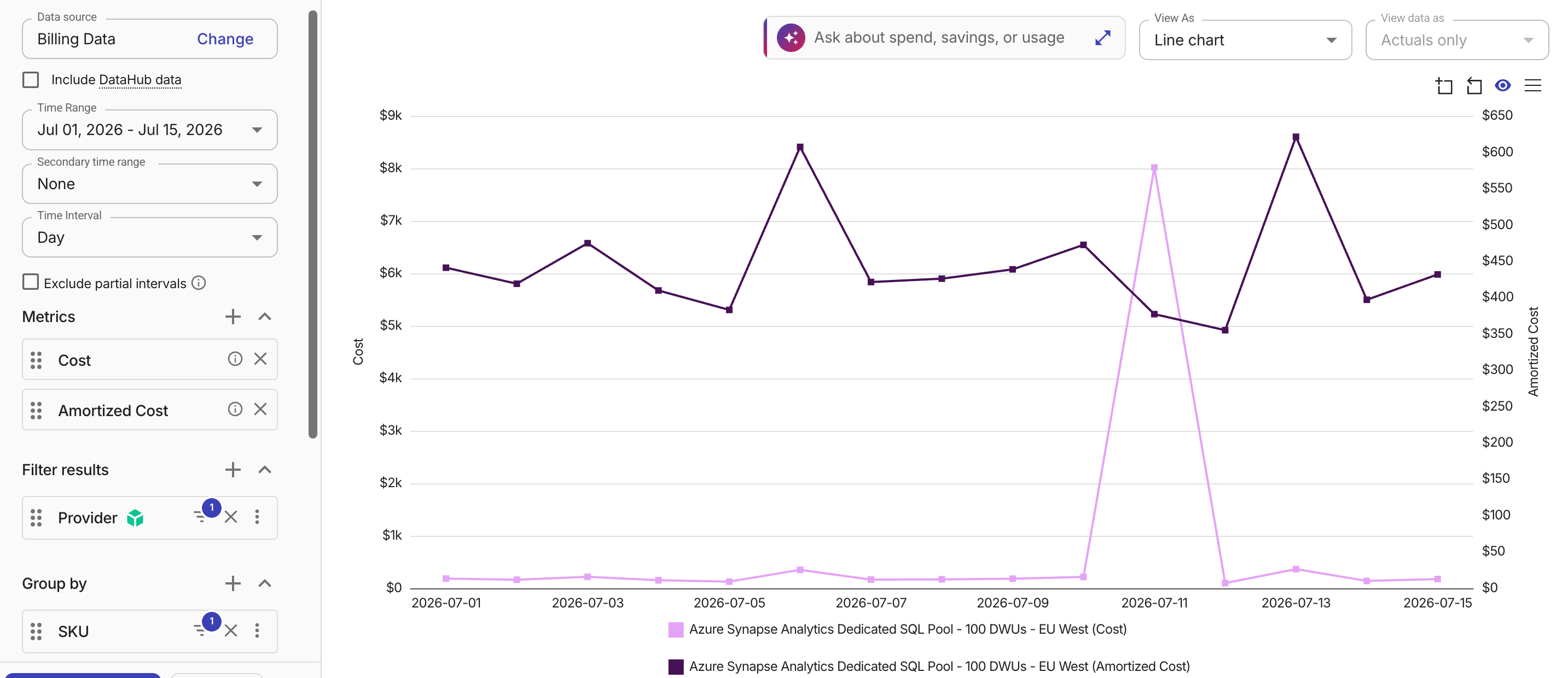
次の例は、Cost メトリックと Amortized cost メトリックを使用して、Azure サービスの日次コストを比較したものです。
Cost の線は、Azure Synapse Analytics のリザーブドキャパシティ購入による一度きりのスパイクとして表示されますが、Amortized cost の線は、その前払い料金をオンデマンド利用とあわせて時間経過に沿って均等に按分し、実際の運用コストの状況をより明確に表します。
関連項目
-
Microsoft ドキュメント: View Azure savings plan cost and usage details