Report templates
Report templates are a collection of reports created by DoiT's global team of experts to help you manage cloud costs. They are grouped into the following categories:
-
Compute: Templates in this category focus on costs associated with cloud computing resources, for example, virtual machines, containers, and serverless functions. Computing resource costs often make up the largest portion of an organization's cloud spending.
-
Networking: This category focuses on data transfer and network service costs. Templates in this category could be helpful if your business involves data transfer across regions or clouds.
-
Storage: This category deals with costs of data storage services. To reduce waste caused by inefficient storage management, you need to monitor the storage cost, choose the right storage class for your data, and store the data in the appropriate location.
-
Data warehouses: This category deals with costs of data warehouse services, which are used for data analytics and business intelligence activities.
-
Reservations: Reserving cloud resources in advance can lead to significant savings for predictable workloads. To take full advantage of reservations, it's important to monitor your spend and make necessary adjustments in time.
-
Finance: Templates in this category integrate cloud cost data with financial systems and processes. They aim for accurate financial reporting, budgeting, and forecasting. These templates can be used to enable chargeback and showback, promoting cost accountability in the organization.
Required permission
-
To view report templates and add or remove managed reports: Cloud Analytics Read Only, Cloud Analytics User, or Cloud Analytics Admin
-
To customize a template and save it as a custom report: Cloud Analytics User or Cloud Analytics Admin
-
To create, edit, or delete report templates your organization owns (distributor and reseller organizations only): Cloud Analytics Admin
Find a template
To view all the available report templates in the DoiT console, select Reporting and analytics > Reports from the top navigation mega menu, then select Report library.
Basic information of each template is shown on its card. Templates that you have already added to your reports are marked Added.
You can filter templates by category, metric, or cloud service provider, or search by name to narrow down the scope.
Choose a template for your cloud cost management
To use a template for you cloud cost management:
-
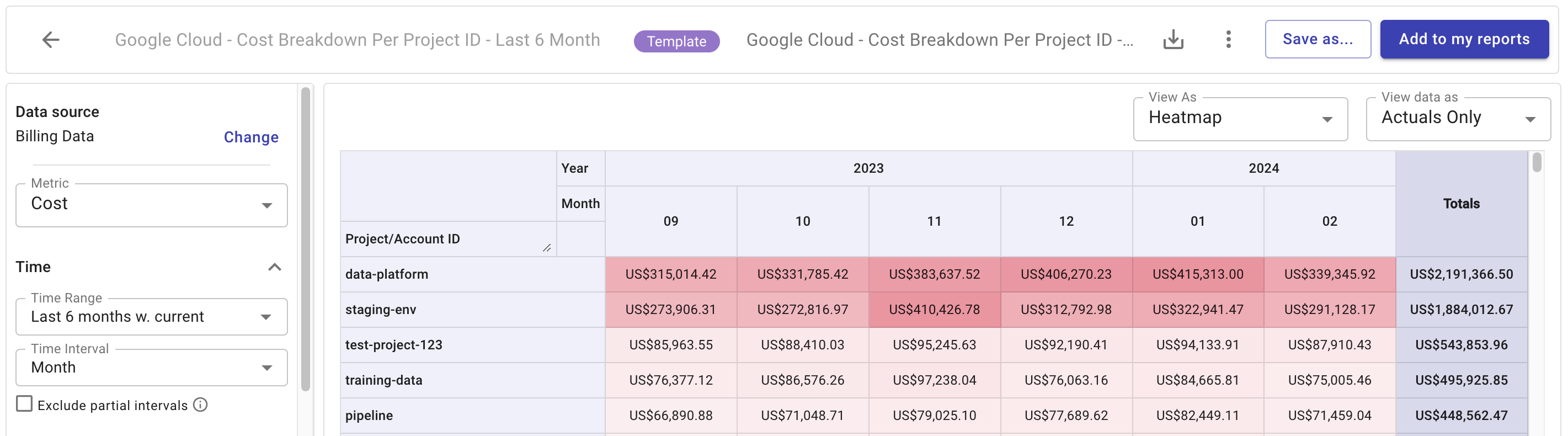
Open the template card to view its report configuration and see a preview chart if applicable. Select the back arrow to return to the list of templates.
-
To use the template as it is, select Add to my reports. The template will be added as a Managed report on the main Reports page. Managed reports are maintained by DoiT. To stop using the template, select Remove from my reports, or select Remove in the report's menu on the Reports page.
-
To change the template, select Customize to open the report. You can edit report settings, then select Save as to create a new report with you as the owner.
Manage templates
If you can create or edit templates, select Report library on the Reports page. Select Create new template to create a template, or open a template you own and select Edit this template or Delete.