Webhook trigger
You can use a webhook trigger to start a flow using data from an API. Consequently, any external system capable of making API calls can trigger a flow. For example, you can use the Run flow action in Zapier to trigger a flow. See also DoiT Integrations.
Typical use cases:
-
Integrating third-party automation platforms such as Zapier that push events to a flow.
-
Starting a flow from CI/CD pipelines, internal tools, or scripts that send structured JSON.
-
Building approval or request workflows where an external system submits a request payload for the flow to process.
You must provide a sample of your JSON so that we can detect the structure of your data. Once we have detected the structure, the flow automatically creates the fields required for subsequent actions. With this, your data becomes part of the flow and can be used in any activity nodes, just like other data.
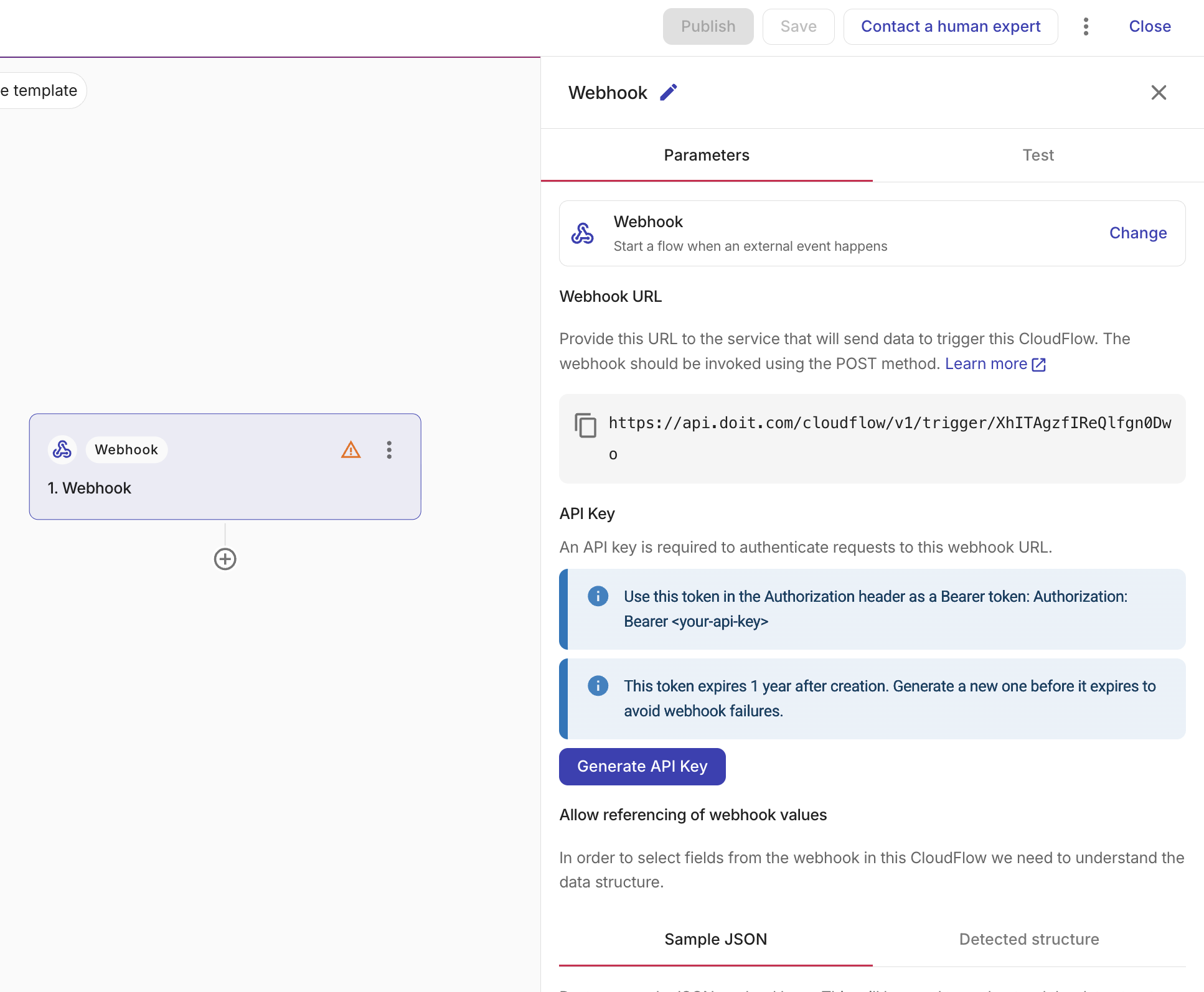
-
Webhook URL: Provide the URL to the service that will send data to trigger this flow.
-
Sample JSON: Provide a sample of your JSON so that we can detect the structure of your data. Select Detected structure to ensure that we have identified the fields correctly. If you think it is incorrect, amend your JSON sample and paste it again.
-
Generate API token: Create a DoiT API token from the trigger node so you do not have to open your Profile in Cloud Intelligence. Each click generates a uniquely named token scoped to CloudFlow management permissions. The token expires one year after creation; generate a new one before it expires to avoid webhook failures.
Like other automated triggers, webhook-triggered flows run only after the flow is published and cannot be started with the Run button.
Pass parameters to the flow
The JSON body of the request becomes the trigger's payload. Every field you include in the Sample JSON is available to downstream nodes—reference the fields in filters, branches, notifications, or as inputs to action nodes, just like output from any other node. To pass parameters to a run, include them as fields in the request body.
To trigger the flow, send a POST request to the webhook URL with your DoiT API token in the Authorization header and the parameters in the JSON body. For example, a flow that stops an EC2 instance can receive the instance ID and a reason from the caller:
curl -X POST "<webhook-url>" \
  -H "Authorization: Bearer $DOIT_API_TOKEN" \
  -H "Content-Type: application/json" \
  -d '{
    "instanceId": "i-0abcd1234efgh5678",
    "region": "us-east-1",
    "reason": "idle for 14 days"
  }'
Downstream nodes can then reference instanceId, region, and reason from the trigger's output—for example, an AWS node uses instanceId and region to stop the instance, and a notification node includes reason in the message.
The request body must match the structure of the Sample JSON you provided in the trigger configuration. If you add new fields to the request, update the sample so the fields become available for referencing in downstream nodes.