Custom schedule
A Custom schedule is useful when you need a flow to run at specific times or recurring intervals. For example, you can list unattached Azure managed disks, check AWS EC2 instance states, or review Google Cloud Compute Engine utilization every day.
Typical use cases:
-
Recurring hygiene and cost-optimization checks, such as finding unattached disks, idle instances, or untagged resources.
-
Periodic reports delivered on a fixed cadence, for example a weekly utilization summary posted to Slack.
-
One-time maintenance actions scheduled for a specific window, such as applying a patch or updating the OS kernel on a legacy server.
Configuration
-
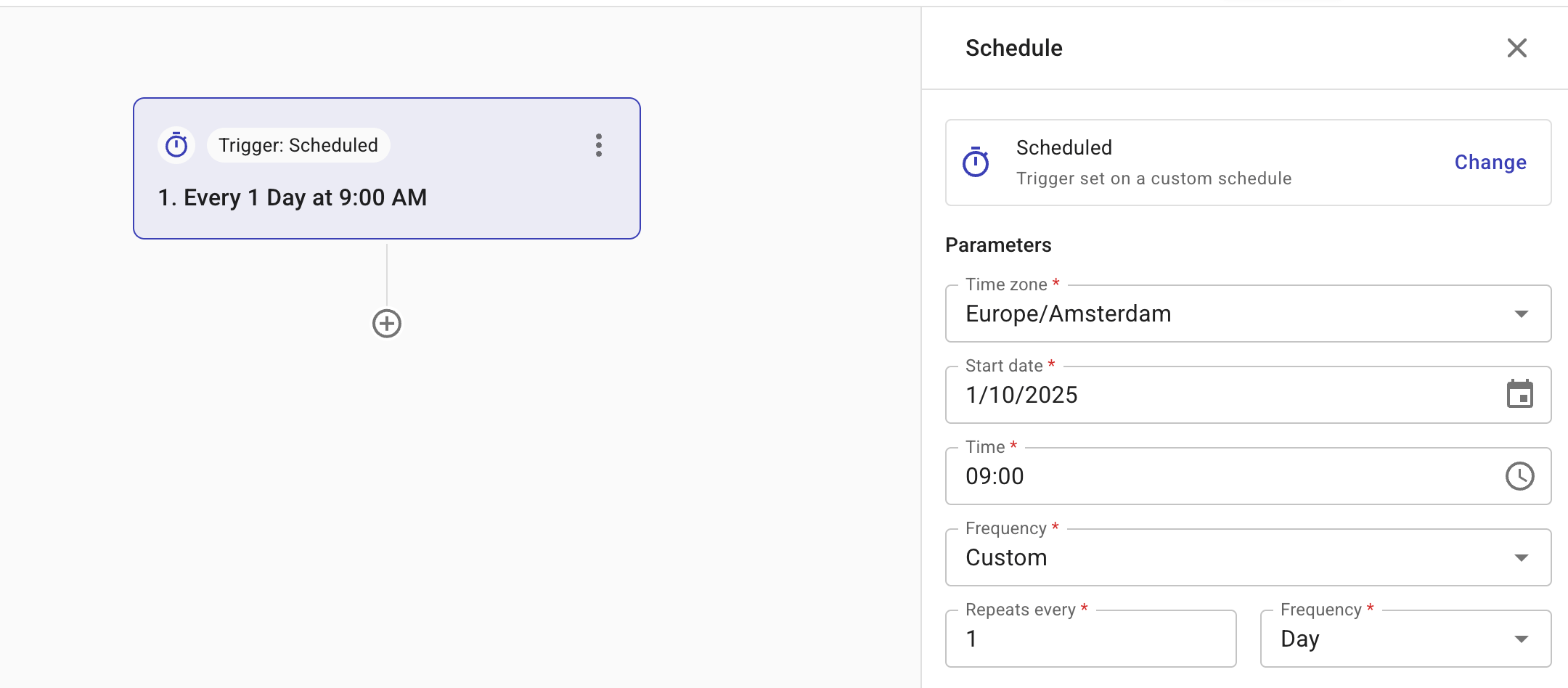
Configuration options: Time zone, Start date, Time, Frequency.
-
Frequency defines how often a flow is triggered. Supported values: Daily, Weekly, Monthly, Custom, and Run once.
-
When choosing Daily, you can trigger flows to run at specific times throughout the day. The minimum interval between runs is one hour, allowing you to schedule up to 24 executions per 24-hour period.
-
Choose Custom if you need the flow to run at recurring intervals. Supported values: Hour, Day, Week, or Month. For example, every two hours or every two weeks.
-
Choose Run once to schedule a single, non-repeating execution that can be run at a custom time. This is useful when performing one-time actions, such as updating the OS kernel on a legacy server or applying a patch during a maintenance window.
-
Below is an example custom schedule.
The Schedule trigger node's output can be referenced from any node in the flow. See Trigger node results for the available fields.