Settings
The Settings page on an onboarded account lets you configure recommendation and automation preferences.
Settings apply independently to each account; changes you make on one account do not affect other accounts.
Required permissions
-
To view settings: PerfectScale Commitments Read Only or PerfectScale Commitments Admin permission.
-
To change settings: PerfectScale Commitments Admin permission.
Commitment settings
When multiple commitment types are enabled, select the sub-tab for the commitment type you want to configure.
-
Each payer/billing account has its own settings for each commitment type.
-
For Google Cloud SQL, each region has it's own settings.
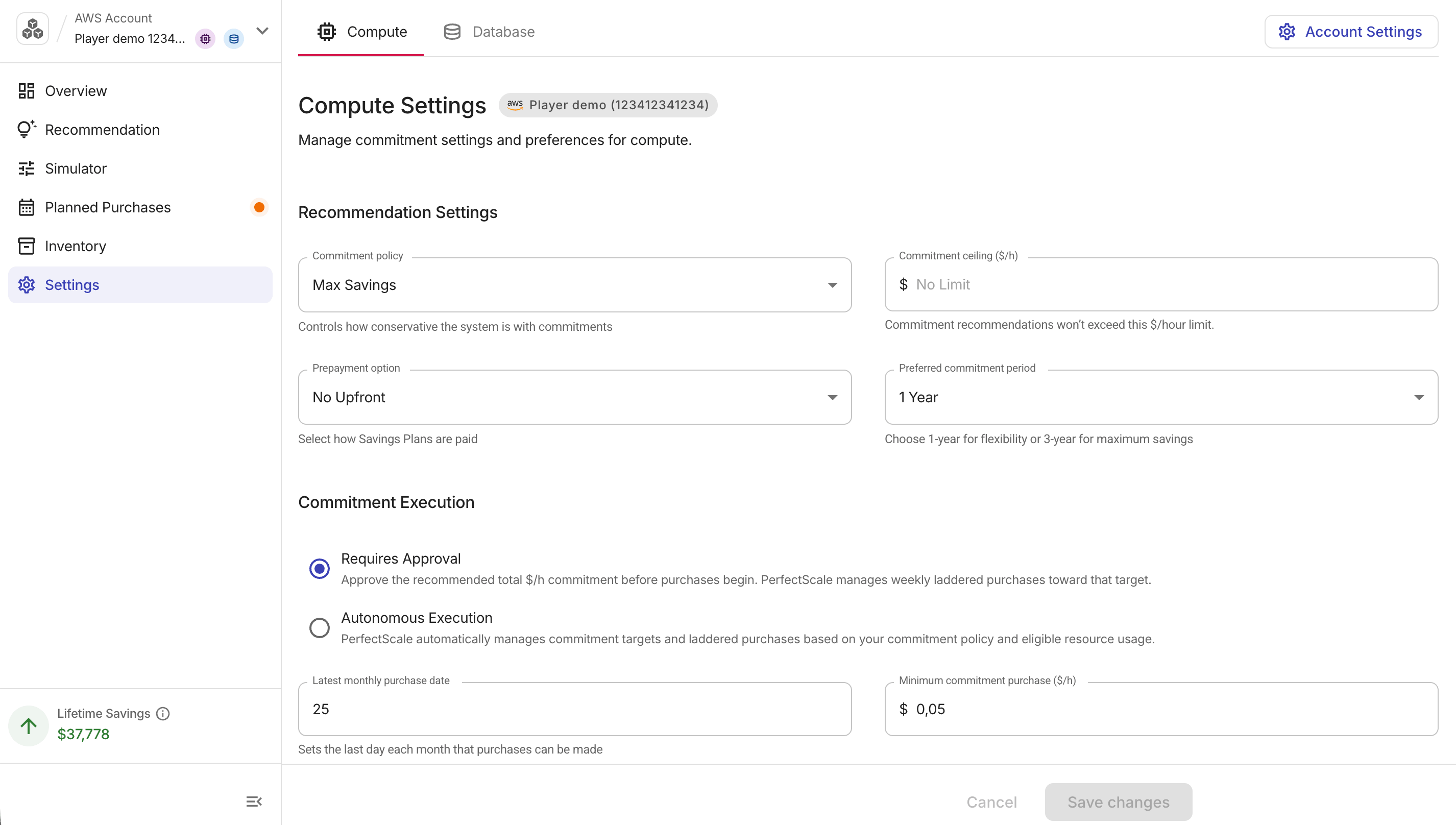
Recommendation settings
These fields define the target and constraints for recommendations:
-
Commitment policy: How aggressively PerfectScale reaches the recommended commitment. Choose from built-in policies and custom policies you have created.
-
Commitment ceiling ($/h): PerfectScale will not recommend commitments above this amount. Leave the field empty for no limit. When set, this value appears on the Planned Purchases page.
-
Prepayment option (AWS only): The payment structure for purchased Savings Plans:
No Upfront,Partial Upfront, orAll Upfront.On the AWS Database tab, only
No Upfrontis available. Google Cloud CUDs are billed monthly and do not have a prepayment option. -
Upfront percentage (%) (AWS Compute only): When
Partial Upfrontis selected, the share of the total cost paid upfront (50–99%). A higher upfront percentage lowers the hourly rate. -
Preferred commitment period:
1 Yearor3 Years. PerfectScale uses this as the default term when generating purchase recommendations. For AWS Database, only1 Yearis available.
Commitment Execution
There are two automation modes:
-
Requires Approval (default): PerfectScale for Commitments prepares commitment purchases automatically, then waits for your approval before execution.
-
Autonomous Execution: PerfectScale sets commitment targets and purchases commitments automatically based on your commitment policy and eligible usage, without requiring approval. Your configured guardrails (commitment ceiling, minimum commitment purchase, and latest monthly purchase date) still apply.
If you choose Autonomous Execution:
-
Commitment targets are set automatically based on your commitment policy and eligible usage.
-
PerfectScale purchases binding Savings Plans and CUDs in weekly laddered steps toward each target.
-
Your guardrails still apply: commitment ceiling, minimum purchase, and latest monthly purchase date.
You must select the acknowledgment checkbox to confirm before you can proceed. Select Enable Autonomous Execution to apply the change, or Cancel to keep the current mode.
-
You can switch back to Requires Approval at any time without a confirmation step, but commitments already purchased cannot be undone.
Minimum purchase and latest date
-
Latest monthly purchase date: The cutoff day of the month after which no new purchases are scheduled until the following month. This controls the No Purchase Window shown on the Planned Purchases ladder chart.
-
By default, the 25th of the month is the last purchase date.
-
The latest configurable day is the 28th, leaving a buffer before month-end to avoid conflicts with billing cycles.
-
-
Minimum commitment purchase ($/h): The minimum step size in the purchase ladder. Purchases below this threshold are skipped.
Select Save changes to apply updates. This triggers a full recalculation of the recommendations and purchase ladder for the selected commitment type.