設定
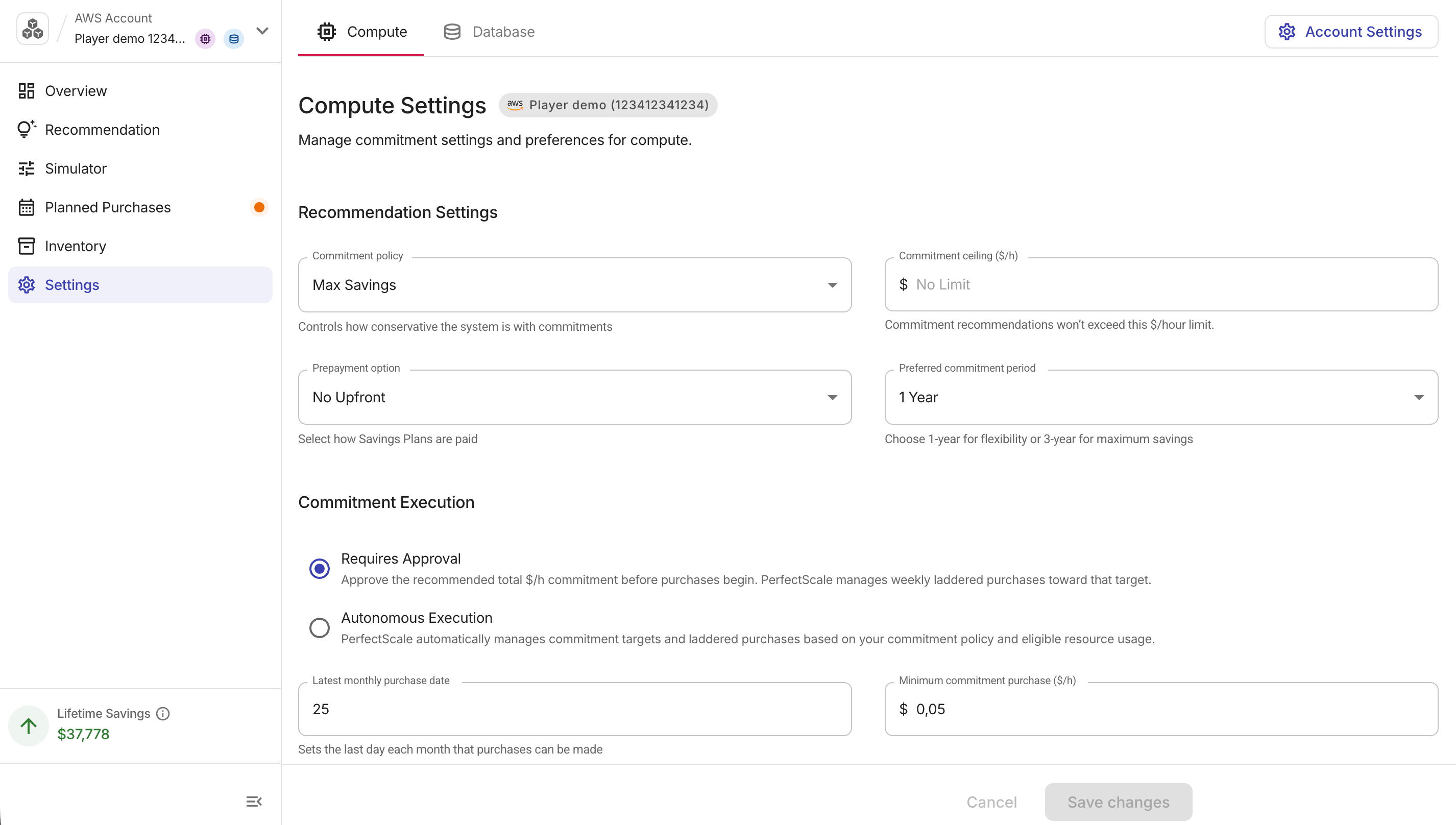
オンボーディング済みアカウントの Settings ページでは、推奨事項とオートメーションの設定を構成できます。
必要な権限
- 設定を表示する権限:PerfectScale Commitments Read Only または PerfectScale Commitments Admin 権限
- 設定を変更する権限:PerfectScale Commitments Admin 権限
コミットメントの設定
複数のコミットメントタイプが有効になっている場合は、設定したいコミットメントタイプのサブタブを選択してください。
Google Cloud で Cloud SQL が有効になっている場合、Settings タブに Cloud SQL 用の Region セレクターが表示されます。リージョンを選択すると、そのリージョンに保存されている設定が読み込まれます。ここで行い保存した変更は、選択したリージョンにのみ適用されます。
推奨設定
これらのフィールドは、推奨事項の目標と制約を定義します。
-
Commitment policy:PerfectScale が推奨コミットメントにどの程度積極的に到達するかを指定します。3 つのリスクプロファイルについては、Preview and apply commitment policy を参照してください。
-
Commitment ceiling ($/h):PerfectScale は、この金額を超えるコミットメントは推奨しません。No Limit にするにはフィールドを空のままにしてください。設定すると、この値は Laddering Policy Summary の Commitment ceiling として表示され、Planned Purchases チャート上では破線の基準線として表示されます。
-
Prepayment option (AWS のみ):購入する Savings Plans の支払い構成です。No Upfront、Partial Upfront、All Upfront から選択します。詳細は Requires Approval を参照してください。Database タブでは No Upfront のみ利用可能です。Google Cloud CUD は月次請求で前払いオプションがないため、Google Cloud ではこのフィールドは表示されません。
-
Upfront percentage (%) (AWS Compute のみ):Partial Upfront を選択した場合に、総コストのうち前払いする割合(50〜99%)です。前払い割合を高くすると時間単価が下がります。
-
Preferred commitment period:1 Year または 3 Years。PerfectScale は購入推奨を生成する際に、この期間をデフォルトのコミットメント期間として使用します。AWS の Database タブでは 1 Year のみ利用可能です。
コミットメント実行
オートメーションモードには 2 種類あります。
-
Requires Approval(デフォルト):PerfectScale for Commitments はコミットメント購入を自動的に準備し、実行前にお客様の承認を待機します。
-
Autonomous Execution:PerfectScale はコミットメントポリシーと対象となる利用状況に基づき、承認を必要とせずにコミットメント目標の設定とコミットメント購入を自動で行います。設定したガードレール(commitment ceiling・最小コミットメント購入額・毎月の最終購入日)は引き続き適用されます。
Autonomous Execution を選択した場合:
-
コミットメント目標は、コミットメントポリシーと対象となる利用状況に基づき自動で設定されます。
-
PerfectScale は、それぞれの目標に向けて、Savings Plans と CUD の拘束力のある購入を毎週のラダー形式で実施します。
-
ガードレール(commitment ceiling・最小購入額・毎月の最終購入日)は引き続き有効です。
続行する前に、確認用チェックボックスをオンにして同意する必要があります。変更を適用するには Enable Autonomous Execution を選択してください。現在のモードを維持するには Cancel を選択してください。
-
Requires Approval にはいつでも確認ステップなしで戻すことができますが、既に購入されたコミットメントを取り消すことはできません。
最小購入額と最終日
-
Latest monthly purchase date:翌月まで新規購入をスケジュールしない、月ごとの締め日です。Planned Purchases のラダーチャートに表示される No Purchase Window を制御します。
-
デフォルトでは、その月の 25 日が最終購入日です。
-
設定可能な最終日は 28 日で、月末前にバッファを設け、請求サイクルとの競合を避けます。
-
-
Minimum commitment purchase ($/h):購入ラダーにおける最小ステップサイズです。この閾値を下回る購入はスキップされます。
更新内容を適用するには Save changes を選択してください。これにより、選択したコミットメントタイプに対する推奨事項と購入ラダーがすべて再計算されます。