Access invoices
Required permission
- Invoice Viewer
Access invoices
To access your invoices in the DoiT console, select Billing > Invoices from the top navigation mega menu.
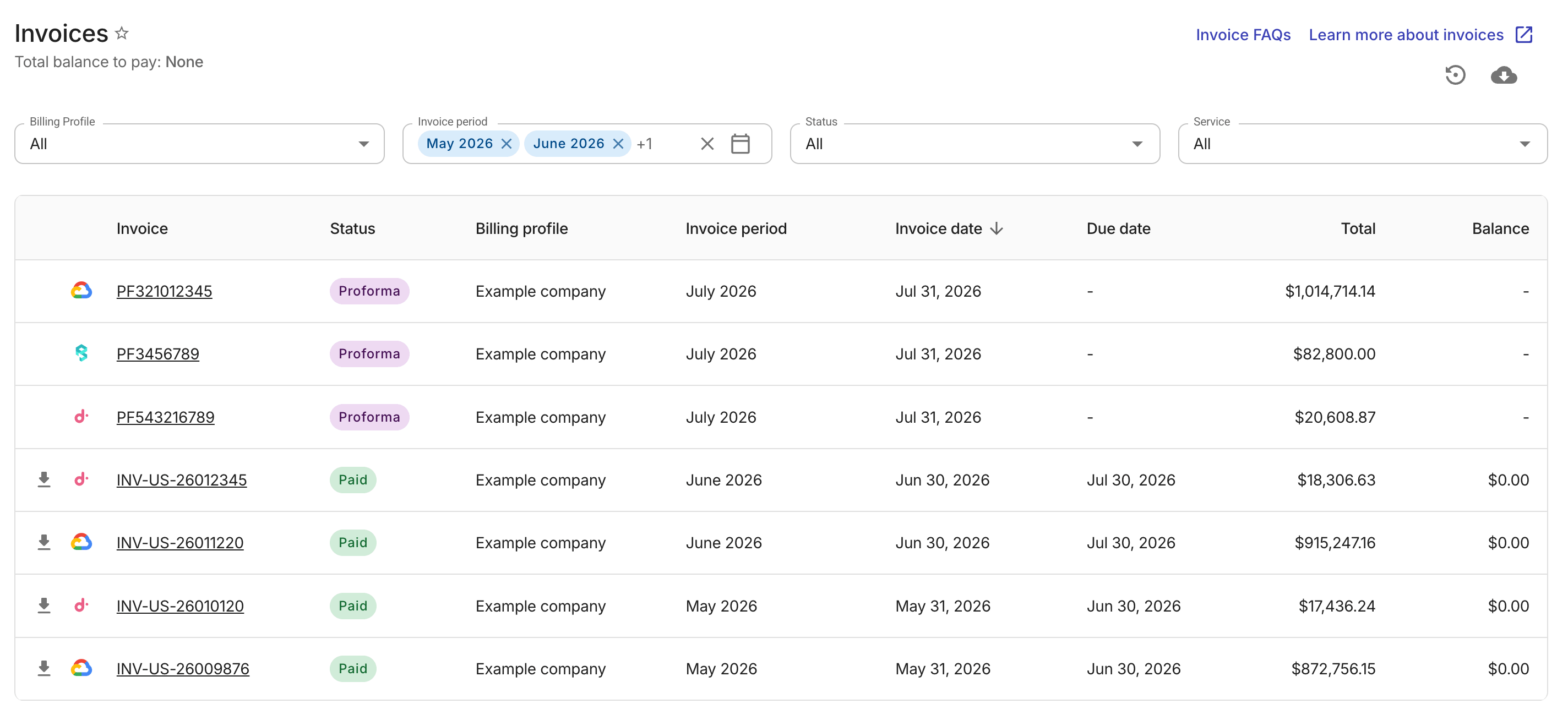
You can filter the invoices by billing profile, invoice period, invoice status, and service. To view the details of a specific invoice, select its invoice number to open the invoice details page.
By default, invoices of the last three months that are not proforma or cancelled are displayed.
Invoice status
Each invoice displays a color-coded status chip. An invoice can be in one of the following statuses:
-
Open
-
Paid
-
Partially Paid
-
Past Due
-
Processing
-
Proforma: Proforma invoices are provided for informational purposes only. You don't need to pay them.
-
Canceled
Proforma invoices
A proforma invoice is a preliminary bill based on the available data up to the current day of the month. It helps you verify your billing information and contact us for corrections before the final invoice is issued.
-
Proforma invoices are updated daily until the final invoices are issued. You cannot download proforma invoices.
-
You can identify proforma invoices in the invoice list by the
PFprefix in the invoice ID. -
When calculating billing charges for proforma invoices, we use the exchange rate of the day you check the invoice, which may differ in the final invoice.