PDF invoices
View your PDF invoice
At the beginning of each month, we send a PDF invoice for the previous month's costs to the accounts payable contact specified in your billing profile.
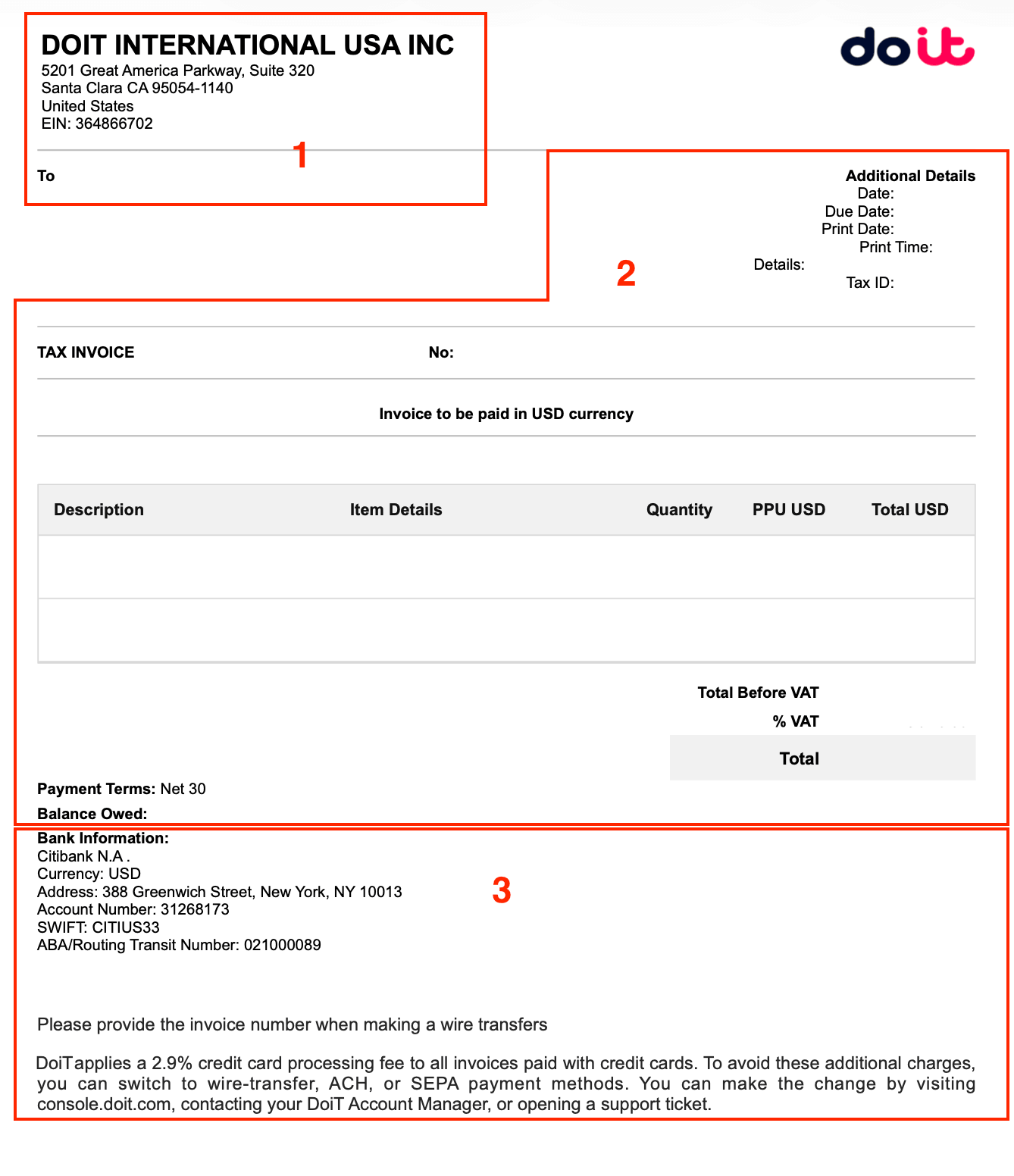
In general, a PDF invoice is organized into three main sections: legal information, usage costs, and payment instructions. Note that the specific content may vary based on the country of issuance and local jurisdictional requirements.
Section 1: Legal information
Legal information includes the registered company name, address, and tax IDs.
This section of a PDF invoice shows the legal information of the appropriate DoiT entity and your billing address and company details specified in your billing profile.
Section 2: Invoice summary, usage costs, and payment information
Invoice summary is shown in the upper-right corner of the invoice. It contains:
-
Invoice Date: The last day of the calendar month in the billing period.
-
Print Date, Print Time: The date and time the invoice is posted. See Invoice posting dates.
-
Document Number: Also called invoice number. You may need this number to make payments.
-
Details: A brief description of the purpose of the invoice. Example:
Covering MONTH YEAR.
Detailed usage costs for the month are displayed using a table. It contains:
-
Description: A short description of the purchased product/service.
-
Details: A more detailed description of the product/service.
-
Quantity: The quantity of billing units of the product/service.
-
Unit Price or PPU: Price per unit (PPU).
-
Total: The total cost of the billing units of the product/service.
-
Total Before: The total amount of the invoice before taxes (Amount W/O Tax).
-
Tax or VAT: The total tax or VAT for the charges.
-
TOTAL: The total amount of the invoice after taxes (Total W/Tax).
Payment information contains:
-
Payment Terms: The number of days before the payment is due.
-
Balance Owed: The running balance of your account.
Section 3: Payment instructions
This section contains DoiT banking information and payment instructions.
Example PDF invoice
Below is an example PDF invoice by DoiT International USA, Inc.
Download your PDF invoice
Users with the Invoice viewer permission can download PDF invoices from the console by:
-
Selecting the download icon next to an invoice entry on the main Invoices page, or
-
Selecting the attached PDF Documents on the Invoice Details page