フロー出力ノード
フロー出力ノードを使用すると、サブフロー内で名前付きの出力を定義し、親フローがそのデータを下流のノードで利用できるようにできます。フロー出力ノードがない場合、サブフローが親フローに返す出力データは executionId 以外にありませんが、フロー出力ノードを使うことで、特定のフィールド(例:リソース ID のリストやサマリー件数)を明示的に公開し、親フローからフィルター・変換・通知・その他のノードで参照できるようにします。たとえば、サブフローで EC2 インスタンス・Azure managed disks・Compute Engine インスタンスを列挙し、resourceIds 出力を公開し、親フローではそのリストを Notification ノードで使用してチームにサマリーを送信できます。
フロー出力ノードは、サブフローとして使用されるフロー内でのみ利用できます。フローが単体で実行される場合(例:独自のトリガーやマニュアル実行)には効果がありません。
サブフローで出力を定義する
-
CloudFlow エディタでサブフローを開きます。
-
サブフローに Flow output ノードを追加します。公開したいデータを生成するノードの後に配置してください。出力は、サブフロー内の任意の上流ノードのフィールドを参照できます。
-
Flow output ノードを編集し、1 つ以上の出力パラメータを追加します。各出力について、name(例:
instanceIdsやsummary)と公開する field(サブフロー内の上流ノードのフィールド)を設定します。 -
サブフローを保存し、公開して、親フローが新しい出力を利用できるようにします。
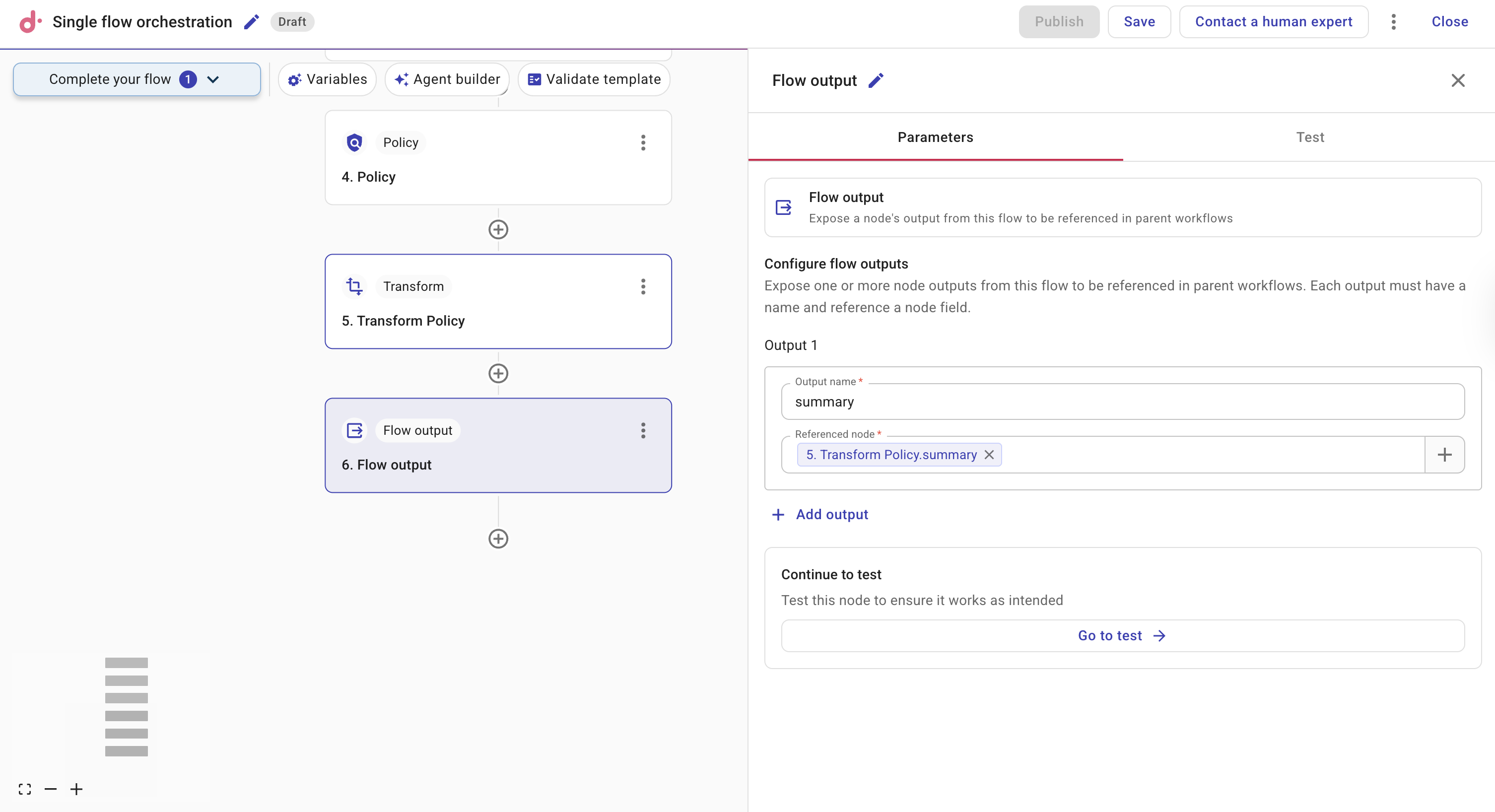
親フローで参照したときに意図が分かりやすくなるよう、明確で説明的な出力名を使用してください。複数のフィールドを公開するために、複数の Flow output ノードや複数の出力パラメータを追加できます。
親フローで出力を使用する
-
親フローで、このサブフローを呼び出す Sub Flow ノードを追加または選択します。必要に応じて Flow to call および実行パラメータを設定します。
-
下流ノード(例:Filter・Transform・Notification)で、プラスアイコン(+)またはフィールドピッカーからサブフローの出力を参照します。出力は Sub Flow ノードの出力配下(サブフロー名やステップ番号の配下)に表示されます。定義した名前付き出力(例:
instanceIdsやsummary)を選択し、そのデータを現在のノードに渡します。
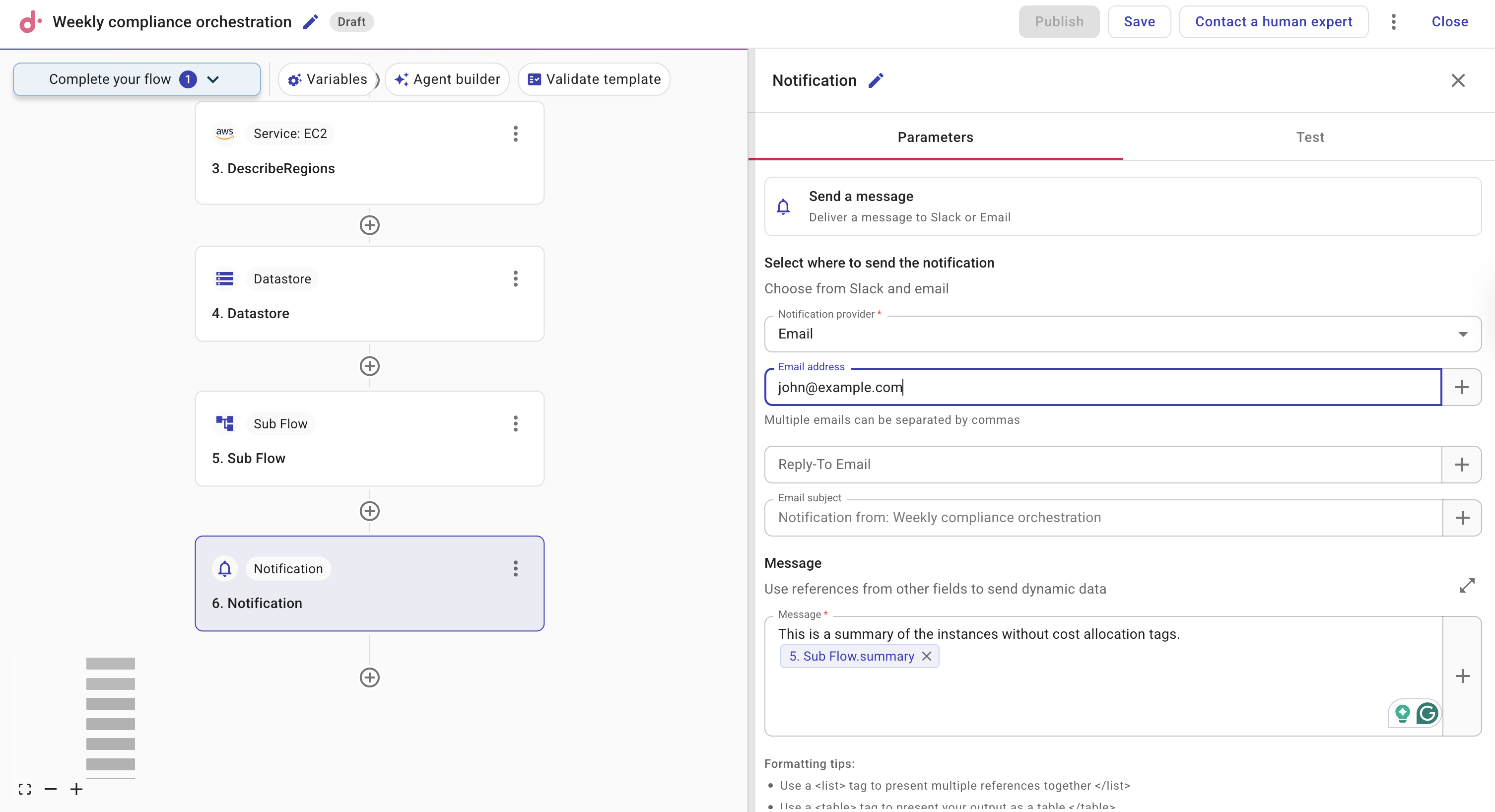
例:サブフローでインスタンス一覧を公開する
サブフローでは、AWS・Azure・GCP ノードを使用してリソースを一覧取得し、その後の Transform ノードでリソース ID を抽出できます。Flow output ノードで resources という名前の出力(リソース ID の一覧)を公開します。親フローは Sub Flow ノードでこのサブフローを呼び出し、その後の Notification ノードで Sub Flow ノードの resources 出力を参照して、Slack やメールに一覧を送信します。親フローはシンプルなまま、サブフロー側にデータ取得と整形のロジックをカプセル化できます。
テスト
ノードをテストするには Test を選択してください。