コストを分割する
FinOps のコストアロケーション機能は、クラウドコストを、そのコストの各コンポーネントに責任を持つ担当者に、直接または共有要素としてどのように配分すべきかを扱います。ほとんどの組織における共有コストは、サポート費用、ネットワークサービス、または共有環境(プラットフォーム・コンテナなど)から発生します。アロケーション戦略を定義する際には、コストのサブセットをアロケーションターゲット間で共有する必要性と、各共有コスト項目のコストを共有する仕組みを明示した共有コスト戦略を含めることが重要です。
コストを共有するプラクティスは、コストスプリット とも呼ばれます。レポートでは、次のコストを分割できます。
-
未アロケーションコスト:複数の組織単位で共有されるサービスまたはリソースによって発生し、単一の所有者に直接ひも付けできないコスト。
Cloud Analytics では、未アロケーションコストは、あらかじめ定義されたグループ内の特定メンバーにアトリビュートできないコストを指します。詳細は、グループアロケーションを参照してください。
-
同じディメンション内の他の値と比較した、特定の 1 つのディメンション値のコスト。このオプションはより柔軟で、グループアロケーションを作成することなく、その場でコストを分割できます。
注意アロケーションルールで直接コストを分割することはできません。ルールはグループアロケーションに追加する必要があります。
コストスプリットはレポートの設定の一部です。コストスプリットは、それを定義したレポートにのみ適用され、他のレポートで同じデータの表示方法が変更されることはありません。
配分方法
DoiT は、分割したコストをターゲットアイテムに配分する次の方法をサポートしています。
| Method | 説明 |
|---|---|
| Custom | 各ターゲットアイテムに配分するコストの割合を手動で定義するか、コストを均等に配分します。 |
| Proportional | レポート内の合計値に対する各ターゲットアイテムの割合に応じてコストを配分します。 |
| Driver metric | オペレーションメトリック(例:チームごとのデータベース IOPS)に比例してコストを配分し、レポートの各時間バケットごとに再計算します。 |
Driver metric 方法は早期アクセス機能です。詳細は、早期アクセス機能を参照してください。
必要な権限
-
Cloud Analytics User
-
選択するディメンションによっては、DoiT アカウントで他の権限が必要になる場合があります。
レポートでコストを分割する
全体的なワークフローは、すべての配分方法で共通です。
-
レポートの左側のサイドバーで Group by セクションに移動し、ディメンションの最も右端にあるケバブメニュー(⋮)を選択してから、Split cost を選択してください。
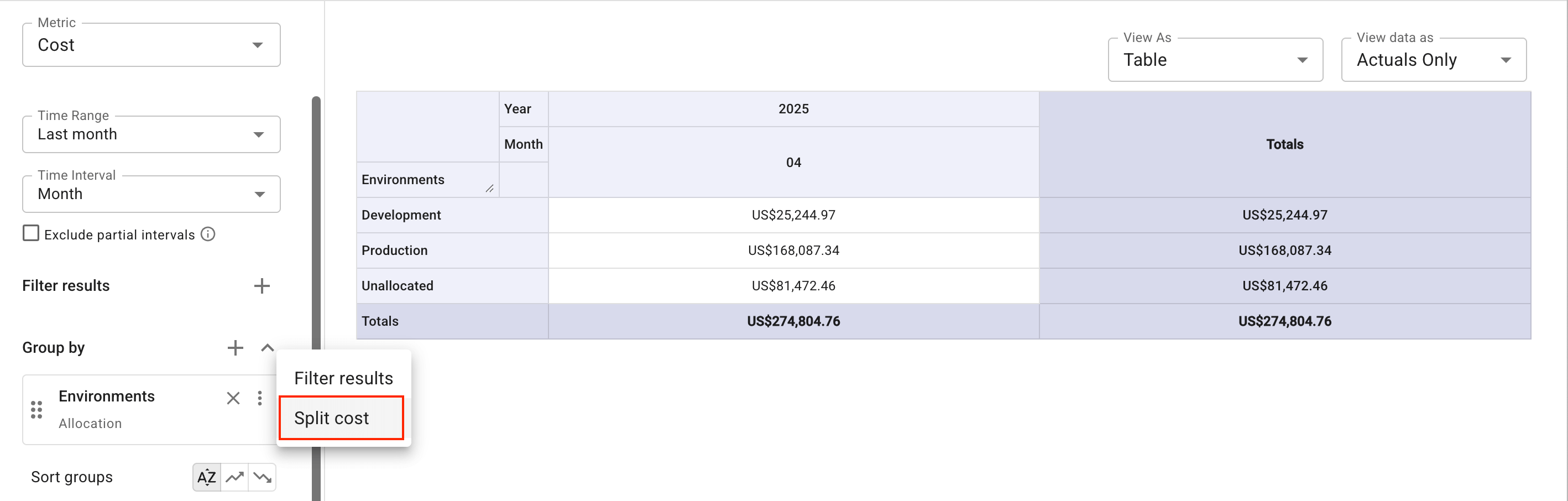
-
コストを分割したいソースアイテムを選択してください。
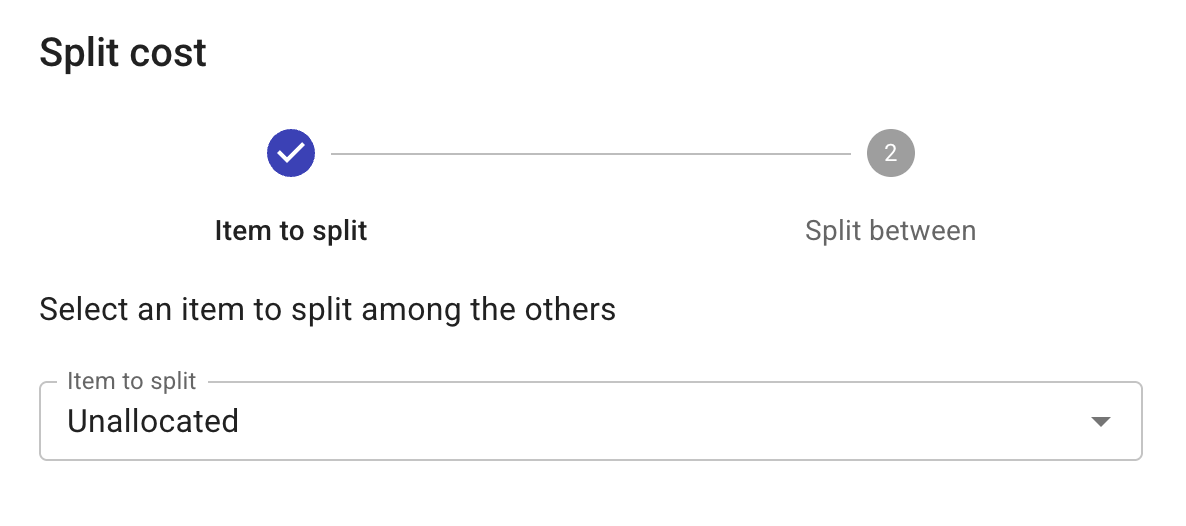
-
コストを配分する対象となるアイテムのチェックボックスを選択し、配分方法を指定してください。
-
Split cost を選択し、レポートを実行して結果を確認してください。
各配分方法の詳細な手順については、次のページを参照してください。
カスタム分割
手動で定義したパーセント配分でコストを分割します。
比例分割
合計コストに対する各ターゲットの割合に応じてコストを分割します。
ドライバーメトリックによる分割
データベースの IOPS をチームごとに割り当てるなど、オペレーションメトリクスに比例してコストを分割します。