Contracts
Contracts define the financial relationships and commercial terms between distributors, resellers, and end customers.
Effective scope
The effective scope of a contract depends on the tier where the contract is created.
-
Tier-1 contracts: Contracts created for a distributor are base contracts. Billing rules defined in a base contract apply to all downstream tenants, including resellers (Tier 2) and end customers (Tier 3).
-
Tier-2 contracts: Contracts created for specific resellers are Tier-2 contracts. A distributor creates a Tier-2 contract for an individual reseller to accommodate specific pricing and service agreements.
-
Tier-3 contracts: Contracts created for an end customer are Tier-3 contracts. A reseller creates Tier-3 contracts for its end customers. A distributor can also create Tier-3 contracts on behalf of its reseller.
Each tier's billing is calculated based on the contracts created for that tier. There is no fallback to upstream tiers if a downstream contract is missing.
Access contracts
To view contracts assigned to a customer:
-
In the DoiT console, select Customers from the top navigation mega menu.
-
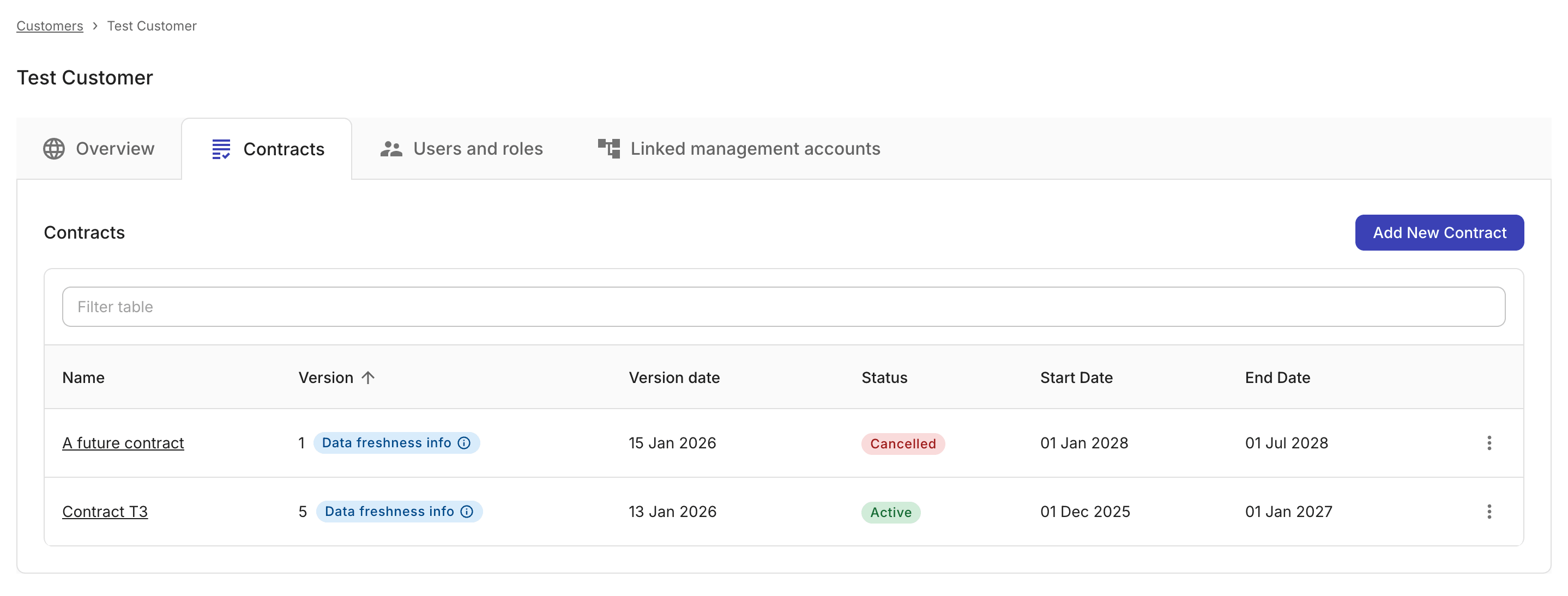
Locate the customer of interest, select Settings (the gear icon ) of the entry, and then select the Contracts tab.
Contract properties
The Contracts tab displays the following properties for each contract:
-
Name: The contract name. You can select the contract name open the contract details page.
-
Version: The current version number of the contract and the data freshness info if applicable. A new version is created each time the contract is updated.
- Data freshness info: Appliable only to end customer contracts. Indicates that a recent change to the contract is still being applied across invoices and reports.
-
Version date: When the current version was last saved. See also Compare contract versions.
-
Status: The status of the contract.
-
Start date, End date: The effective period of the contract.
Contract status
Contracts can have one of the following statuses:
-
active: The contract is ready and in effect. -
cancelled: The contract has been cancelled. -
draft: The contract is saved but not marked asreadyyet. This state is manually set. -
expired: The contract has passed its end date. -
scheduled: The contract is ready but not yet in effect (future start date). -
superseded: The contract has been manually marked assuperseded.
See also Change contract status.