PerfectScale for Commitments
DoiT's PerfectScale for Commitments helps FinOps and engineering teams reduce Amazon Web Services (AWS) and Google Cloud (GCP) spend by translating real usage into commitment plans and keeping coverage up to date as environments change. It also allows automating purchases with approval workflows or autonomous execution.
How it works
PerfectScale for Commitments combines planning and operations in one workflow:
-
Plan with Commitment Simulator: Model commitment levels, compare terms, and find a safe target before you commit. Available to all DoiT Cloud Intelligence users at no extra cost.
-
Onboard payer and billing accounts: Connect payer and billing accounts, enable commitment types, and optionally configure auto-purchase.
-
Monitor in Accounts overview: Track Effective Savings Rate (ESR), potential savings, coverage, hourly commitment, and account status across payer and billing accounts.
-
Optimize with Recommendation: Apply commitment policy, review laddered purchase plans, and optionally automate purchases.
Before you connect accounts, the PerfectScale for Commitments landing page displays a preview of your potential savings, including a cost-comparison chart and estimated savings broken down by cloud provider, to help you evaluate the savings opportunity.
Core features
PerfectScale for Commitments provides a complete suite of tools to manage the entire commitment lifecycle:
-
Unified visibility: View all your existing commitments and their associated savings across all accounts in one place.
-
Intelligent recommendations: Generate optimal purchase recommendations for supported commitment types, based on your risk tolerance, existing commitments, term preferences, and payment options.
-
Laddered purchases (opt-in): Automatically purchase incremental commitments using laddering, buying smaller amounts over time to reduce the risk of over-commitment and adjusting the commitment to actual usage. Purchases are typically scheduled within the first 20 days of the month, giving you a window to review and cancel before execution.
-
Expired commitment handling: Track upcoming and expired commitments, factor expirations into recommendations, and renew coverage through laddering as plans expire.
-
Purchase and approval notifications (optional): Get notified when purchases need approval and each time PerfectScale completes a commitment purchase.
-
Simulation and forecasting: Simulate the impact of new Savings Plans against your historical usage to predict savings. See Evaluate commitment levels.
-
Validation: Verify recommendations against your cloud provider's native recommendations (where available) and manual checks before purchasing.
-
Continuous optimization: The system continuously reassesses your environment, ensuring your coverage adapts as your infrastructure evolves.
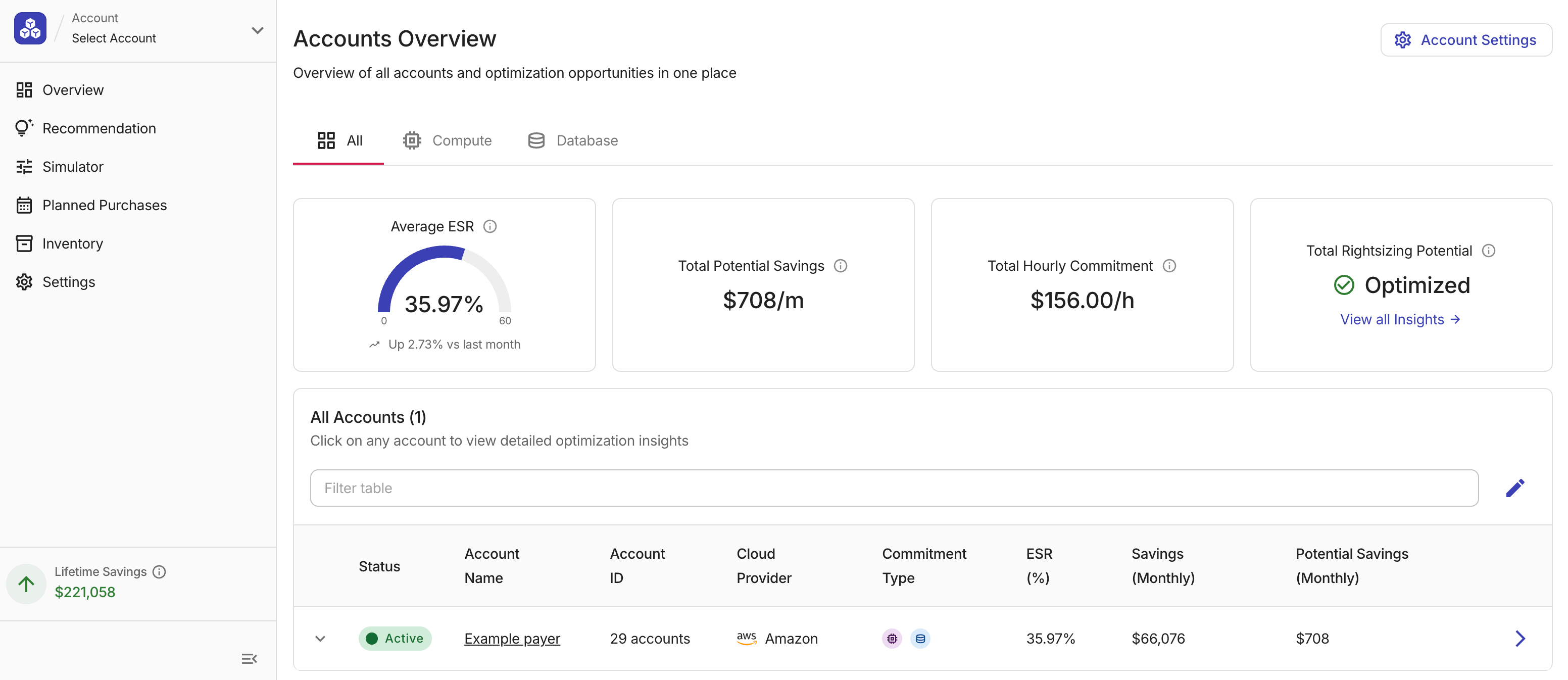
Effective Savings Rate
Effective Savings Rate (ESR) measures what fraction of your eligible spend is saved through active commitments.
-
A higher ESR means your discounted commitment coverage is well utilized.
-
A declining ESR often signals coverage gaps, underutilized commitments, or a rise in uncovered on-demand spend.
Lifetime Savings
PerfectScale for Commitments presents an organization-wide Lifetime Savings in the console, showing the total savings accumulated across all accounts since the earliest date your organization onboarded for PerfectScale for Commitments.
Commitment types
PerfectScale for Commitments supports the following commitment types.
AWS
-
Visibility: Customer-purchased Savings Plans (SP) and Reserved Instances (RI).
-
Metrics, recommendations, laddering, and auto-purchase: Customer-purchased Compute and Database SPs only. EC2 Instance SPs, SageMaker SPs, and RIs are excluded from these calculations.
-
Commitment Simulator: SP types Compute, Database, and Machine Learning (SageMaker) (one billing month, full cost curves).
If your account uses Flexsave for Compute, select Include Flexsave to show Flexsave SPs in inventory. Flexsave commitments are never included in metrics, recommendations, laddering, or auto-purchase.
Google Cloud
-
Visibility: Resource-based and spend-based Compute Engine CUDs, and spend-based CUDs for Cloud SQL.
-
Metrics, recommendations, laddering, and auto-purchase: When calculating recommendations, PerfectScale analyzes all commitments in the Google Cloud billing account and takes existing CUDs into account. For remaining eligible, uncovered usage, it recommends and can purchase the appropriate spend-based CUD type.
-
Commitment Simulator: Spend-based CUDs across multiple Google Cloud products: Compute, Cloud SQL, BigQuery Editions, AlloyDB, Spanner, Firestore, Dataflow, Memorystore, Bigtable, and Managed Service for Apache Kafka.
Start with a goal
-
Evaluating commitment levels? Start with Evaluate commitment levels. No PS4C contract required.
-
Ready to automate? If your subscription includes PerfectScale for Commitments, follow Set up PerfectScale for Commitments, then review Recommendation.
-
Mixed organization? Some payer and billing accounts may be Active (onboarded) and others Inactive (Commitment Simulator only). See All accounts in Accounts Overview.
Commitment ownership, term, and service period
PerfectScale for Commitments purchases commitments in your cloud environment.
-
On AWS, each onboarded payer account has a Commitments purchasing account where Savings Plans for that payer are bought.
-
On Google Cloud, CUDs are purchased on the Cloud Billing account itself. The commitments are owned by your organization, billed to your payer or billing account; they are not DoiT-owned.
PerfectScale for Commitments purchases commitments with a 1-year or 3-year commitment term, based on your settings.
-
Each commitment remains active in the cloud provider account for its full commitment term.
-
Plans purchased late in your DoiT service period, for example, a 3-year plan near the end of your agreement, can stay active and billable in your account after your PerfectScale for Commitments service ends.
When your PerfectScale for Commitments contract is within 30 days of its end date, or after it has expired, a non-dismissible banner appears across PerfectScale for Commitments pages. Automation and recommendations pause, and PerfectScale for Commitments pages are locked. Select Renew Now on the banner to start a renewal.