Invoices
DoiT PartnerOps allows resellers to generate invoices for end customers in PDF and CSV formats. Resellers can find all the end customer invoices on the Invoices page under Billing.
Required permission
-
Admin role: Full access. This role allows you to view, edit, and issue invoices.
-
Sales role: View-only access. This role allows you to view invoices but not modify or issue invoices.
Access end customer invoices
To view all the end customer invoices:
-
Sign in to the DoiT console, select Billing > Invoicing from the top navigation mega menu.
-
Select Invoices.
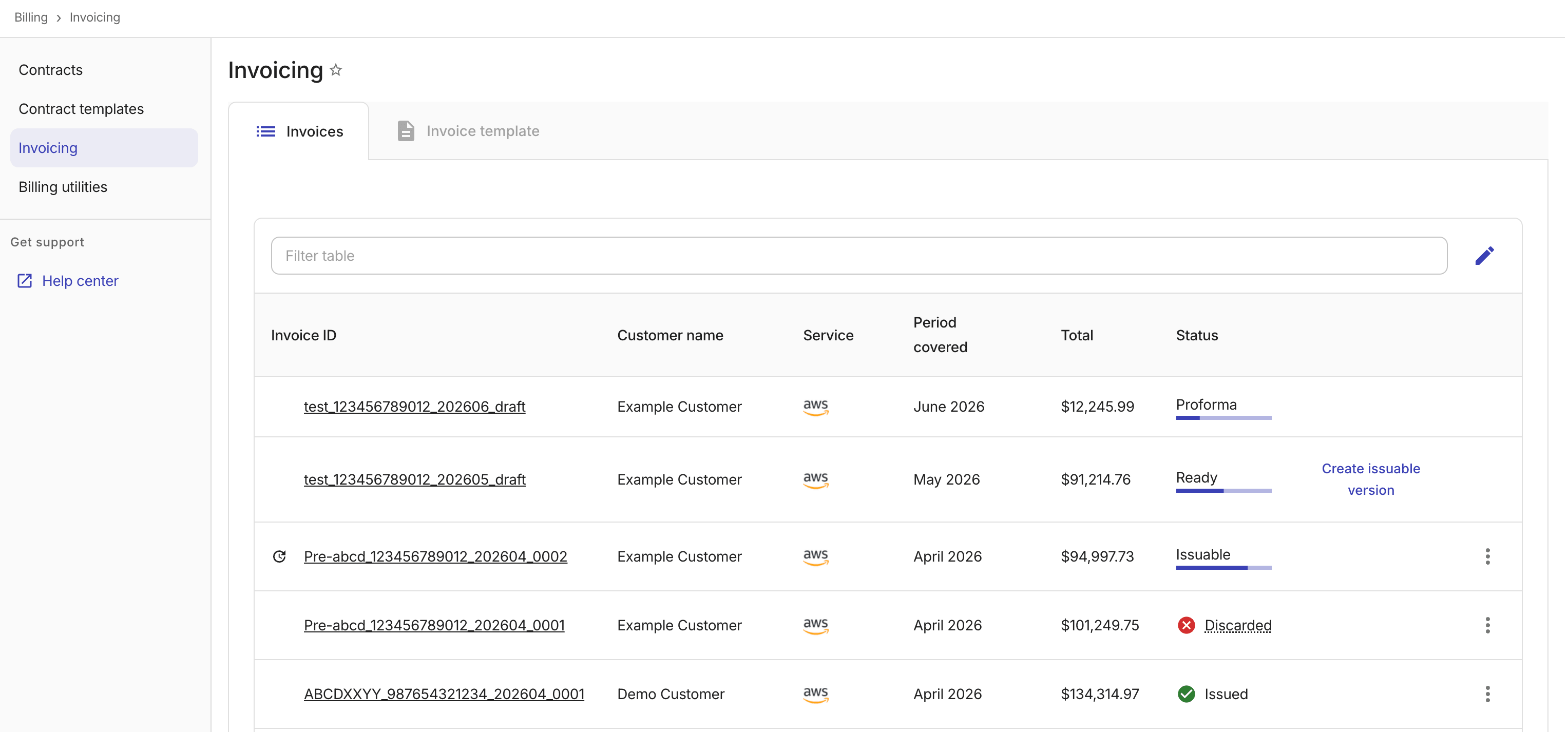
Invoice statuses
An invoice can be in one of the following statuses:
-
Ready: The invoice is ready. You can generate an issuable version based on such an invoice.
-
Issuable: The invoice is ready to be issued to the customer.
-
Issued: The invoice has been issued.
-
Cancelled: The issued invoice has been cancelled.
-
Discarded: The issuable invoice has been discarded.
-
Proforma: Proforma invoices are provided for informational purposes only. A proforma invoice is a preliminary bill based on the available data up to the current day of the month. It helps you verify billing information and make corrections.
Options
-
For each invoice, you can view details, download, issue, and manage invoices using the available actions. See Manage invoices and Issue invoices.
-
To manually trigger data recalculation or invoice refresh, see Billing utilities.