RPMA mapping
The RPMA mapping page lets distributors attach each Reseller PMA (RPMA) to an existing Cloud Intelligence reseller tenant. Use this page to manage RPMA-to-reseller mappings across all of your onboarded Distributor PMAs (DPMAs).
You can add or edit reseller mappings at any time. Mappings do not trigger AWS handshakes; they only link RPMAs to DoiT reseller tenants.
Required permission
- Distributor: Your DoiT account must have the Admin role.
Access RPMA mapping
After connecting your DPMAs, map each RPMA to the correct DoiT reseller tenant.
To access the RPMA mapping page, sign in to the DoiT console and select Billing transfer > RPMA mapping.
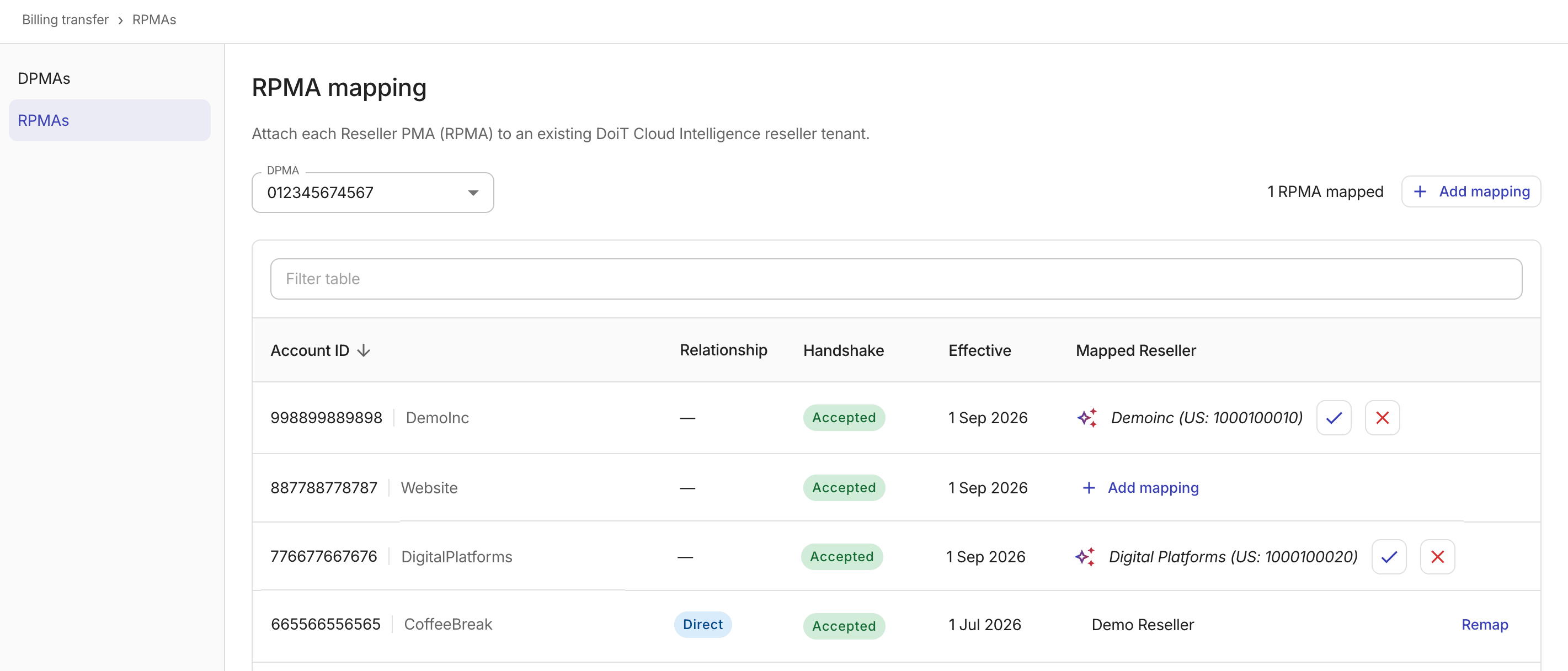
If you have onboarded more than one DPMA, use the DPMA dropdown at the top of the page to select which DPMA's reseller mappings to view.
The console displays all direct (RPMA-level) and indirect (EC-level) bill-source accounts visible under the selected DPMA, including accepted transfers that have not yet been mapped:
-
Account ID: The 12-digit AWS account ID and account name of the RPMA.
-
Relationship: The relationship type. For mapped accounts, this displays the relationship type, for example,
Direct. -
Handshake: The current handshake status. Possible values:
Accepted: The handshake has been accepted.Pending: The handshake has been requested and is awaiting a response.Declined: The handshake was declined.Expired: The handshake expired.Canceled: The handshake was canceled.
-
Effective: The date the handshake took effect, if applicable.
-
Mapped Reseller:
-
For a mapped account, this field displays the name of the DoiT reseller tenant linked to the RPMA.
-
For an unmapped account, this field displays the + Add mapping option. If the account name matches an existing reseller tenant, a suggested mapping appears; select the confirm icon (✓) to accept the mapping or the dismiss icon (✗) to decline it.
-
Use the filter bar above the table to search by account ID, handshake status, or mapped reseller name.
Add a mapping
To map an RPMA to a reseller tenant:
-
Select Add mapping in the table toolbar, or select + Add mapping on an unmapped table row to pre-fill the RPMA account ID.
-
Configure the mapping.
-
RPMA account ID: Select the RPMA from the dropdown. Each option displays the 12-digit AWS account ID and the account name. Only unmapped accounts with an accepted handshake can be selected.
-
Reseller tenant: Select the reseller tenant to map.

-
-
Select Add mapping to save. The console validates that:
-
The RPMA appears as a
directbill-source under the named DPMA. -
The selected tenant exists and is of type
reseller.
-
Remap a reseller
To change which reseller tenant an RPMA is mapped to:
-
Locate the mapping of interest in the mapped resellers table and select Remap at the rightmost end of the entry.
-
In the Remap reseller dialog, search for and select the new reseller tenant.
-
Select Remap.
The RPMA account ID cannot be updated during a remap. To map a different RPMA, use Add mapping instead.
What's next
Once your mappings are in place, the DoiT pipeline automatically ingests the mapping data for downstream billing processing.
For questions or issues with your mappings, contact DoiT Support.