Manage clusters
After you enable Kubernetes core on your connected cloud accounts in the console, DoiT performs a daily scan to uncover Kubernetes clusters in your cloud environment.
Clusters in the console
To access the list of Kubernetes clusters identified via the daily scan in the DoiT console, use either of the following ways:
-
Select Data ingestion and integrations > Integrations from the top navigation mega menu, then select Details on the Kubernetes integration card.
-
Navigate to the Kubernetes Intelligence dashboard, then select the Manage clusters button.
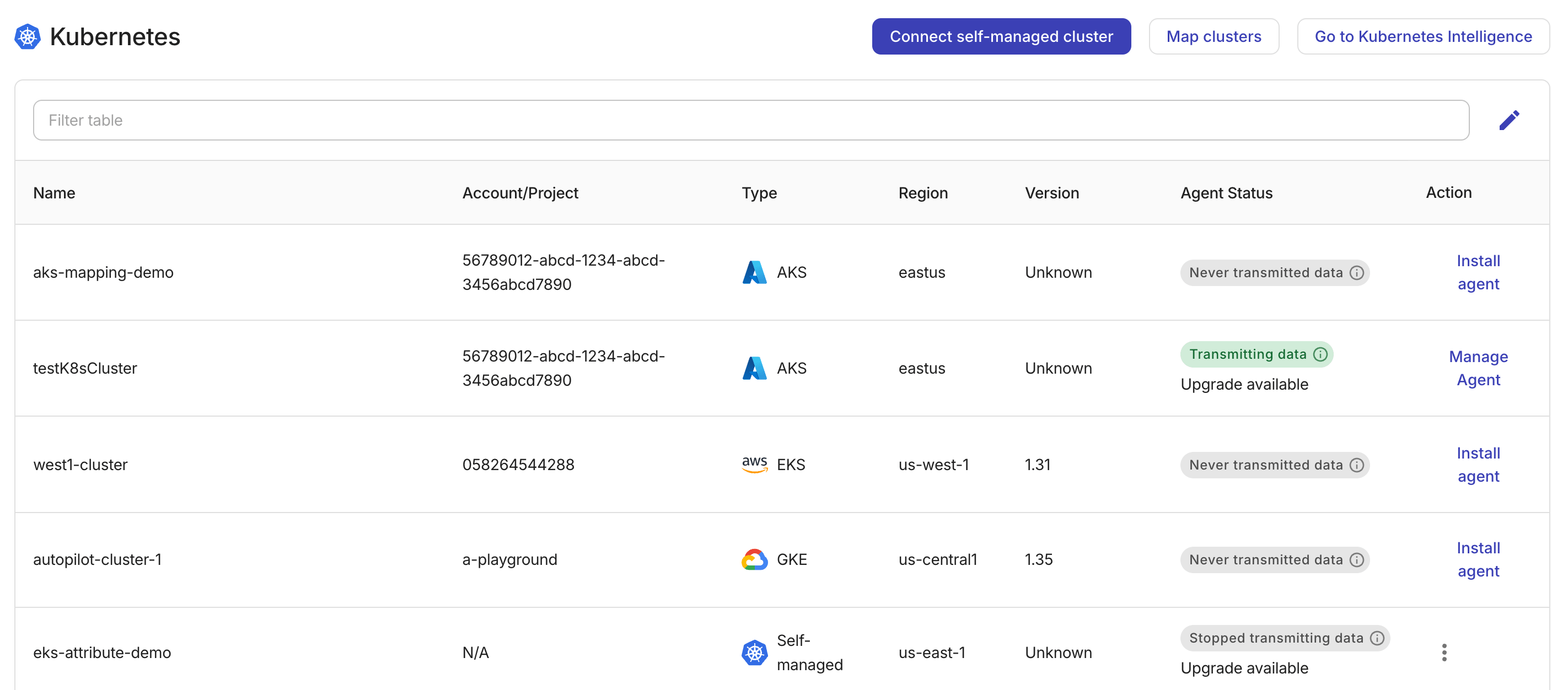
-
Name: The cluster name as defined in your cloud environment or set when adding a self-managed cluster.
-
Account/Project: For EKS, this is the 12-digit AWS account. For GKE, it's the Google Cloud project ID. For AKS, it's the Azure subscription ID (the GUID of the subscription that owns the cluster). This field is not available for self-managed clusters.
-
Type: The type of the cluster. Possible values: EKS, GKE, AKS, and Self-managed.
-
Region: The region that the cluster was created in.
-
Version: The Kubernetes version of the cluster. This field is not available for self-managed clusters.
-
Agent status: The status of the Kubernetes Intelligence agent.
-
Action: Available options.
-
Install agent: Available if the cluster has no agent installed yet.
-
Manage agent: Available if the cluster has an agent installed. This option provides instructions to Upgrade agent and to Delete agent.
-
Agent status
The agent status indicates two aspects:
-
Status of data transmission: Whether the agent is transmitting utilization metrics to the console.
-
Status of the agent: Whether the agent is running on the latest version.
-
Upgrade available: A new version is ready for installation. The agent continues data processing with the current version. -
Upgrade required: The current version of the agent is outdated. The agent has stopped working.
-
Upgrade agent
If the Agent status displays Upgrade available or Upgrade required, selecting Manage agent will show the upgrade instructions.

The --reset-then-reuse-values flag is available in Helm 3.14 or newer versions. It allows you to retain the values from the last deployment and override only the parameters explicitly set. See helm upgrade for details. If you are using an older Helm version, turn the Helm 3.14+ toggle off to regenerate the command.
Delete agent
This tab displays the kubectl command that you can run to remove the PerfectScale namespace and offboard the cluster.
