Anthropic Integration
Introduction
The Attribute platform can be integrated with different third-party cloud services in order to assure a consolidated cost view and complete cost attribution.
This document describes the required steps to complete the integration with Anthropic billing.
Requirements
Attribute supports integration with both types of Anthropic organization:
- Claude Platform Organization — API-based usage, with models accessed via the Anthropic API.
- Claude Enterprise Organization — seat-based claude.ai products (such as Claude Code, Cowork, etc.).
In order to obtain secure access to Anthropic billing information, the proper integration keys should be provided according to your Anthropic organization type.
Integration Steps for Claude Platform Organization
For Claude Platform organizations, an Admin API key is required to grant read access to your organization's usage and cost reporting endpoints.
The key will start with sk-ant-admin....
This key cannot be used to make model API calls or modify your organization settings.
Please follow the steps below to generate this key and securely provide it to Attribute.
Generating a New Admin API Key
-
Sign in to your Anthropic Console.
You will need Admin or Owner permissions in your organization.
-
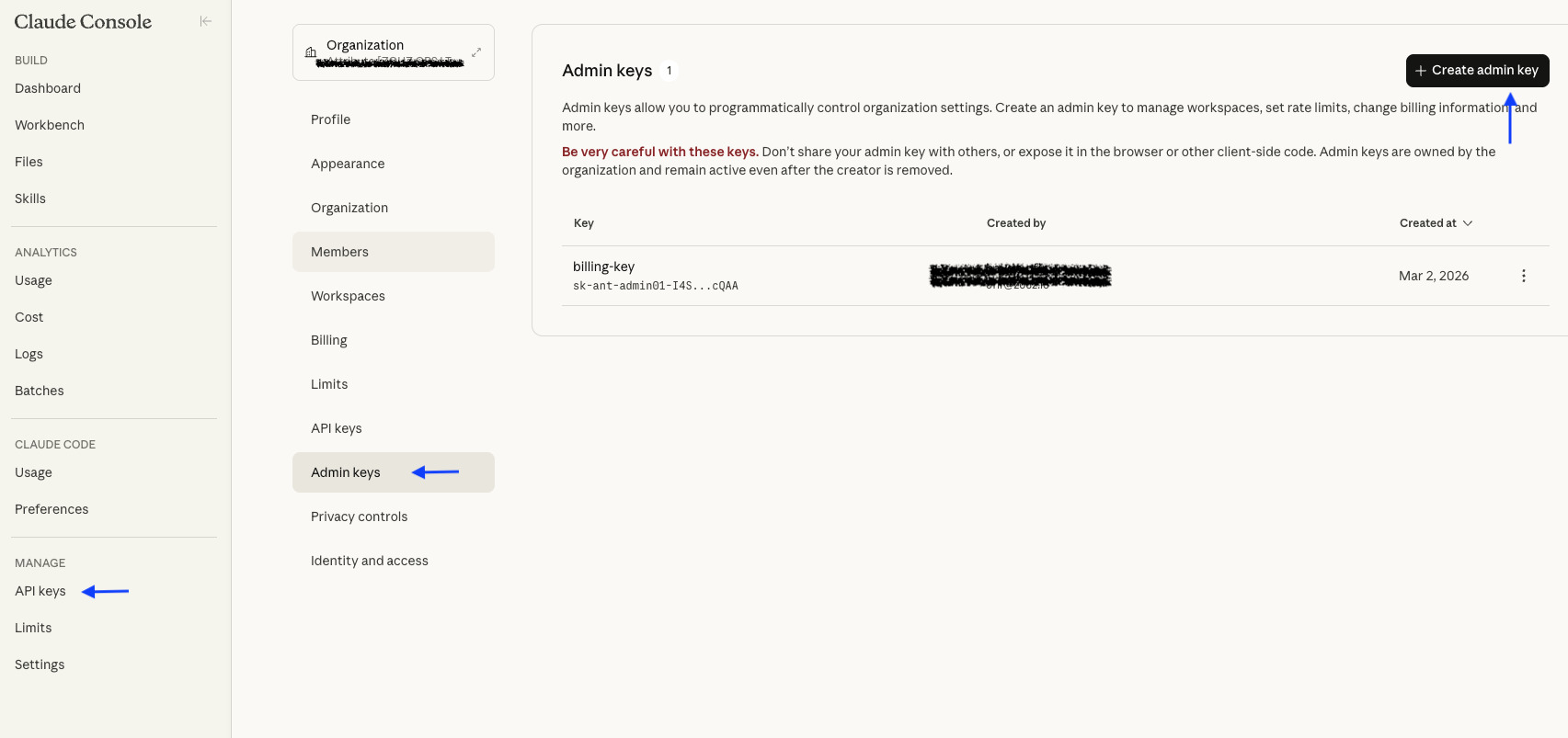
Navigate to API keys. In the left sidebar, click on Admin keys.
-
Create a new admin key:
- Name your key.
- Make sure you keep the key information, as you will not be able to access it again.
-
Verify the key has the correct permissions using the following command. The expected result is a JSON response with a
dataarray:curl -sG "https://api.anthropic.com/v1/organizations/cost_report" \--data-urlencode "starting_at=2026-03-10T00:00:00Z" \--data-urlencode "ending_at=2026-04-01T00:00:00Z" \--data-urlencode "bucket_width=1d" \-H "x-api-key: sk-ant-admin..." \-H "anthropic-version: 2023-06-01" \-H "anthropic-beta: fast-mode-2026-02-01" -
Securely share the admin key with Attribute.
If you prefer not to share your Admin API key with Attribute directly, you can create an internal proxy that makes the request to the billing API on your behalf. The Admin API key never leaves your environment in that case.
Integration Steps for Claude Enterprise Organization
For Claude Enterprise organizations, an Enterprise Analytics API key is required to grant read access to your organization's usage and cost reporting endpoints.
The key will start with sk-ant-api....
This key cannot be used to make model API calls or modify your organization settings.
Please follow the steps below to generate this key and securely provide it to Attribute.
Generating a New Enterprise Analytics API Key
-
Sign in to claude.ai with a Primary Owner account of your Enterprise organization.
-
Navigate to the Analytics API keys page.
-
Create a new analytics API key:
- Name your key.
- The key is created with the
read:analyticsscope. - Make sure you keep the key information, as you will not be able to access it again.
-
Verify the key has the correct permissions using the following command. The expected result is a JSON response with a
dataarray:curl -sG "https://api.anthropic.com/v1/organizations/cost_report" \--data-urlencode "starting_at=2026-03-10T00:00:00Z" \--data-urlencode "ending_at=2026-04-01T00:00:00Z" \--data-urlencode "bucket_width=1d" \-H "x-api-key: <Analytics API Key>" \-H "anthropic-version: 2023-06-01" \-H "anthropic-beta: fast-mode-2026-02-01" -
Securely share the Analytics API key with Attribute.
Contact
If you require any additional assistance, please contact Attribute's support at [email protected].
Alternatively, you can request to join a shared Slack channel for support. To request access, email [email protected] with your details.
Trademarks: Anthropic and Claude are trademarks of Anthropic, PBC. All other trademarks are the property of their respective owners.