Anthropic 連携
はじめに
Attribute プラットフォームは、さまざまなサードパーティーのクラウドサービスと連携し、コストの統合ビューと完全なコストアトリビューションを実現できます。
本ドキュメントでは、Anthropic の請求情報との連携を完了するために必要な手順について説明します。
要件
Attribute は、以下 2 種類の Anthropic 組織との連携をサポートしています。
- Claude Platform Organization — Anthropic API を介してモデルにアクセスする、API ベースの利用形態
- Claude Enterprise Organization — Claude Code・Cowork などの seat ベースの claude.ai 製品
Anthropic の請求情報への安全なアクセスを得るために、利用している Anthropic 組織の種類に応じて、適切な連携キーを用意する必要があります。
Claude Platform Organization 連携手順
Claude Platform 組織の場合、組織の利用状況およびコストレポート用エンドポイントへの読み取りアクセスを付与するために、Admin API キーが必要です。
キーは sk-ant-admin... で始まります。
このキーを使用してモデルの API 呼び出しを行ったり、組織の設定を修正したりすることはできません。
以下の手順に従って、このキーを生成し、安全な方法で Attribute に提供してください。
新しい Admin API キーの生成
-
Anthropic Console にサインインします。
組織内で Admin または Owner 権限が必要です。
-
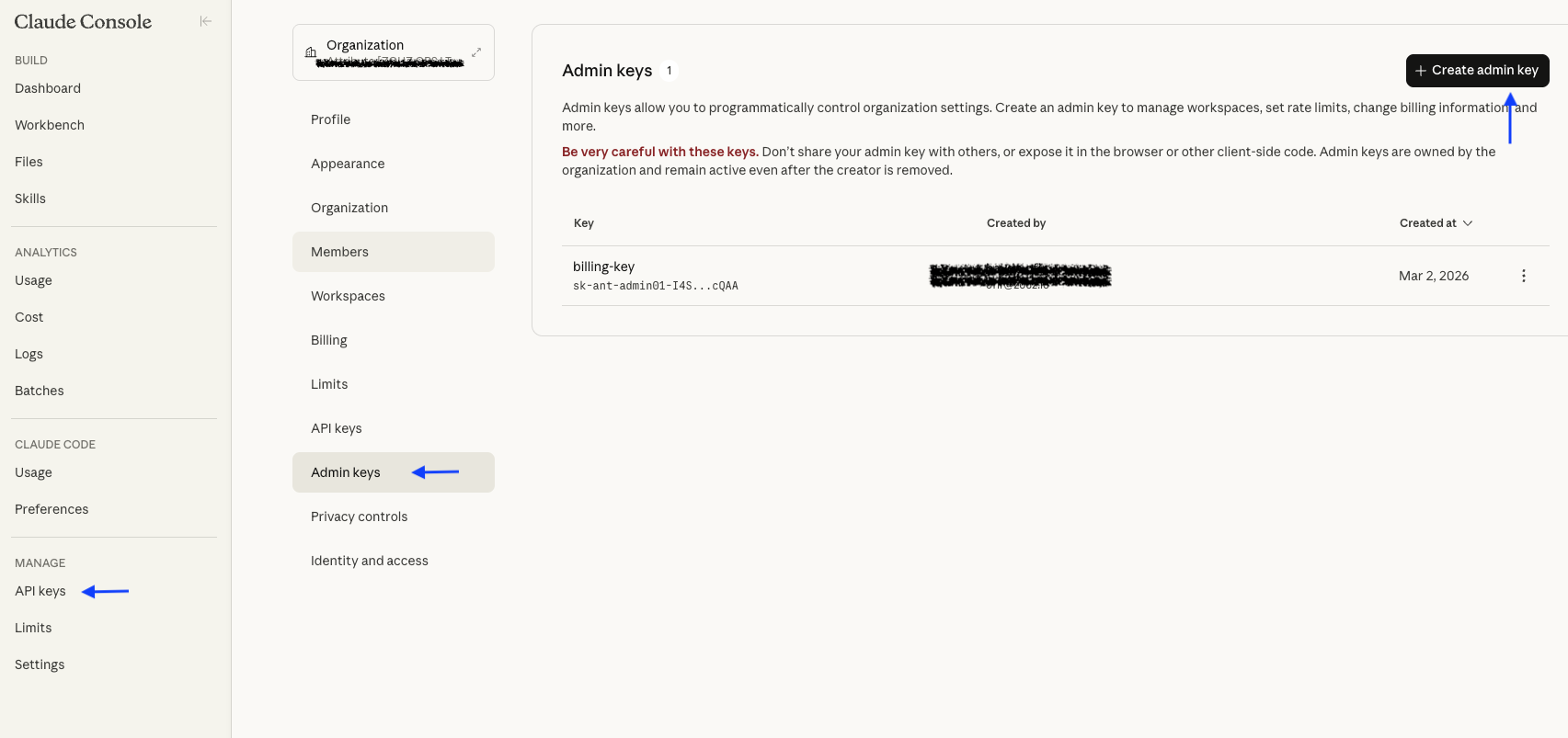
API keys に移動します。左側のサイドバーで Admin keys をクリックします。
-
新しい admin キーを作成します。
- キーに名前を付けます。
- キー情報は後から再表示できないため、必ず控えを保存してください。
-
次のコマンドを使用して、キーに正しい権限が付与されていることを確認します。期待される結果は、
data配列を含む JSON レスポンスです。curl -sG "https://api.anthropic.com/v1/organizations/cost_report" \--data-urlencode "starting_at=2026-03-10T00:00:00Z" \--data-urlencode "ending_at=2026-04-01T00:00:00Z" \--data-urlencode "bucket_width=1d" \-H "x-api-key: sk-ant-admin..." \-H "anthropic-version: 2023-06-01" \-H "anthropic-beta: fast-mode-2026-02-01" -
Admin キーを安全な方法で Attribute と共有します。
Admin API キーを Attribute と直接共有したくない場合は、社内向けプロキシを作成し、そのプロキシがあなたに代わって Billing API へのリクエストを実行するようにすることもできます。この場合、Admin API キーが自分の環境の外に出ることはありません。
Claude Enterprise Organization 連携手順
Claude Enterprise 組織の場合、組織の利用状況およびコストレポート用エンドポイントへの読み取りアクセスを付与するために、Enterprise Analytics API キーが必要です。
キーは sk-ant-api... で始まります。
このキーを使用してモデルの API 呼び出しを行ったり、組織の設定を修正したりすることはできません。
以下の手順に従って、このキーを生成し、安全な方法で Attribute に提供してください。
新しい Enterprise Analytics API キーの生成
-
エンタープライズ組織の Primary Owner アカウントで claude.ai にサインインします。
-
Analytics API keys ページ に移動します。
-
新しい analytics API キーを作成します。
- キーに名前を付けます。
- キーは
read:analyticsスコープで作成されます。 - キー情報は後から再表示できないため、必ず控えを保存してください。
-
次のコマンドを使用して、キーに正しい権限が付与されていることを確認します。期待される結果は、
data配列を含む JSON レスポンスです。curl -sG "https://api.anthropic.com/v1/organizations/cost_report" \--data-urlencode "starting_at=2026-03-10T00:00:00Z" \--data-urlencode "ending_at=2026-04-01T00:00:00Z" \--data-urlencode "bucket_width=1d" \-H "x-api-key: <Analytics API Key>" \-H "anthropic-version: 2023-06-01" \-H "anthropic-beta: fast-mode-2026-02-01" -
Analytics API キーを安全な方法で Attribute と共有します。
お問い合わせ
追加のサポートが必要な場合は、[email protected] まで Attribute のサポートにご連絡ください。
また、サポート用の共有 Slack チャンネルへの参加をリクエストすることもできます。アクセスをリクエストするには、[email protected] 宛てに、必要な情報を記載してメールを送信してください。
商標: Anthropic および Claude は Anthropic, PBC の商標です。その他すべての商標は、それぞれの所有者に帰属します。