Attribute Sensor for AWS ECS
The Attribute ECS sensor is an eBPF sensor that runs as one task per EC2 container instance in your cluster. It observes network and system-level events on the instance without changes to your application code and without kernel modules, so it sees the traffic of every task scheduled on that instance and attributes task-level cost to the resources those tasks use.
How the Deployment Works
Attribute delivers you a CloudFormation template named ecs-sensor-<your-account>.json. Your installation token and the sensor image version are already filled in as parameter defaults — do not enter or edit them.
Installing the sensor is a two-step process:
| Step | What You Do | Why It Is Separate |
|---|---|---|
| Deploy the CloudFormation stack | Create a stack from the template, in the region of the ECS cluster you want to cover. | The stack creates the IAM role and the sensor task definition. |
| Create the ECS service | Manually create a Daemon service in the cluster, using the task definition from the stack. | The template deliberately does not create a service, so you choose which clusters run the sensor. |
Both steps are repeated per region and per cluster: one stack for each region that holds clusters you want covered, and one service in each of those clusters.
Deploy the stack in the same region as the ECS cluster. The task definition and the IAM role it references are regional resources, and a cluster cannot use a task definition from another region.
Requirements
| Requirement | Details |
|---|---|
| Cluster capacity | An ECS cluster with EC2 container instances. Fargate is not covered by this guide — see Attribute Sensor for AWS Fargate. |
| Container instances | Linux, kernel 5.10 or newer. The sensor supports both x86_64 and arm64, but the task definition the template creates declares a single architecture — see the note below. |
| IAM permissions | Permission to create IAM roles with custom names (the stack needs CAPABILITY_NAMED_IAM) and to register ECS task definitions. |
| Outbound network | HTTPS (TCP 443) from the container instances to otel-endpoint.app.attrb.io. |
| Image pull | Container instances must be able to pull images from quay.io. |
| Task placement | The sensor task runs privileged with host PID mode and host path mounts. |
What the Template Creates
The stack creates two resources and nothing else. It does not modify your clusters, services, or existing task definitions.
-
An IAM role, named
AttributeECSZprobeDaemonSetRole-<region>, assumed byecs-tasks.amazonaws.comand used as both the task role and the execution role of the sensor task. It carries the AWS managed policiesAmazonECSTaskExecutionRolePolicy(to pull the image) andAmazonEC2ReadOnlyAccess(to identify the instance the sensor is running on). -
An ECS task definition, in the family you name, with a single container called
zsenserunningquay.io/attribute/sensor. It is an EC2-launch-type task definition with host PID mode, a 1024 MiB memory limit, a 512 MiB memory reservation, and no reserved CPU.
Because the role name is fixed per region, only one Attribute ECS stack can exist in a region at a time. A second stack in the same region fails with a role-name conflict. To cover more clusters in the same region, reuse the task definition the existing stack already created.
The task definition carries no log configuration, so sensor container logs go to the container instance's default Docker log driver rather than to CloudWatch. If you need them in CloudWatch, add an awslogs log configuration to a new revision of the task definition after the stack has been created.
Architecture
The sensor itself runs on both x86_64 and arm64, but an ECS task definition declares exactly one CpuArchitecture, and the template ships with X86_64. As created, the task definition therefore places only on x86_64 container instances, and any arm64 (Graviton) instances in the cluster are left uncovered.
If your cluster runs arm64 container instances, contact Attribute before you deploy — covering them needs a task definition that declares ARM64, and a cluster with both architectures needs one Daemon service per architecture.
Step 1: Deploy the CloudFormation Stack
-
In the AWS console, switch to the region of the ECS cluster you want to cover.
-
Go to CloudFormation > Stacks > Create stack > With new resources (standard).
-
Select Choose an existing template, then Upload a template file, and upload the
ecs-sensor-<your-account>.jsonfile. -
Add the stack details:
Field Value Stack name A name of your choosing, for example attribute-ecs-sensor.AttributeToken Pre-filled by Attribute. Leave it exactly as it is. TaskFamily The name for the sensor task definition family, for example attribute. Note the value down — you need it in step 2.SensorVersion Pre-filled with the current released sensor version. Leave it as it is unless Attribute has asked you to pin a specific version. -
On the review page, acknowledge that the stack creates IAM resources with custom names.
-
Submit the stack and wait for it to reach
CREATE_COMPLETE.
Step 2: Create the ECS Service
The stack has registered the task definition, but nothing is running yet. Create a service in the cluster to schedule the sensor onto every container instance.
-
Go to ECS > Clusters > your cluster > Services > Create.
-
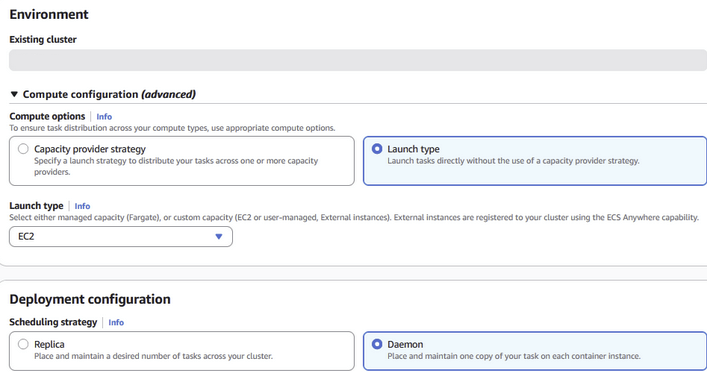
Under Compute configuration, choose Launch type and set the launch type to EC2. Do not use a capacity provider strategy.
-
Under Deployment configuration, set:
-
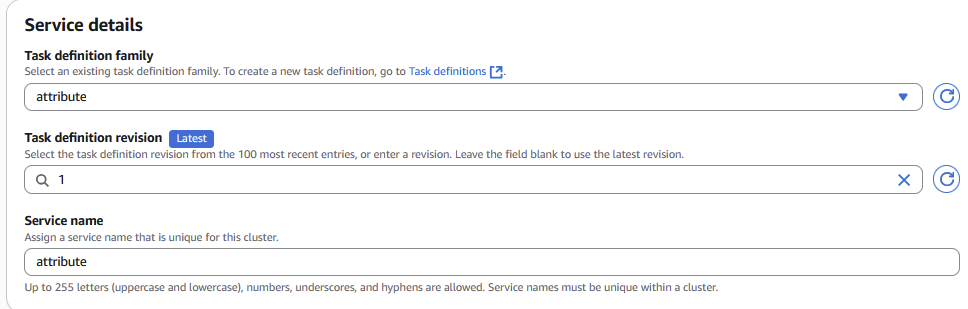
Task definition family: the
TaskFamilyvalue you entered in step 1. -
Task definition revision: the latest revision.
-
Service name: a name of your choosing, for example
attribute. -
Scheduling strategy: Daemon. This places and maintains exactly one sensor task on each container instance in the cluster, including instances added later.
 Note
NoteThe screenshots use
attributeas the task definition family and service name. Substitute theTaskFamilyvalue you chose. -
-
Under Deployment failure detection, clear Use the Amazon ECS deployment circuit breaker.
ImportantThe circuit breaker must be off. On a mixed cluster, container instances the sensor task cannot be placed on —
arm64instances, or an unsupported operating system — cause individual task failures. With the circuit breaker enabled, ECS reads those as a failed deployment and rolls the whole service back, so the sensor is removed from the instances where it was running correctly. With it off, the sensor runs wherever it can and the remaining instances are simply left uncovered. -
Leave the remaining settings at their defaults and create the service.
Verifying the Installation
-
In the cluster's Tasks tab, confirm there is one running sensor task per EC2 container instance, and that the tasks stay in
RUNNINGrather than cycling through stops and restarts. -
Confirm that the service's running count matches its desired count. For a Daemon service, ECS sets the desired count to the number of eligible container instances.
-
Task-level data appears in the Attribute dashboard shortly after the tasks reach
RUNNING. If nothing appears, verify outbound HTTPS access tootel-endpoint.app.attrb.iofrom the container instances.
Upgrading the Sensor
Attribute tells you when a new sensor version is available.
-
Go to CloudFormation > Stacks > your Attribute ECS stack > Update.
-
Choose Replace existing template and upload the newer template, or keep the current template and set SensorVersion to the version Attribute specified.
-
Apply the update. CloudFormation registers a new revision of the task definition.
-
Update the ECS service to the new task definition revision and deploy it. The Daemon service replaces the sensor task on each container instance in turn.
Uninstalling
-
Delete the ECS service in each cluster running the sensor. This stops and removes the sensor tasks.
-
Delete the CloudFormation stack in each region. This removes the IAM role and the sensor task definition.
Trademarks: AWS is a trademark of Amazon.com, Inc. or its affiliates. Docker is a trademark of Docker, Inc. All other trademarks are the property of their respective owners.