Attribute Azure Deployment
Install with Attribute Terraform
To ensure a smooth implementation, Attribute provides a Terraform module that automates setup for billing-information extraction and sensor registration. Detailed Terraform documentation and examples can be found in the README within the Terraform module.
Resources Created by This Module
When you run the module, the following resources are created:
- Resource group named
Attribute. - Storage account to hold the billing data.
- Managed Identity named
Attributeto allow us to fetch data. - Data Export resource to facilitate data retrieval.
Important Clarifications
- Supported Terraform version is 1.9 and above.
- The module can be installed at either the Azure tenant level or Azure subscription level and will create all the required infrastructure for the Attribute solution.
- To run the module, the user needs a specific set of permissions (see the full list of required permissions reproduced in step 2 of the installation instructions below).
- The module does not deploy the Attribute sensor on the compute infrastructure. That process is done with different tools per compute cluster (see Attribute's installation guide).
Appendix A: Detailed Installation Instructions
This appendix walks you through the entire setup process at the subscription level.
Step 1 — Billing Integration
-
Verify your Terraform version is 1.9 or above:
terraform version -
Make sure you have permission to run the module. The most up-to-date list can be found in the module README. Required permissions:
Microsoft.Resources/subscriptions/resourceGroups/readMicrosoft.Resources/subscriptions/resourceGroups/writeMicrosoft.Resources/subscriptions/readMicrosoft.Storage/storageAccounts/readMicrosoft.Storage/storageAccounts/writeMicrosoft.Storage/storageAccounts/listkeys/actionMicrosoft.Storage/storageAccounts/blobServices/containers/readMicrosoft.Storage/storageAccounts/blobServices/containers/writeMicrosoft.Storage/storageAccounts/blobServices/readMicrosoft.Storage/storageAccounts/fileServices/readMicrosoft.ManagedIdentity/userAssignedIdentities/readMicrosoft.ManagedIdentity/userAssignedIdentities/writeMicrosoft.ManagedIdentity/userAssignedIdentities/federatedIdentityCredentials/readMicrosoft.ManagedIdentity/userAssignedIdentities/federatedIdentityCredentials/writeMicrosoft.Authorization/roleAssignments/readMicrosoft.Authorization/roleAssignments/writeMicrosoft.CostManagement/exports/readMicrosoft.CostManagement/exports/write -
Update the
main.tffile.By default, the Billing Export is created at the subscription scope. If you'd like to create the export at the billing account scope instead, see Option 2 below.
Option 1 — Running on the subscription level:
- Update the Terraform profile you're using so it points to the correct Azure subscription.
- Update
subscription_idto point to your subscription. - Do not change the
organization_idandtokenvalues — leave them as is.
terraform {required_providers {azurerm = {source = "hashicorp/azurerm"version = "~> 4.0"}azapi = {source = "azure/azapi"version = ">= 2.0.0, < 3.0"}}}provider "azurerm" {features {}subscription_id = "subscription-id"}module "attribute-sensor" {source = "ZouzIO/attribute-sensor/azurerm"version = "~> 2.0"organization_id = "XXXXXXXXXXXXXXXXXXX"token = "XXXXXXXXXXXXXXXXX"}Option 2 — Create Billing Export at the billing account level:
Update the
attribute-sensormodule inmain.tfto include the billing account ID:module "attribute-sensor" {source = "ZouzIO/attribute-sensor/azurerm"version = "2.0.1"organization_id = var.organization_idtoken = var.tokenbilling_account_id = "<YOUR_BILLING_ACCOUNT_ID>"}For each additional subscription, update the module to include the following values (disabling the costs export for non-primary subscriptions):
module "attribute-sensor" {source = "ZouzIO/attribute-sensor/azurerm"version = "2.0.1"organization_id = var.organization_idtoken = var.tokencreate_costs_export = false} -
Apply the Terraform:
terraform initterraform apply -
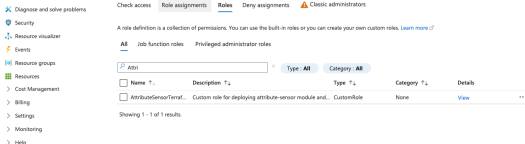
Verification. Confirm the following resources were created:
- An
Attributerole. - A storage account.
- The
AttributeExportCost Management export.
- An
Step 2 — Sensor Implementation
Next, run the sensor installation on each AKS cluster using a Helm chart.
-
Save the values file provided by Attribute (
operator-values.yaml). This file contains a unique ephemeral token. -
Verify your Helm version — version 3.8.0 or above is supported:
helm version -
Update the
cluster_namevalue inoperator-values.yamlto match the target cluster:cluster_name: <subscription_id>/<resource_group>/<cluster_name>Notesubscription_idandresource_groupare for the specific cluster. If you're using different resource groups for the cluster nodes, use the cluster resource group, not the node resource group. -
Review the Java instrumentation settings in
operator-values.yaml. The file includes the following flags by default:# Java instrumentation settingssensorDisableAutoJavaInstrumentation: truejavaAutoInject:enabled: trueThis configuration is supported on Kubernetes 1.28 and above. The injection backend is selected automatically, so no version-specific adjustment is needed.
To use the sensor's dynamic Java instrumentation instead of admission-time injection, set
javaAutoInject.enabledtofalseand setsensorDisableAutoJavaInstrumentationtofalse. The two must never be enabled together. For a full explanation of both modes, see the Attribute Java Instrumentation Guide. -
Install the Helm chart:
helm upgrade -i attribute \oci://quay.io/attribute/operator-chart \-f <values.yaml> \-n attribute \--create-namespace -
Verification. Run the following to verify the Helm release and that the operator and sensor are running:
helm list -n attributekubectl get pods -n attributeExample expected output:


If you'd like to deploy the sensor on other compute resource types (such as standalone), refer to the relevant sensor deployment documentation.
Trademarks: Microsoft and Microsoft Azure are trademarks of the Microsoft group of companies. Terraform is a registered trademark of HashiCorp, Inc. Kubernetes is a registered trademark of The Linux Foundation. All other trademarks are the property of their respective owners.