Attribute Sensor for AWS ECS
Attribute ECS センサーは、クラスタ内の各 EC2 コンテナインスタンスごとに 1 つのタスクとして実行される eBPF センサーです。アプリケーションコードやカーネルモジュールを変更することなく、インスタンス上のネットワークおよびシステムレベルのイベントを監視し、そのインスタンス上でスケジュールされたすべてのタスクのトラフィックを把握し、タスクレベルのコストをそれらのタスクが使用するリソースにアトリビュートします。
How the Deployment Works
Attribute からは、ecs-sensor-<your-account>.json という名前の CloudFormation テンプレートが提供されます。インストールトークンとセンサーイメージのバージョンは、すでにパラメータのデフォルト値として入力されています — これらを入力・編集しないでください。
センサーのインストールは 2 つのステップで構成されます。
| Step | What You Do | Why It Is Separate |
|---|---|---|
| Deploy the CloudFormation stack | 対象とする ECS クラスタの地域でテンプレートからスタックを作成します。 | このスタックは IAM ロールとセンサーのタスク定義を作成します。 |
| Create the ECS service | スタックで作成されたタスク定義を使用して、クラスタ内に Daemon サービスを手動で作成します。 | どのクラスタでセンサーを実行するかを選択できるように、テンプレートではあえてサービスを作成していません。 |
両方のステップは、地域ごと・クラスタごとに繰り返す必要があります。対象とするクラスタが存在する各地域ごとに 1 つのスタックを作成し、その地域内の各クラスタごとに 1 つのサービスを作成します。
スタックは必ず ECS クラスタと同じ地域 にデプロイしてください。タスク定義と、そのタスク定義が参照する IAM ロールは地域リソースであり、クラスタは他の地域のタスク定義を使用できません。
Requirements
| Requirement | Details |
|---|---|
| Cluster capacity | EC2 コンテナインスタンスを持つ ECS クラスタ。Fargate はこのガイドの対象外です — 詳細は Attribute Sensor for AWS Fargate を参照してください。 |
| Container instances | Linux、カーネル 5.10 以降。センサーは x86_64 と arm64 の両方をサポートしますが、テンプレートが作成するタスク定義では 1 つのアーキテクチャのみを宣言します — 後述の注意を参照してください。 |
| IAM permissions | カスタム名付きの IAM ロールを作成する権限(スタックには CAPABILITY_NAMED_IAM が必要)と、ECS タスク定義を登録する権限。 |
| Outbound network | コンテナインスタンスから otel-endpoint.app.attrb.io への HTTPS(TCP 443)。 |
| Image pull | コンテナインスタンスが quay.io からイメージを pull できること。 |
| Task placement | センサータスクは、特権モード・ホスト PID モード・ホストパスマウントで実行されます。 |
What the Template Creates
スタックは 2 つのリソースのみを作成し、それ以外は何も行いません。既存のクラスタ、サービス、タスク定義を変更することはありません。
-
IAM ロール:
AttributeECSZprobeDaemonSetRole-<region>という名前で、ecs-tasks.amazonaws.comによって引き受けられ、センサータスクのタスクロールおよび実行ロールの両方として使用されます。AmazonECSTaskExecutionRolePolicy(イメージの pull 用)とAmazonEC2ReadOnlyAccess(センサーが実行されているインスタンスの特定用)の AWS マネージドポリシーがアタッチされます。 -
ECS タスク定義:指定したファミリー名で作成され、
quay.io/attribute/sensorを実行するzsenseという 1 つのコンテナを含みます。EC2 起動タイプのタスク定義であり、ホスト PID モード、1024 MiB のメモリ制限、512 MiB のメモリ予約、予約 CPU なしで構成されます。
ロール名は地域ごとに固定であるため、同じ地域内には同時に 1 つの Attribute ECS スタックしか存在できません。同一地域に 2 つ目のスタックを作成しようとすると、ロール名の競合により失敗します。同じ地域内でより多くのクラスタを対象にする場合は、既存スタックがすでに作成したタスク定義を再利用してください。
タスク定義にはログ設定が含まれていないため、センサーコンテナのログは CloudWatch ではなく、コンテナインスタンスのデフォルトの Docker ログドライバーに送られます。CloudWatch に出力する必要がある場合は、スタック作成後にタスク定義の新しいリビジョンを作成し、awslogs のログ設定を追加してください。
Architecture
センサー自体は x86_64 と arm64 の両方で動作しますが、ECS タスク定義では CpuArchitecture を 1 つだけ宣言できます。テンプレートでは X86_64 が設定されています。そのため、作成されたタスク定義は x86_64 コンテナインスタンスにのみ配置され、クラスタ内の arm64(Graviton)インスタンスはカバーされません。
クラスタで arm64 コンテナインスタンスを使用している場合は、デプロイ前に Attribute に連絡してください。ARM64 を宣言したタスク定義が必要であり、両方のアーキテクチャを含むクラスタでは、アーキテクチャごとに 1 つずつ、合計 2 つの Daemon サービスが必要になります。
Step 1: Deploy the CloudFormation Stack
-
AWS コンソールで、対象とする ECS クラスタの地域に切り替えてください。
-
CloudFormation > Stacks > Create stack > With new resources (standard) に移動してください。
-
Choose an existing template を選択し、Upload a template file を選択して、
ecs-sensor-<your-account>.jsonファイルをアップロードしてください。 -
スタックの詳細を入力します。
Field Value Stack name 任意の名前(例: attribute-ecs-sensor)。AttributeToken Attribute によって事前入力されています。そのまま変更せずに使用してください。 TaskFamily センサーのタスク定義ファミリーの名前(例: attribute)。この値はステップ 2 で使用するため、控えておいてください。SensorVersion 現在リリースされているセンサーバージョンが事前入力されています。Attribute から特定バージョンへの固定を依頼されている場合を除き、そのままにしてください。 -
レビューページで、このスタックがカスタム名付きの IAM リソースを作成することを承認してください。
-
スタックを送信し、状態が
CREATE_COMPLETEになるまで待ってください。
Step 2: Create the ECS Service
スタックによってタスク定義は登録されていますが、まだ何も実行されていません。クラスタ内にサービスを作成し、各コンテナインスタンス上にセンサーをスケジュールしてください。
-
ECS > Clusters > 対象クラスタ > Services > Create に移動してください。
-
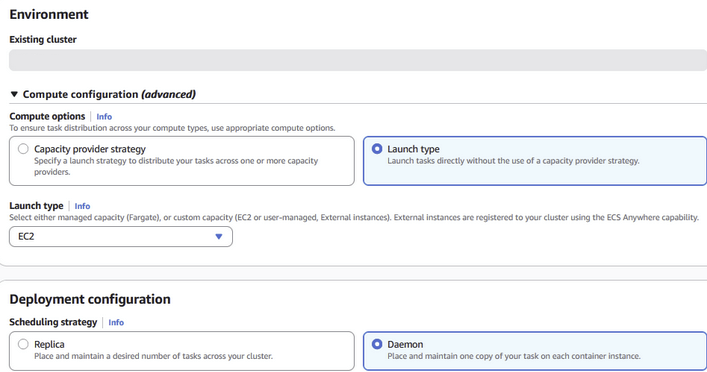
Compute configuration の Launch type を選択し、起動タイプを EC2 に設定してください。Capacity provider strategy は使用しないでください。
-
Deployment configuration で次のように設定してください。
-
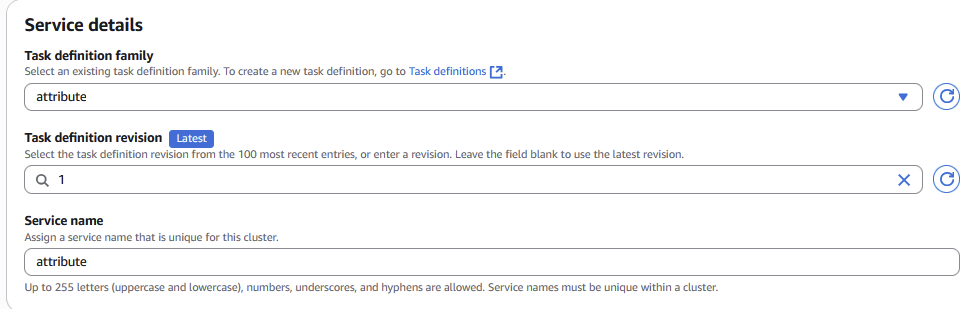
Task definition family: ステップ 1 で入力した
TaskFamilyの値。 -
Task definition revision: 最新のリビジョン。
-
Service name: 任意の名前(例:
attribute)。 -
Scheduling strategy: Daemon。これにより、クラスタ内の各コンテナインスタンス(後から追加されたインスタンスも含む)上に、センサータスクがちょうど 1 つずつ配置・維持されます。
 注意
注意スクリーンショットでは、タスク定義ファミリー名とサービス名の両方に
attributeを使用しています。実際には、選択したTaskFamilyの値に置き換えてください。 -
-
Deployment failure detection で、Use the Amazon ECS deployment circuit breaker のチェックを外してください。
ImportantCircuit breaker は必ずオフにしてください。混在クラスタでは、センサータスクを配置できないコンテナインスタンス(
arm64インスタンスや非対応 OS など)が個々のタスク失敗を引き起こします。Circuit breaker を有効にしていると、ECS はこれをデプロイ失敗とみなし、サービス全体をロールバックしてしまうため、正常に動作していたインスタンスからもセンサーが削除されます。オフにしておけば、センサーは実行可能なインスタンス上で動作し、残りのインスタンスは単にカバーされないだけになります。 -
残りの設定はデフォルトのままにして、サービスを作成してください。
Verifying the Installation
-
クラスタの Tasks タブで、EC2 コンテナインスタンスごとに 1 つのセンサータスクが実行中であり、そのタスクが停止と再起動を繰り返すことなく
RUNNING状態を維持していることを確認してください。 -
サービスの running count が desired count と一致していることを確認してください。Daemon サービスの場合、ECS は desired count を、対象となるコンテナインスタンスの数に設定します。
-
タスクが
RUNNING状態になって間もなく、Attribute ダッシュボードにタスクレベルのデータが表示されます。何も表示されない場合は、コンテナインスタンスからotel-endpoint.app.attrb.ioへのアウトバウンド HTTPS アクセスを確認してください。
Upgrading the Sensor
新しいセンサーバージョンが利用可能になると、Attribute から案内があります。
-
CloudFormation > Stacks > 使用中の Attribute ECS スタック > Update に移動してください。
-
Replace existing template を選択して新しいテンプレートをアップロードするか、現在のテンプレートを維持したまま、SensorVersion を Attribute から指定されたバージョンに設定してください。
-
更新を適用してください。CloudFormation によって、新しいリビジョンのタスク定義が登録されます。
-
ECS サービスを新しいタスク定義リビジョンに更新してデプロイしてください。Daemon サービスは、各コンテナインスタンス上のセンサータスクを順次置き換えます。
Uninstalling
-
センサーを実行している各クラスタで ECS サービスを削除してください。これにより、センサータスクが停止・削除されます。
-
各地域で CloudFormation スタックを削除してください。これにより、IAM ロールとセンサータスク定義が削除されます。
商標:AWS は Amazon.com, Inc. またはその関連会社の商標です。Docker は Docker, Inc. の商標です。その他すべての商標は、それぞれの所有者に帰属します。