Deploy the AWSStrategic role
During your onboarding process, DoiT creates an AWSStrategic IAM role in your AWS payer account for automated invoice reporting. If the role was removed or is not configured correctly, you need to redeploy it, following the instructions on this page.
Required permission
You must have permissions to manage IAM roles and create CloudFormation stacks in the AWS payer account (management account).
Before you begin
Delete any existing AWSStrategic role:
-
In the AWS IAM Console, select Roles and search for
AWSStrategic. -
If the role already exists, select the checkbox next to
AWSStrategicrole, and then select Delete.
Deploy the AWSStrategic role
We recommend creating the resources using our CloudFormation template:
-
Open the AWS CloudFormation provided quick-create link. You can use any AWS Region.
-
For Stack name, enter a recognizable name, for example,
DoiT-AWSStrategic.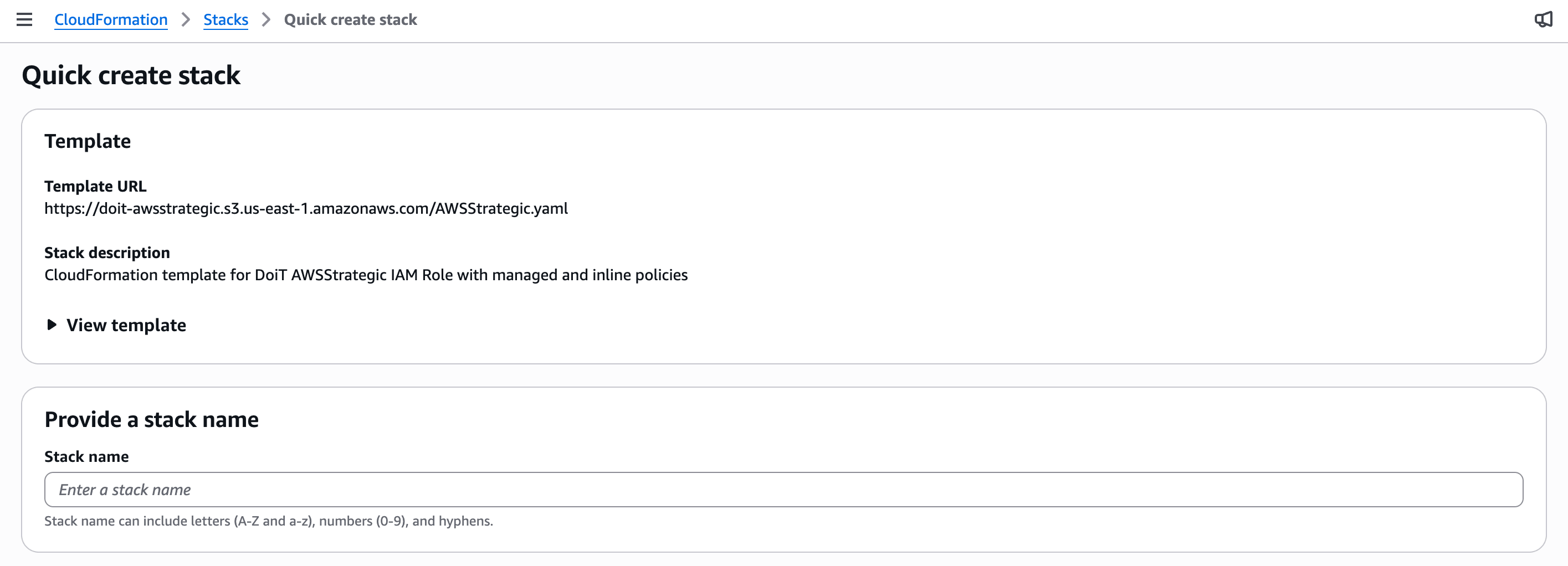
-
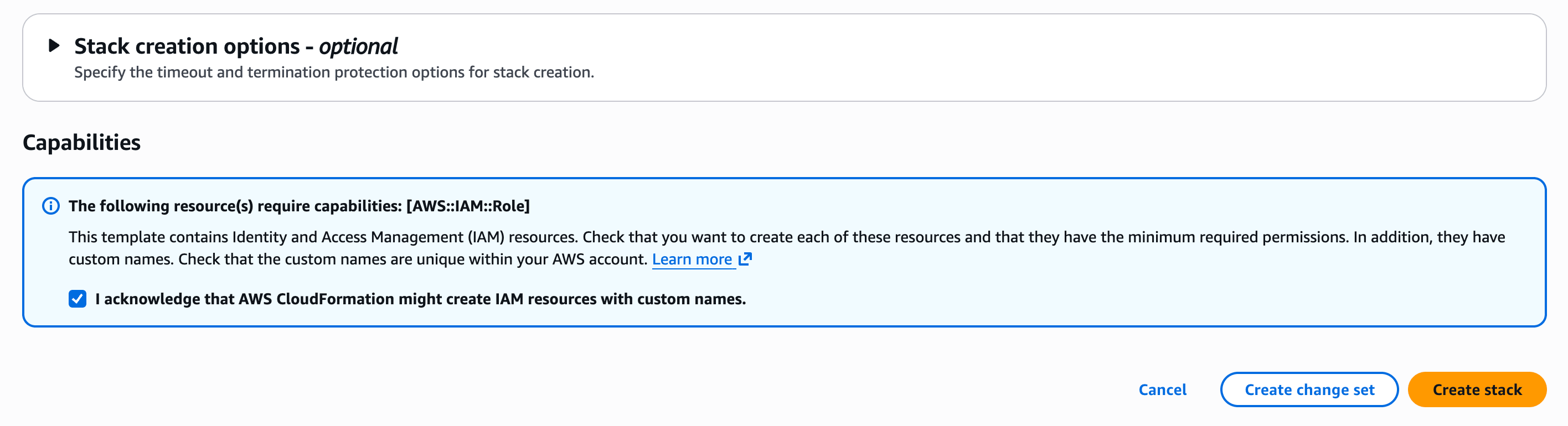
Scroll to the bottom and select I acknowledge that AWS CloudFormation might create IAM resources with custom names.
-
Select Create stack.
The stack typically deploys in about one minute. On the stack events page, wait until the top event shows CREATE_COMPLETE.
Alternatively, you can review the AWSStrategic CloudFormation template below and manually create the stack:
AWSTemplateFormatVersion: '2010-09-09'
Description: 'CloudFormation template for DoiT AWSStrategic IAM Role with managed and inline policies'

Resources:
  AWSStrategicRole:
    Type: AWS::IAM::Role
    Properties:
      RoleName: AWSStrategic
      AssumeRolePolicyDocument:
        Version: '2012-10-17'
        Statement:
          - Effect: Allow
            Principal:
              AWS: 'arn:aws:iam::561602220360:root'
            Action: 'sts:AssumeRole'
      ManagedPolicyArns:
        - 'arn:aws:iam::aws:policy/AWSSavingsPlansFullAccess'
        - 'arn:aws:iam::aws:policy/AWSSupportAccess'
        - 'arn:aws:iam::aws:policy/job-function/Billing'
        - 'arn:aws:iam::aws:policy/job-function/SupportUser'
      Policies:
        - PolicyName: AWSStrategicPolicy
          PolicyDocument:
            Version: '2012-10-17'
            Statement:
              - Effect: Allow
                Action:
                  - 'autoscaling:DescribeAutoScalingGroups'
                  - 'bcm-data-exports:Get*'
                  - 'bcm-data-exports:List*'
                  - 'bcm-data-exports:Update*'
                  - 'ce:Describe*'
                  - 'ce:Get*'
                  - 'ce:List*'
                  - 'cloudwatch:GetMetricData'
                  - 'compute-optimizer:*'
                  - 'ec2:DescribeInstances'
                  - 'organizations:Describe*'
                  - 'organizations:List*'
                  - 'servicequotas:GetAWSDefaultServiceQuota'
                  - 'servicequotas:GetAssociationForServiceQuotaTemplate'
                  - 'servicequotas:GetRequestedServiceQuotaChange'
                  - 'servicequotas:GetServiceQuota'
                  - 'servicequotas:GetServiceQuotaIncreaseRequestFromTemplate'
                  - 'servicequotas:ListAWSDefaultServiceQuotas'
                  - 'servicequotas:ListRequestedServiceQuotaChangeHistory'
                  - 'servicequotas:ListRequestedServiceQuotaChangeHistoryByQuota'
                  - 'servicequotas:ListServiceQuotaIncreaseRequestsInTemplate'
                  - 'servicequotas:ListServiceQuotas'
                  - 'servicequotas:ListServices'
                Resource: '*'
      Tags:
        - Key: App
          Value: Onboarding
        - Key: Owner
          Value: DoiT
        - Key: 'doit:support'
          Value: 'true'
        - Key: Name
          Value: SupportIam

Outputs:
  RoleArn:
    Description: ARN of the AWSStrategic IAM Role
    Value: !GetAtt AWSStrategicRole.Arn
    Export:
      Name: !Sub 'AWSStrategicRole-${AWS::StackName}'

  RoleName:
    Description: Name of the AWSStrategic IAM Role
    Value: !Ref AWSStrategicRole
    Export:
      Name: !Sub 'AWSStrategicRoleName-${AWS::StackName}'
If you have questions or need further assistance, please contact your DoiT Account Manager or open an expert inquiry.