AWSStrategic ロールをデプロイする
オンボーディングプロセスの中で、DoiT は自動請求書レポート用に AWSStrategic IAM ロールをお客様の AWS 支払アカウントに作成します。ロールが削除された、または正しく設定されていない場合は、このページの手順に従って再デプロイする必要があります。
必要な権限
AWS 支払アカウント(管理アカウント)で IAM ロールを管理し、CloudFormation スタックを作成する権限が必要です。
始める前に
既存の AWSStrategic ロールを削除します。
-
AWS IAM Console で Roles を選択し、
AWSStrategicを検索します。 -
すでにロールが存在する場合は、
AWSStrategicロールの横のチェックボックスを選択し、Delete を選択します。
AWSStrategic ロールをデプロイする
CloudFormation テンプレートを使用してリソースを作成することを推奨します。
-
AWS CloudFormation のクイック作成リンク を開きます。任意の AWS Region を使用できます。
-
Stack name に、
DoiT-AWSStrategicなど認識しやすい名前を入力します。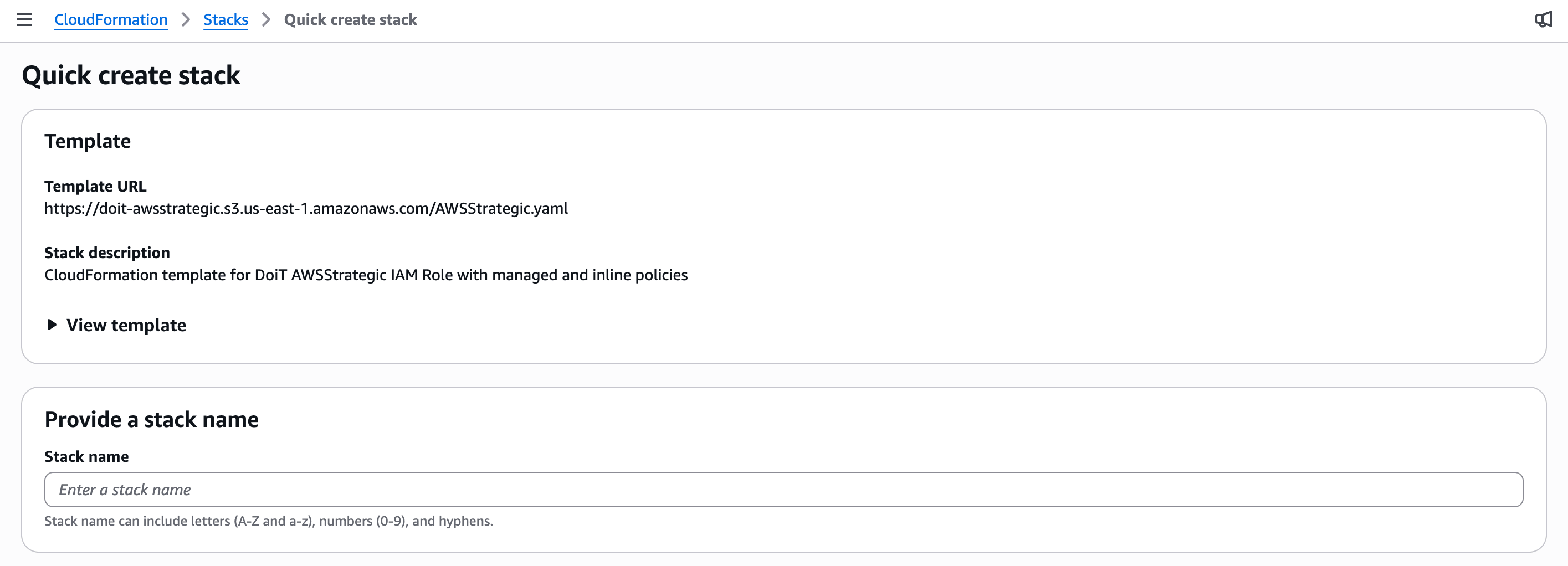
-
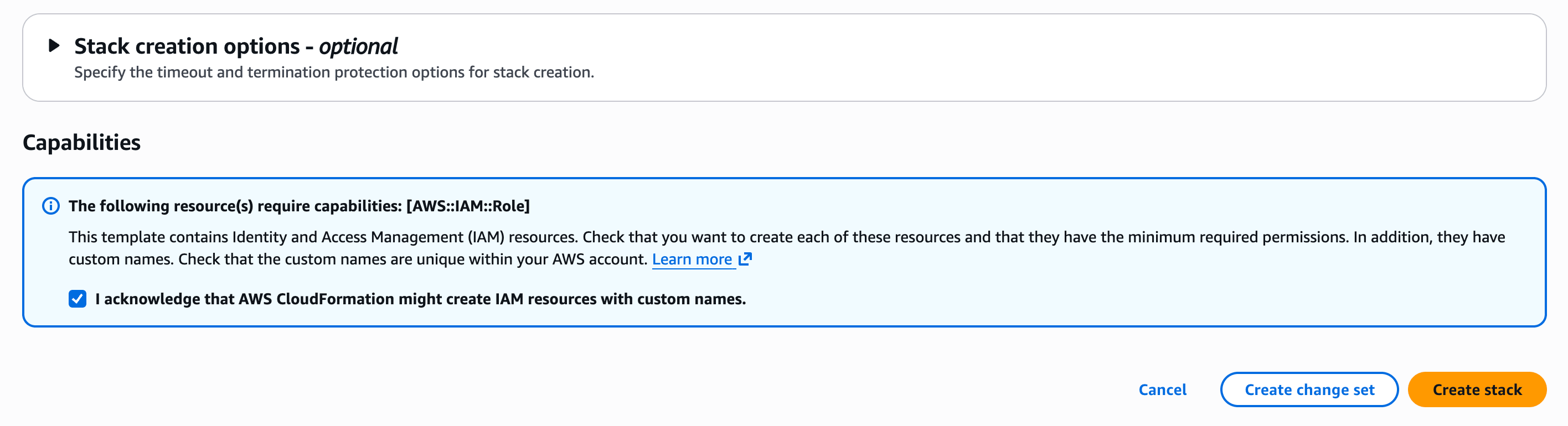
ページのボトムまでスクロールし、I acknowledge that AWS CloudFormation might create IAM resources with custom names を選択します。
-
Create stack を選択します。
通常、スタックは約 1 分でデプロイされます。スタックのイベントページで、トップのイベントが CREATE_COMPLETE と表示されるまで待機してください。
または、以下の AWSStrategic CloudFormation テンプレートを確認し、手動でスタックを作成することもできます。
AWSTemplateFormatVersion: '2010-09-09'
Description: 'CloudFormation template for DoiT AWSStrategic IAM Role with managed and inline policies'

Resources:
  AWSStrategicRole:
    Type: AWS::IAM::Role
    Properties:
      RoleName: AWSStrategic
      AssumeRolePolicyDocument:
        Version: '2012-10-17'
        Statement:
          - Effect: Allow
            Principal:
              AWS: 'arn:aws:iam::561602220360:root'
            Action: 'sts:AssumeRole'
      ManagedPolicyArns:
        - 'arn:aws:iam::aws:policy/AWSSavingsPlansFullAccess'
        - 'arn:aws:iam::aws:policy/AWSSupportAccess'
        - 'arn:aws:iam::aws:policy/job-function/Billing'
        - 'arn:aws:iam::aws:policy/job-function/SupportUser'
      Policies:
        - PolicyName: AWSStrategicPolicy
          PolicyDocument:
            Version: '2012-10-17'
            Statement:
              - Effect: Allow
                Action:
                  - 'autoscaling:DescribeAutoScalingGroups'
                  - 'bcm-data-exports:Get*'
                  - 'bcm-data-exports:List*'
                  - 'bcm-data-exports:Update*'
                  - 'ce:Describe*'
                  - 'ce:Get*'
                  - 'ce:List*'
                  - 'cloudwatch:GetMetricData'
                  - 'compute-optimizer:*'
                  - 'ec2:DescribeInstances'
                  - 'organizations:Describe*'
                  - 'organizations:List*'
                  - 'servicequotas:GetAWSDefaultServiceQuota'
                  - 'servicequotas:GetAssociationForServiceQuotaTemplate'
                  - 'servicequotas:GetRequestedServiceQuotaChange'
                  - 'servicequotas:GetServiceQuota'
                  - 'servicequotas:GetServiceQuotaIncreaseRequestFromTemplate'
                  - 'servicequotas:ListAWSDefaultServiceQuotas'
                  - 'servicequotas:ListRequestedServiceQuotaChangeHistory'
                  - 'servicequotas:ListRequestedServiceQuotaChangeHistoryByQuota'
                  - 'servicequotas:ListServiceQuotaIncreaseRequestsInTemplate'
                  - 'servicequotas:ListServiceQuotas'
                  - 'servicequotas:ListServices'
                Resource: '*'
      Tags:
        - Key: App
          Value: Onboarding
        - Key: Owner
          Value: DoiT
        - Key: 'doit:support'
          Value: 'true'
        - Key: Name
          Value: SupportIam

Outputs:
  RoleArn:
    Description: ARN of the AWSStrategic IAM Role
    Value: !GetAtt AWSStrategicRole.Arn
    Export:
      Name: !Sub 'AWSStrategicRole-${AWS::StackName}'

  RoleName:
    Description: Name of the AWSStrategic IAM Role
    Value: !Ref AWSStrategicRole
    Export:
      Name: !Sub 'AWSStrategicRoleName-${AWS::StackName}'
ご不明な点や追加のサポートが必要な場合は、DoiT のアカウントマネージャーに連絡するか、エキスパートへ問い合わせを開いてください。