DataHub API 経由でデータをインポート
前提条件
すでに DoiT API token を発行している必要があります。API token はセキュリティ確保のために GCP Secret Manager に保存できます。
このチュートリアルでは、デモンストレーションを目的として作成されたデータを使用します。実際のシナリオでは、送信前に必ずデータをサニタイズし、たとえば個人を特定できる情報(PII)をマスクするようにしてください。
目的
このチュートリアルでは、次の内容を学びます。
-
DataHub API で JSON ペイロードを使用して、複数のデータセットを Cloud Analytics(クラウド分析)に取り込む方法
-
クラウド請求データと取り込んだデータを組み合わせて Cloud Analytics レポートを構築し、組織の支出を分析する方法
ステップ 1: データソースを特定する
組織の支出は、次の要素で構成されます。
-
パブリッククラウドの請求データ: 組織は DoiT から Amazon Web Services と Google Cloud のサービスを購入しています。クラウド請求データはすでに Cloud Analytics で利用可能です。
-
サードパーティの課金: 組織はビジネス管理に NetSuite を使用しており、毎月請求されます。
-
運用コスト: 組織には、AMER・APAC・EMEA の 3 つのスーパー地域に従業員がいます。各地域には複数の機能別チームがあります。従業員コストのデータは CSV ファイルに保存されています。
以下は、CSV ファイルの例です。
employees.csv
Employee ID,Employee Name,Territory,Team,Month,Cost
E1001,John Doe,AMER,Exec,2024-03-01,$75000
E1001,John Doe,AMER,Exec,2024-04-01,$75000
E1001,John Doe,AMER,Exec,2024-05-01,$75000
E1002,Jane Smith,AMER,Legal and Finance,2024-03-01,$60000
E1002,Jane Smith,AMER,Legal and Finance,2024-04-01,$60000
E1002,Jane Smith,AMER,Legal and Finance,2024-05-01,$60000
E1003,Emily Davis,AMER,R&D,2024-03-01,$116000
E1003,Emily Davis,AMER,R&D,2024-04-01,$116000
E1003,Emily Davis,AMER,R&D,2024-05-01,$116000
E1004,William Brown,AMER,HR and Support,2024-03-01,$56000
E1004,William Brown,AMER,HR and Support,2024-04-01,$56000
E1004,William Brown,AMER,HR and Support,2024-05-01,$56000
E1005,Xiao Ming,EMEA,R&D,2024-03-01,$61000
E1005,Xiao Ming,EMEA,R&D,2024-04-01,$61000
E1005,Xiao Ming,EMEA,R&D,2024-05-01,$61000
E1006,Ahmed Khan,APAC,R&D,2024-03-01,$58000
E1006,Ahmed Khan,APAC,R&D,2024-04-01,$58000
E1006,Ahmed Khan,APAC,R&D,2024-05-01,$58000
netsuite.csv
Territory,Month,Cost
AMER,2024-03-01,$70000
AMER,2024-04-01,$70000
AMER,2024-05-01,$70000
EMEA,2024-03-01,$7500
EMEA,2024-04-01,$7500
EMEA,2024-05-01,$7500
APAC,2024-03-01,$3700
APAC,2024-04-01,$3700
APAC,2024-05-01,$3700
ステップ 2: データの粒度を定義する
全体的な支出を分析するには、サードパーティの課金および運用コストを Cloud Analytics に取り込み、クラウド請求データと組み合わせる必要があります。
-
NetSuite の課金データと従業員コストを分けて取り込み、データソース識別子(Events スキーマの
providerフィールド)としてNetSuiteとEmployeesを使用します。 -
従業員コストデータについては、DataHub API リクエストのペイロードを構築する際に、
Employee ID、Employee Name、Territory、Teamをカスタムディメンション(labelタイプのディメンション)として追加します。
ステップ 3: ペイロードを準備してデータを送信する
このステップでは、Flask と Werkzeug を使用して Python スクリプトをセットアップし、従業員コストデータを変換して API リクエストを実行します。実際には、同じ目的を達成するために他のツールを使用してもかまいません。
Requirements ファイル:
requirements.txt
google-cloud-secret-manager
Flask==2.2.5
Werkzeug==2.0.1
pytz
requests
python-dotenv
Python スクリプト:
main.py
from flask import request
import time
from pytz import timezone, utc
from google.cloud import secretmanager
import requests
import csv
from datetime import datetime

def access_secret(secret_id):
    """Accesses the specified secret from Secret Manager."""
    project_id = GCP_PROJECT # Automatically provided by Cloud Functions
    name = f"projects/{project_id}/secrets/{secret_id}/versions/latest"
    response = client.access_secret_version(name=name)
    return response.payload.data.decode('UTF-8')

def send_api_request(data,doit_api_key):
    url = f"https://api.doit.com/datahub/v1/events"  #prod

    headers = {
        "Content-Type": "application/json",
        "Authorization": f"Bearer {doit_api_key}"  # Add the Authorization header
    }
    response = requests.post(url, json=data, headers=headers)
    return response

def format_to_iso(date_str):
    # Parse the date string to a datetime object assuming the format is YYYY-MM-DD
    date = datetime.strptime(date_str, "%Y-%m-%d")

    # Format the datetime object to ISO 8601 format with time set to midnight
    formatted_date = date.strftime("%Y-%m-%dT%H:%M:%S.00Z")

    return formatted_date

def ingest(json_data, doit_api_key):
    """Process and send the JSON data to the API endpoint."""
    for item in json_data:
        employee_id = item.get("employee_id")
        employee_name = item.get("employee_name")
        territory = item.get("territory")
        team = item.get("team")
        month = format_to_iso(item.get("month"))
        cost = item.get("cost").replace("$", "").replace(",", "")  # Remove $ and commas

        api_request_data = {
            "events": [{
                "provider": "Employees",
                "id": f"{employee_id}_{month}",
                "dimensions": [
                    {"key": "Employee_ID", "type": "label", "value": employee_id},
                    {"key": "Employee_name", "type": "label", "value": employee_name},
                    {"key": "Territory", "type": "label", "value": territory},
                    {"key": "Team", "type": "label", "value": team}
                ],
                "time": month,
                "metrics": [
                    {"value": float(cost), "type": "cost"},
                    {"value": 180, "type": "usage"},  # Example monthly working hours
                    {"value": 0, "type": "savings"}  # Example savings (e.g., from benefits or discounts)
                ]
            }]
        }

        max_retries = 6
        retry_delay = 10  # seconds
        for attempt in range(max_retries + 1):
            response = send_api_request(api_request_data, doit_api_key)
            if response.status_code in [200, 201]:
                break
            elif response.status_code == 429:
                print(f"API request rate limited. Attempt {attempt + 1} of {max_retries}. Retrying in {retry_delay} seconds.")
                if attempt < max_retries:
                    time.sleep(retry_delay)
                else:
                    print("Maximum retries reached. Exiting.")
            else:
                print(f"API request failed with status code: {response.status_code} {response.text}")
                break

def access_secret(secret_id):
    """Accesses the specified secret from Secret Manager."""
    project_id = GCP_PROJECT
    name = f"projects/{project_id}/secrets/{secret_id}/versions/latest"
    response = client.access_secret_version(name=name)
    return response.payload.data.decode('UTF-8')

def ingest_employees(file_path, doit_api_key):
    """Read data from a CSV file and use the ingest function to ingest it."""
    with open(file_path, mode='r') as csv_file:
        csv_reader = csv.DictReader(csv_file)
        for row in csv_reader:
            json_data = [{
                "employee_id": row["Employee ID"],
                "employee_name": row["Employee Name"],
                "territory": row["Territory"],
                "team": row["Team"],
                "month": row["Month"],
                "cost": row["Cost"]
            }]
            ingest(json_data, doit_api_key)

def ingest_employee_cost(request):
    doit_api_key = access_secret('DOIT_API_KEY')
    print(f"ingesting employees cost from CSV")

    file_path = 'employees.csv'  # Path to your CSV file
    ingest_employees(file_path, doit_api_key)

    # Return the response
    return f'Done'

client = secretmanager.SecretManagerServiceClient()
GCP_PROJECT  = "your-gc-project"

if __name__ == "__main__":
    ingest_employee_cost("")
誤ったデータを取り込んだ場合は、取り込みから 90 分後に イベントを DELETE できます。
続けて、NetSuite データを取り込むための API リクエストを実行します。
ステップ 4: コスト分析を実行する
API リクエストが成功していれば、約 15 分後に、統合されたデータセットを使用してコスト分析を開始できます。
-
コンソールのトップナビゲーションのメガメニューから レポートと分析 を選択し、レポート を選択します。
-
新しいレポートを作成します。左側のペインで、データソース の下にある DataHub データを含める チェックボックスを選択します。
取り込んだデータが利用可能になるまで、このチェックボックスはグレーアウトされています。

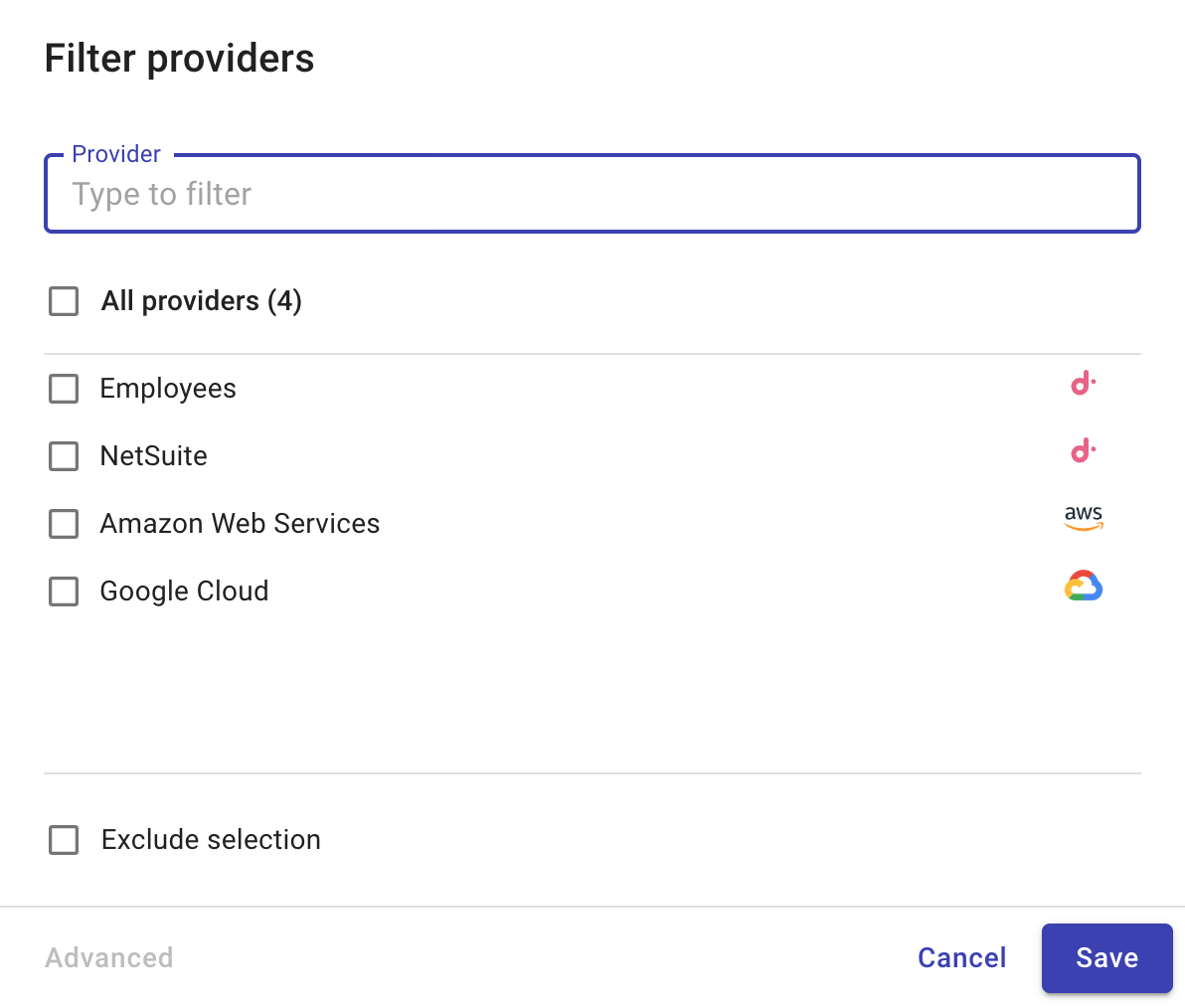
プロバイダーをフィルター オプションを使用して、利用可能なすべてのデータセットを確認できます。
-
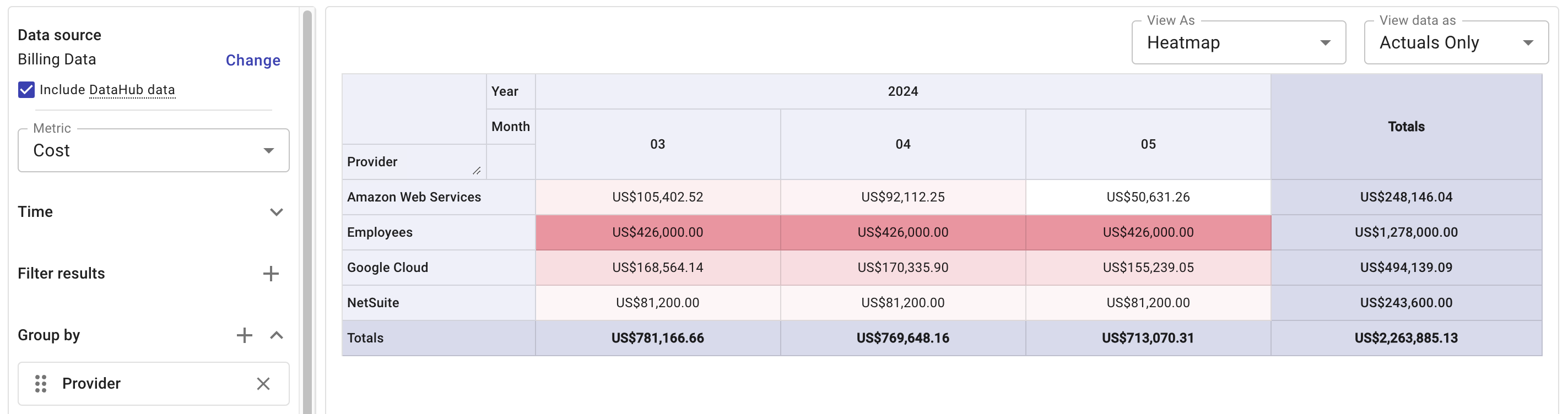
ディメンションとラベル を指定し、レポートを実行します。
- このサンプルレポートでは、データセットごとの月次コストを表示します。
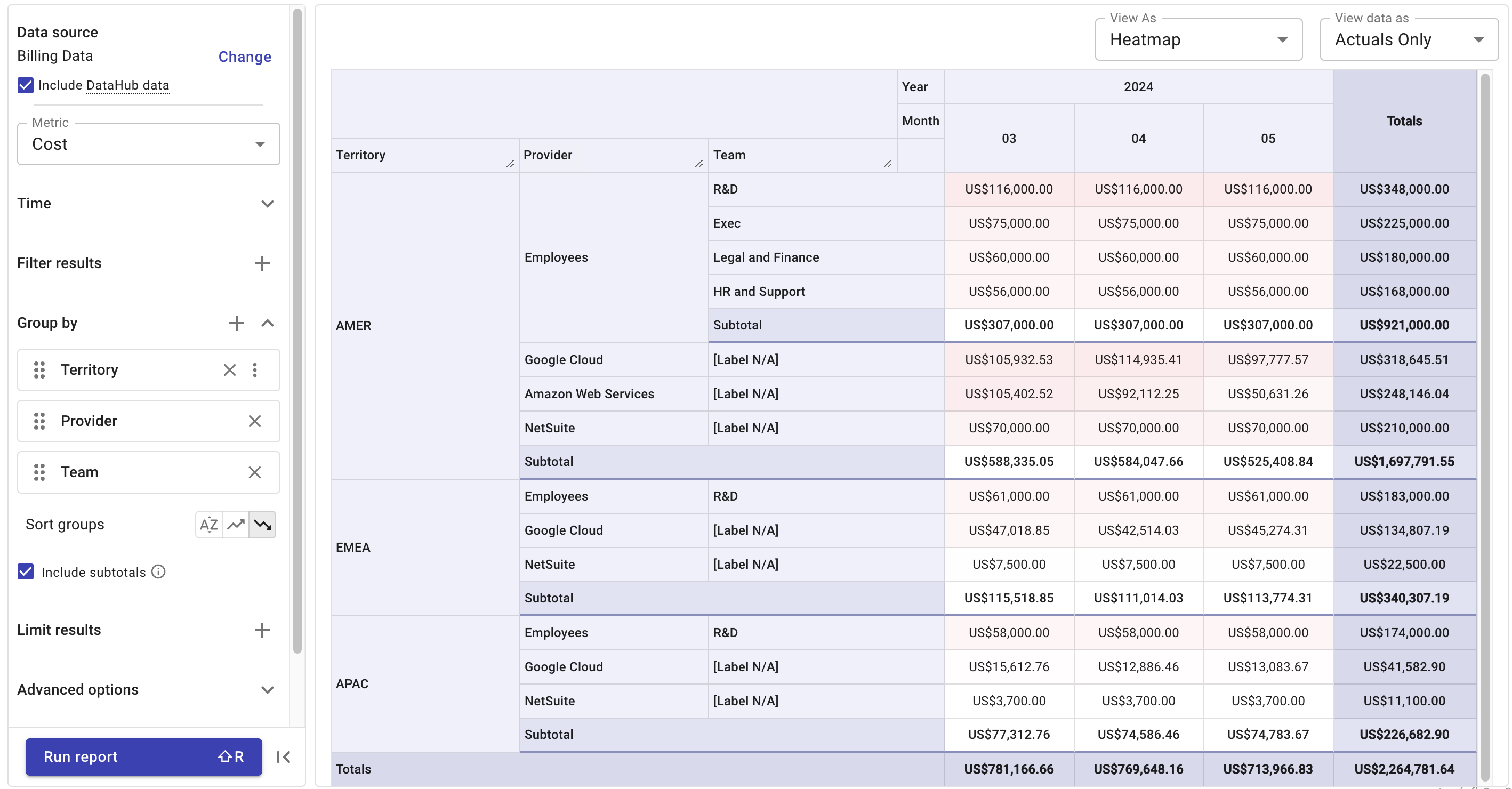
- すべてのデータセットに
Territoryラベルを適用している場合は、スーパー地域ごとにコストをブレイクダウンできます。
ステップ 5(オプション): ダッシュボードを設定する
取り込んだデータを使用して 1 つ以上のレポートを作成したら、レポートをカスタマイズ可能なダッシュボードに追加することを検討してください。