Attribute EC2 Sensor のインストール
はじめに
Attribute EC2 Sensor は、Linux ベースの仮想マシン上で systemd サービスとして動作する eBPF センサーです。
このセンサーは eBPF(Extended Berkeley Packet Filter)技術を使用して EC2 インスタンスを深く可視化し、リアルタイムで監視します。アプリケーションコードやカーネルモジュールを変更することなく、ネットワークおよびシステムレベルのイベントを取得します。センサーはパッシブなオブザーバーとして動作するため、監視対象インスタンスへのオーバーヘッドやパフォーマンスへの影響は最小限に抑えられます。
必要条件
| Requirement | Details |
|---|---|
| Kernel version | 5.10 以降 |
| Architecture | x86_64 および arm64 |
| Privileges | インスタンス上の sudo 権限 |
事前準備
Attribute からインストール用トークンを取得してください。このトークンはアカウントごとに一意であり、インストール時および後のアップグレード時の両方で使用します。
インストール方法
センサーのインストール方法は 2 通りあります。インスタンスのプロビジョニング方法に合ったものを選択してください。
| Method | When to Use It |
|---|---|
| イメージまたは起動テンプレートへのインストール | インスタンスがゴールデン AMI、起動テンプレート、または Auto Scaling グループから作成される場合に使用します。イメージ作成時に 1 回インストールすると、そこから起動されるすべてのインスタンスにセンサーが含まれます。 |
| 稼働中インスタンスへのインストール | インスタンスが長期間稼働し、個別に管理されている場合に使用します。稼働中のインスタンスに直接インストールします。 |
どちらの方法でも同じインストールスクリプトを実行します。違いは、インストール時にセンサーを起動するかどうかだけです。
マシンイメージまたは起動テンプレートへのインストール
AMI、起動テンプレートのユーザーデータ、または Packer や EC2 Image Builder などのイメージビルドパイプラインにセンサーを組み込む場合に、この方法を使用します。
-
ビルド用インスタンス上で、インストールスクリプトをダウンロードして実行可能にします。
wget https://storage.googleapis.com/attrb-artifacts/standalone-install.shchmod +x ./standalone-install.sh -
ワークロード名、メモリ制限、トークンを指定してスクリプトを実行します。
sudo ./standalone-install.sh <workload_name> 524288000 <token>Argument Description <workload_name>このイメージから起動されるインスタンス上で動作するサービス名。 524288000センサーのメモリ制限(バイト単位、500 MiB)。 <token>Attribute が提供するインストールトークン。 -
通常どおりイメージのビルドを完了し、AMI を作成します。
ビルド用インスタンス上ではセンサーを起動しないでください。インストールスクリプトは zprobe systemd サービスを有効化するため、このイメージから起動される各インスタンスの初回起動時に自動的に開始されます。センサーの確認は、イメージ自体ではなく起動済みインスタンス上で実施してください。インストールの確認で説明している手順に従ってください。
稼働中インスタンスへのインストール
すでに本番稼働しているインスタンスにセンサーを追加する場合、この方法を使用します。
-
インストールスクリプトをダウンロードして実行可能にします。
wget https://storage.googleapis.com/attrb-artifacts/standalone-install.shchmod +x ./standalone-install.sh -
ワークロード名、メモリ制限、トークンを指定してスクリプトを実行します。
sudo ./standalone-install.sh <workload_name> 524288000 <token>Argument Description <workload_name>インスタンス上で現在動作しているサービス名。 524288000センサーのメモリ制限(バイト単位、500 MiB)。 <token>Attribute が提供するインストールトークン。 -
センサーを起動します。インストーラーは
zprobesystemdサービスを有効化しますが起動はしないため、この手順を実施しない場合、センサーは次回の再起動までレポートを開始しません。sudo systemctl start zprobe
インストールの確認
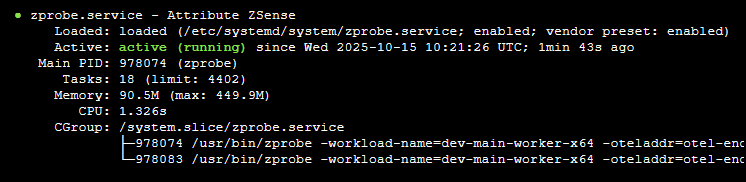
稼働中インスタンスでサービスのステータスを確認します。
sudo systemctl status zprobe
サービスは、次の例のように active (running) と表示されている必要があります。
センサーのアップグレード
インストールスクリプトは常に最新のセンサーバージョンを取得するため、アップグレードは同じアカウント用トークンでスクリプトを再実行するだけで完了します。
イメージベースのデプロイの場合は、イメージビルド内でインストールスクリプトを再実行し、新しいイメージをロールアウトしてください。そのイメージから起動されたインスタンスは、初回起動時に更新済みセンサーを開始します。
稼働中インスタンスの場合:
-
インストールスクリプトを再度実行します。
sudo ./standalone-install.sh <workload_name> 524288000 <token> -
新しいバージョンを読み込むためにセンサーを再起動します。
sudo systemctl restart zprobe
商標: AWS は Amazon.com, Inc. またはその関連会社の商標です。その他の商標は、それぞれの所有者に帰属します。