Manage commitments
With Commitment Manager, you can edit or delete a commitment, or export commitment data as CSV.
Required permissions
- Cloud Analytics Admin
Management options
The management options are available from both the main screen and the commitment details page.
-
On the main Commitment Manager screen, locate the commitment of interest, and then select the kebab menu (⋮) in the top-right corner of the commitment card.
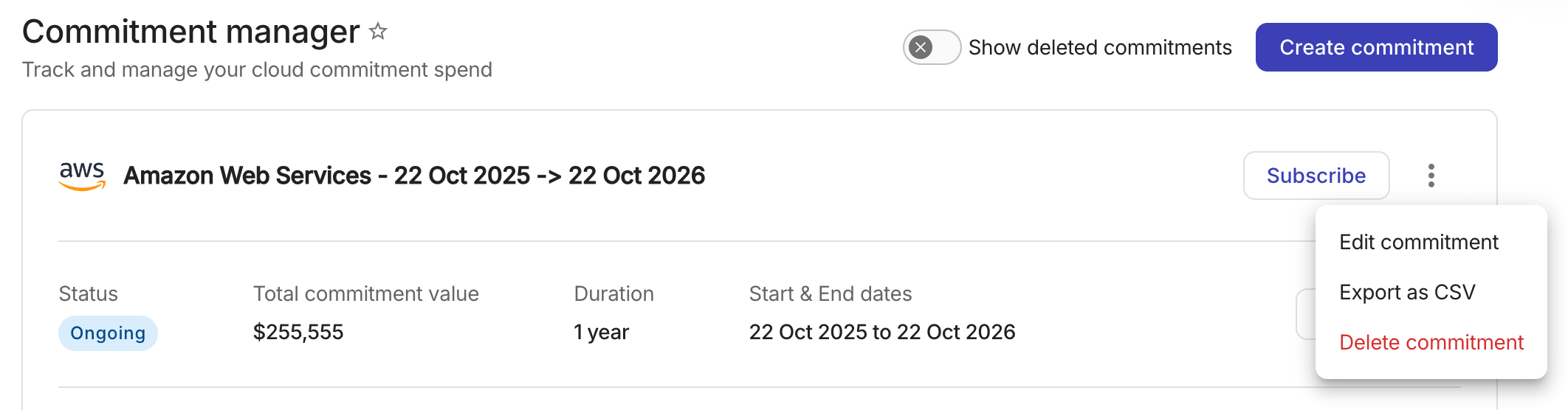
-
On the commitment details page, select the kebab menu (⋮) next to the commitment name.

While an edit is being recalculated, only Edit commitment is available. Export as CSV and Delete commitment return when the calculation finishes. See Edit a commitment.
Edit a commitment
You can edit a commitment at any time. For example, if you need to filter out a service or add a true-up invoice.
See Create commitments for the configuration settings.
When you edit a commitment, Cloud Intelligence recalculates spend for the updated configuration. During this recalculation:
-
The details page displays the last published values and indicates that an update is being calculated.
-
Adjustments are unavailable until the update finishes. The Add adjustment, edit, and delete controls in Period commitment are disabled.
-
Export as CSV and Delete commitment are temporarily unavailable. Only Edit commitment remains available, so you can correct the change if needed.
If an unfinished update exists when you open the edit form, an informational notice explains that saving your changes replaces the previous update and restarts the calculation.
If the commitment was modified by another user while you were editing, a conflict error prompts you to reopen the commitment to load the latest values and try again.
If the calculation fails, the page indicates that the update will be retried automatically. The periods and spend shown may be outdated. A Cloud Analytics Admin can correct the unfinished update by editing the commitment again.
Export as CSV
You can export the commitment breakdown of all periods to CSV for custom analysis and reporting outside the console.
Delete commitment
When you delete a commitment, it is removed from the Commitment Manager and no longer appears in the active or inactive commitment lists. However, it's history is preserved and Cloud Analytics Admins can view deleted commitments using the Show deleted commitments toggle.
Deleted commitments appear in a Deleted commitments section below the active and inactive lists. Deleted cards use a dimmed style and have a Deleted chip. View Details and management options (edit, delete, export) are not available. If you navigate to the URL of a deleted commitment, you are automatically redirected to the main Commitment Manager screen.
Deletions are recorded in the audit log, allowing administrators to review when a commitment was deleted and by whom.