Work with AI data
DoiT supports AI services provided by the following: AWS (Amazon Bedrock, Kiro), Google Cloud (Vertex AI), Microsoft Azure (Azure Machine Learning), Databricks, Snowflake, Anthropic, and OpenAI.
After connecting your GenAI providers, you can start analyzing and monitoring your AI cost and usage.
AI data in Cloud Analytics
Cloud Analytics refreshes most AI data on an hourly basis; Snowflake connector data is synchronized every 12 hours.
Limitations
-
Amazon Bedrock: Billing data doesn't include API key or user-level attribution. As a result, the Cost by API key and GenAI spend - Top 15 users dashboard widgets don't populate for Bedrock-only usage. Connecting a GenAI provider directly (for example, OpenAI or Anthropic) populates these widgets automatically.
-
Databricks: Token usage data (input and output token counts per model) requires granting the DoiT service principal access to the optional serving system tables. See Enable token usage data.
-
OpenAI: OpenAI cost data reflects final charges while usage data is for monitoring activity. This means that the costs shown in reports may not always match your actual usage. If you need more details, check the OpenAI API Usage Dashboard.
- OpenAI audio input tokens: OpenAI Costs API aggregates the costs for cached and non-cached audio input tokens together. Because of this, GenAI Intelligence does not separate OpenAI audio SKUs into cached and non-cached – the cost for audio input tokens is always combined.
-
Anthropic - Claude.ai: Cost and usage data is available only for usage-based Enterprise plans. See Claude Enterprise Analytics API.
-
Snowflake: Direct model inference, Cortex Agents, Snowflake Intelligence, and Cortex Code usage is included. Cortex Search and the deprecated mixed
AI_SERVICESbilling category are excluded. AI SQL telemetry allocates credit-based costs; REST API inference cost remains on the aggregateAI_INFERENCErow, while model, user, region, and token details are recorded as usage-only rows. Historical detail is limited by Snowflake's usage-view retention; older billing rows remain unsplit when canonical telemetry is no longer available. User name and email remain null when the optional user-directory permission or a matching user record is unavailable.
You can get AI data through dimensions and metrics. See below for the mapping between the DoiT and AI terminologies.
Basic metrics
| DoiT term | AI term | AI definition |
|---|---|---|
cost | cost | The total cost for a specific resource or usage. |
usage | usage | The usage for tokens. In addition, the usage metric includes consumption based on seconds, bytes, characters, and so on, depending on the specific service, model, or operation being tracked. |
Standard dimensions
The table below lists the standard dimensions available for all AI models that are integrated with the platform.
| DoiT term | Description |
|---|---|
| Billing Account | The unique identifier for a specific organization in your AI account. |
| Project ID/Account ID | The unique identifier for your AI provider workspace. |
| Service/Service ID/SKU Description | The high-level description of the type of AI product or capability used. For example, Completions API, Embeddings API, Claude haiku3.5 Usage - Input tokens, Web Search Usage. |
| SKU ID/SKU description | The specific, granular and billable unit within the AI service that you are using. For example, chatgpt-4o-latest, input, text-embedding-3-large, claude-3-5-haiku-20241022, input_tokens, claude-sonnet-4-20250514, output_tokens. |
| Unit | The primary unit of usage. For most providers the primary unit is token, but they also use other units depending on the AI service you are consuming. |
| Operation | A distinct, billable action performed by an AI service. For example, input, cached input, web_search, image. |
| Provider | The name of the AI provider: Amazon Web Services, Anthropic, Anthropic (Analytics API), Azure, Databricks, Google Cloud, OpenAI, Snowflake. |
GenAI labels
Below are the GenAI system labels that you can use in the platform. The GenAI system labels are grouped in the GenAI section.
| Label | Description | Provider |
|---|---|---|
| API Key ID | The unique identifier of the AI key. | Anthropic, OpenAI |
| API Key Name | The name of the AI API key. | Anthropic, OpenAI |
| Base Model | The identifier of an AI model offering. Example: gpt-4.1, claude-haiku-4.5. | Anthropic, Anthropic (Analytics API), OpenAI |
| Billing Category | How the request was billed by Cursor. One of the following: Usage-based, Included in Business, Free, Aborted, Not Charged, or Errored, Not Charged. | Cursor |
| Cached | Indicates whether the operation used cached tokens for cost optimization: true, false. | Anthropic, Anthropic (Analytics API), Azure, OpenAI |
| Coding agent | Indicates whether the usage was generated by an AI coding agent such as Claude Code, Kiro, or Snowflake Cortex Code (CoCo): true, false. | Anthropic (Analytics API), AWS, Cursor, Snowflake |
| Consumption Model | The pricing model used for AI services: PAYG (Pay-As-You-Go) or Provisioned Throughput. | Azure, GCP |
| Context Window | A context window restriction applied on the AI model. One of the following: 0-200k, 200k-1M | Anthropic, Anthropic (Analytics API) |
| Cost type | The billable cost component the spend belongs to: tokens (model token usage), web_search (server-side web search), or code_execution (server-side code execution). | Anthropic (Analytics API) |
| Feature | The type of AI capability or service feature being used. Vertex AI examples include Model Serving, Model Serving via Model Garden, Vertex Colab, Metadata storage. Microsoft Azure examples include Model Serving, Audio Generation, Embeddings. | Azure, GCP |
| GenAI Spend | Costs classified as supported generative AI workloads, irrespective of AI provider. | Anthropic, Anthropic (Analytics API), AWS, Azure, Cursor, Databricks, GCP, OpenAI, Snowflake |
| Inference Geo | The geographic region where inference was processed, used to track data residency controls. One of the following: global, us, or not_available (region unset). | Anthropic (Analytics API) |
| Input Tokens | The number of tokens sent to the AI model in the request (the prompt and context). | Cursor |
| Invocation | Indicates what initiated the request, for example human for activity initiated directly by a user. | Anthropic (Analytics API), Cursor |
| Is Chargeable | Indicates whether the request incurred a charge: true (billable) or false (free or included in quota). | Cursor |
| Is Headless | Indicates whether the request came from a background (headless) agent rather than an interactive editor session: true, false. | Cursor |
| Is Model Serving | Indicates whether the service is actively serving a model: true, false. Available for Vertex AI and Amazon Bedrock. | Azure, GCP |
| Max Mode | Indicates whether Cursor's Max mode was enabled for the request: true, false. | Cursor |
| Media Format | For models that support multiple media types, the media format distinguishes whether the service was processing audio, images, or text. For example, audio. | Anthropic, AWS, OpenAI |
| Model | The identifier of an AI model offering. Example: gpt-4o-audio-preview, claude-sonnet-4-6. | Anthropic, Anthropic (Analytics API), AWS, Azure, Cursor, Databricks, GCP, OpenAI, Snowflake |
| Model Family | A group of related AI models that share a common architecture and training methodology. For example, Claude, Gemini, Gemma, GPT-5, Kiro, Mistral. | Anthropic, Anthropic (Analytics API), AWS, Azure, Databricks, GCP, OpenAI, Snowflake |
| Model Version | The version of an AI model offering. For example, 2024-12-17. | Anthropic, OpenAI |
| Organization Name | The unique identifier for the AI organization. For Anthropic (Analytics API), this is the Organization Label of the connection. | Anthropic, Anthropic (Analytics API), AWS, Azure, OpenAI |
| Output Tokens | The number of tokens generated by the AI model in its response. | Cursor |
| Pricing Unit | The unit used to measure GenAI consumption, such as tokens or pages. | Snowflake |
| Product | The AI product surface or capability that produced the usage or cost. For Anthropic (Analytics API): chat, claude_code, cowork, office_agent, claude_in_chrome, claude_design, or other (usage that cannot be attributed to a known surface). For Databricks: Genie, Vector Search, or Agent Evaluation. | Anthropic (Analytics API), Databricks |
| Resolution | The resolution of an image in a single usage. Used in OpenAI models that support image processing. | OpenAI |
| Service Tier | The service tier or subscription plan associated with the usage. For Anthropic, this reflects API availability priority: Priority, Standard, or Batch. For AWS Kiro, this reflects the subscription plan (for example, Pro or ProPlus). | Anthropic, Anthropic (Analytics API), AWS |
| Speed | The inference mode used to process the request: standard, fast. | Anthropic, Anthropic (Analytics API) |
| Token type | The category of token the usage applies to (when the cost type is tokens): uncached_input_tokens, output_tokens, cache_read_input_tokens, or cache-creation tokens (cache_creation.ephemeral_1h_input_tokens, cache_creation.ephemeral_5m_input_tokens). | Anthropic (Analytics API) |
| Unit Category | The billing unit type for Azure AI services. Values include Commitment, Tokens, Batch, Time or Time Short, Period, and Request. | Azure |
| Usage Type | The direction of token flow in the AI model interaction: Input (tokens sent to the model) or Output (tokens generated by the model). Snowflake reports these as lowercase input and output. For Snowflake Cortex Agents, cache_read_input and cache_write_input cover cached prompt tokens; other Snowflake sources report the token metric names provided by Snowflake's telemetry, including total where only an aggregate token count is available. | Anthropic, Anthropic (Analytics API), AWS, Azure, Databricks, GCP, OpenAI, Snowflake |
| User Email | The email address of the user who generated the usage. Null when unavailable or when the account has been deleted. | Anthropic (Analytics API), Cursor, OpenAI, Snowflake |
| User ID | The unique identifier of a specific user in your AI organization. For AWS Kiro, this is the IAM Identity Center user ID. For Databricks, this is the identity of the user or service principal that called the model serving endpoint. | Anthropic, Anthropic (Analytics API), AWS, Databricks, OpenAI, Snowflake |
| User Name | The name of a specific user in your AI organization. Null when not populated. | Anthropic, Anthropic (Analytics API), Cursor, OpenAI, Snowflake |
| User Role | The role assigned to the user in the AI provider's organization. OpenAI roles include owner and reader. | OpenAI |
| Workspace | Workspace name in Anthropic console. | Anthropic |
| Workspace ID | ID of the workspace in Anthropic console. | Anthropic |
Vertex AI Claude model labels in the Model dimension now use Anthropic's official naming convention. The previous labels Claude 4 Sonnet, Claude 4.5 Sonnet, Claude 4.6 Sonnet, and Claude 4.5 Haiku are now Claude Sonnet 4, Claude Sonnet 4.5, Claude Sonnet 4.6, and Claude Haiku 4.5, respectively. Because this change applies retroactively to all historical data, any saved reports, dashboard widgets, or filters that reference the previous label strings must be updated to use the new names.
As of August 25, 2026, Databricks Claude model labels in the Model dimension use Anthropic's official naming convention: Claude 4 Sonnet, Claude 4.5 Sonnet, Claude 4.6 Sonnet, and Claude 4.5 Haiku are now Claude Sonnet 4, Claude Sonnet 4.5, Claude Sonnet 4.6, and Claude Haiku 4.5, respectively. The change applies to data processed after this date; historical data keeps the previous labels. Reports spanning the change date show both spellings for the same model, so saved reports, dashboard widgets, or filters referencing these models should include both the previous and new names.
Example reports
The GenAI Intelligence dashboard contains several preset report widgets to help you jump start the GenAI spend and usage analysis. You can adjust the configurations of a preset report or create your own from scratch to dive deeper into GenAI data.
Cost by usage type
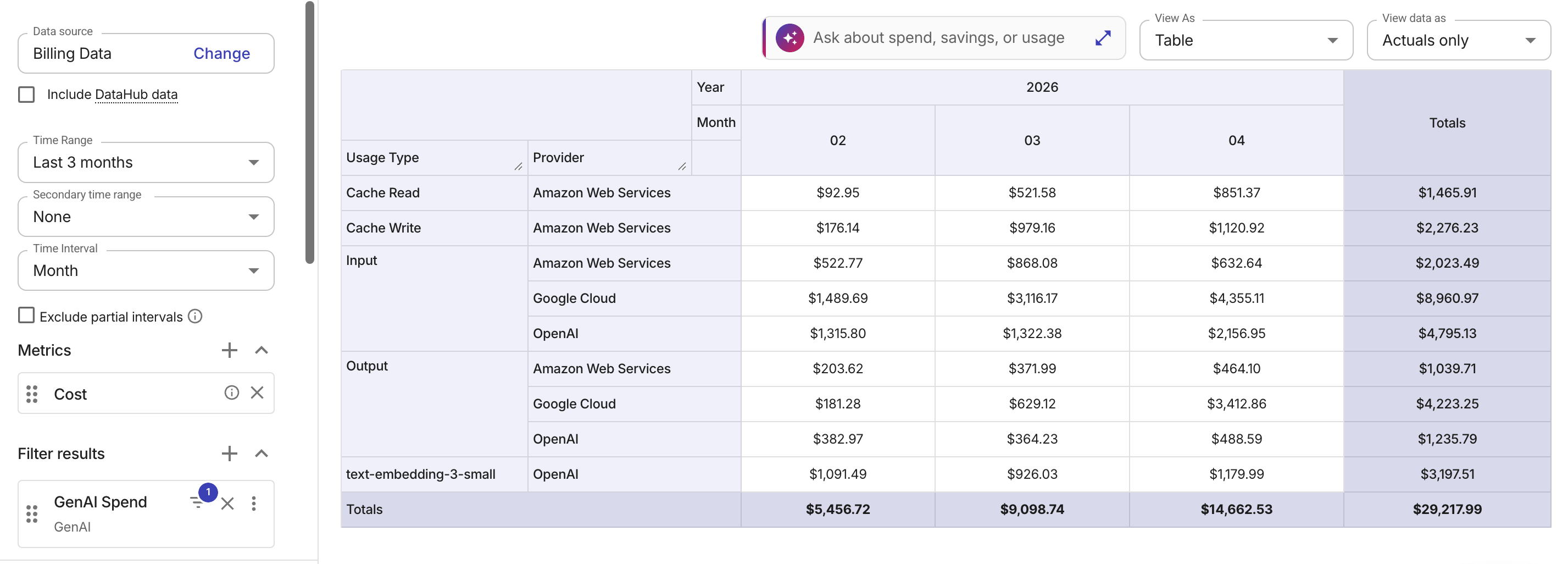
The example below groups costs by the normalized Usage Type dimension across AI providers.
Amazon Bedrock cost by user
Standard AWS billing aggregates Bedrock costs by model and region. For granular cost tracking and allocating, AWS recommends Application Inference Profiles (see AWS re:Post article: How to Track and Limit Amazon Bedrock Usage by User).
To track Bedrock usage by user in the platform:
-
Create an AIP for each user via the Bedrock console or API.
-
Apply custom cost allocation tags and use the AIP ARN in your inference API calls instead of the base model ARN.
-
Activate tags in the AWS Billing and Cost Management console.
-
Activate AWS cost allocation tags in the platform. Depending on your account type, you may need to reactivate your tags.
After a tag appears in AWS billing data, it can take 6–8 hours before the tag shows up in Cloud Analytics reports; for a new tag, it can take up to 24 hours. See Limitations for latency and other restrictions.
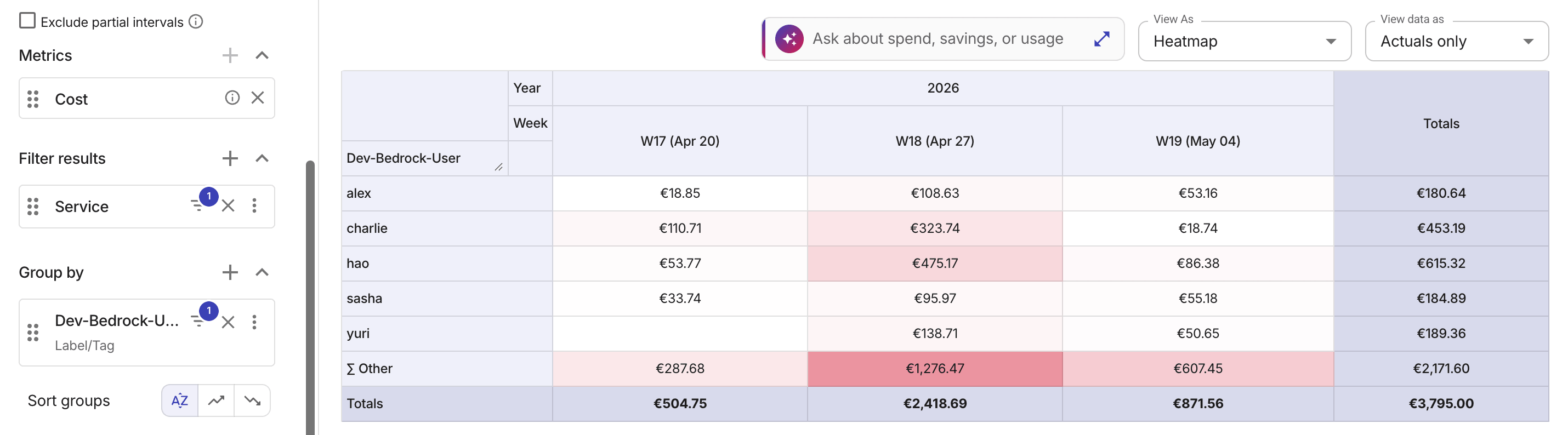
The example below shows top five users by Amazon Bedrock costs in the last three weeks, grouped by a custom cost allocation tag.