CloudHealth のセットアップ
CloudHealth は、DoiT インターナショナルの統合請求に紐づく共有 Amazon Web Services(AWS)組織のうち、管理アカウント(旧 Master Payer Account)561602220360、017920819041、279843869311 配下のお客様のみご利用いただけます。
新規または既存の AWS アカウントで、DoiT インターナショナルの統合請求にリンクされた CloudHealth をセットアップするには、以下の手順に従ってください。
AWS Management Console にサインインする
CloudHealth と連携する AWS アカウントにサインインします。
AWS IAM ロールおよびポリシーを作成する権限を持つ IAM アカウントを使用する必要があります。
AWS IAM ポリシーを作成する
-
IAM Policies に移動し、Create policy を選択します。
-
JSON タブに切り替え、既存の内容を この JSON ポリシー に置き換えます。
AWS IAM policy JSON
{
  "Version": "2012-10-17",
  "Statement": [
    {
      "Effect": "Allow",
      "Action": [
        "appstream:Describe*",
        "appstream:List*",
        "autoscaling:Describe*",
        "cloudformation:ListStacks",
        "cloudformation:ListStackResources",
        "cloudformation:DescribeStacks",
        "cloudformation:DescribeStackEvents",
        "cloudformation:DescribeStackResources",
        "cloudformation:GetTemplate",
        "cloudfront:Get*",
        "cloudfront:List*",
        "cloudtrail:DescribeTrails",
        "cloudtrail:GetEventSelectors",
        "cloudtrail:ListTags",
        "cloudwatch:Describe*",
        "cloudwatch:Get*",
        "cloudwatch:List*",
        "config:Get*",
        "config:Describe*",
        "config:Deliver*",
        "config:List*",
        "cur:Describe*",
        "dms:Describe*",
        "dms:List*",
        "dynamodb:DescribeTable",
        "dynamodb:List*",
        "ec2:Describe*",
        "ec2:GetReservedInstancesExchangeQuote",
        "ecs:List*",
        "ecs:Describe*",
        "elasticache:Describe*",
        "elasticache:ListTagsForResource",
        "elasticbeanstalk:Check*",
        "elasticbeanstalk:Describe*",
        "elasticbeanstalk:List*",
        "elasticbeanstalk:RequestEnvironmentInfo",
        "elasticbeanstalk:RetrieveEnvironmentInfo",
        "elasticfilesystem:Describe*",
        "elasticloadbalancing:Describe*",
        "elasticmapreduce:Describe*",
        "elasticmapreduce:List*",
        "es:List*",
        "es:Describe*",
        "firehose:ListDeliveryStreams",
        "firehose:DescribeDeliveryStream",
        "firehose:ListTagsForDeliveryStream",
        "iam:List*",
        "iam:Get*",
        "iam:GenerateCredentialReport",
        "kinesis:Describe*",
        "kinesis:List*",
        "kms:DescribeKey",
        "kms:GetKeyRotationStatus",
        "kms:ListKeys",
        "kms:ListResourceTags",
        "lambda:List*",
        "logs:Describe*",
        "logs:ListTagsLogGroup",
        "organizations:ListAccounts",
        "organizations:ListTagsForResource",
        "organizations:DescribeOrganization",
        "redshift:Describe*",
        "route53:Get*",
        "route53:List*",
        "rds:Describe*",
        "rds:ListTagsForResource",
        "s3:GetBucketAcl",
        "s3:GetBucketLocation",
        "s3:GetBucketLogging",
        "s3:GetBucketPolicyStatus",
        "s3:GetBucketPublicAccessBlock",
        "s3:GetAccountPublicAccessBlock",
        "s3:GetBucketTagging",
        "s3:GetBucketVersioning",
        "s3:GetBucketWebsite",
        "s3:List*",
        "sagemaker:Describe*",
        "sagemaker:List*",
        "savingsplans:DescribeSavingsPlans",
        "sdb:GetAttributes",
        "sdb:List*",
        "ses:Get*",
        "ses:List*",
        "sns:Get*",
        "sns:List*",
        "sqs:GetQueueAttributes",
        "sqs:ListQueues",
        "storagegateway:List*",
        "storagegateway:Describe*",
        "workspaces:Describe*",
        "eks:Describe*",
        "eks:List*",
        "fsx:Describe*"
      ],
      "Resource": "*"
    }
  ]
}
-
Review Policy を選択し、ポリシー名を CloudHealth に設定します。
-
Create Policy を選択します。
IAM ロールを作成する
-
IAM Roles に移動し、Create Role を選択します。
-
信頼されたエンティティタイプとして AWS Account を選択します。
-
Account ID として
454464851268を入力します。 -
Require external ID を選択し、
6cda262029ad7b34a64ff537196ab4を貼り付けます。 -
Next: Permissions を選択します。CloudHealth IAM Policy を検索して選択します。
-
Next: Tags を選択します。
-
Next: Review を選択し、Role Name を CloudHealth に設定します。
-
Create Role を選択します。
ユーザーを作成する
最初のユーザーは、当社で作成する管理者ユーザーです。管理者は、CloudHealth Interface でさらにユーザーや管理者を作成できます。
さらにサポートが必要な場合は、エキスパートへの問い合わせを開く をご利用ください。
シングルサインオン
CloudHealth で SSO を有効にしている場合、ユーザー名とパスワードによるユーザーの追加はできません。まず IdP のディレクトリ内で適切なロールグループに追加する必要があります。
詳細は、AWS Single Sign-On Service Integration Guide For CloudHealth を参照してください。
CloudHealth による発生コスト
CloudHealth が引き受けるロールは、コストの発生を伴う特定のアクティビティを実行します。例えば、CloudHealth ロールはアカウントから Cost and Usage Reports を収集し、S3 バケットに追加する必要がある場合があります。
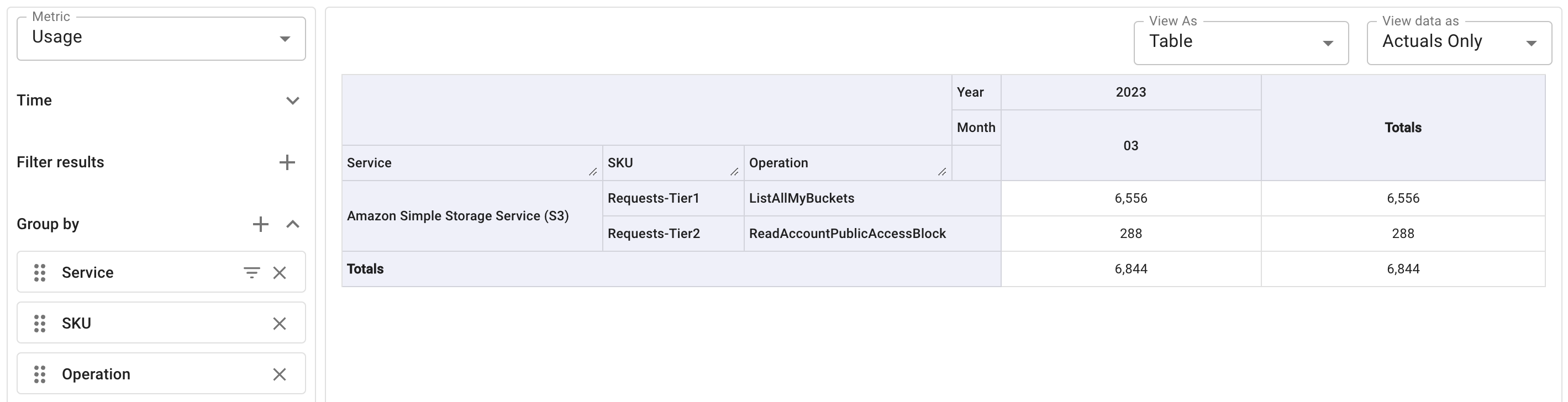
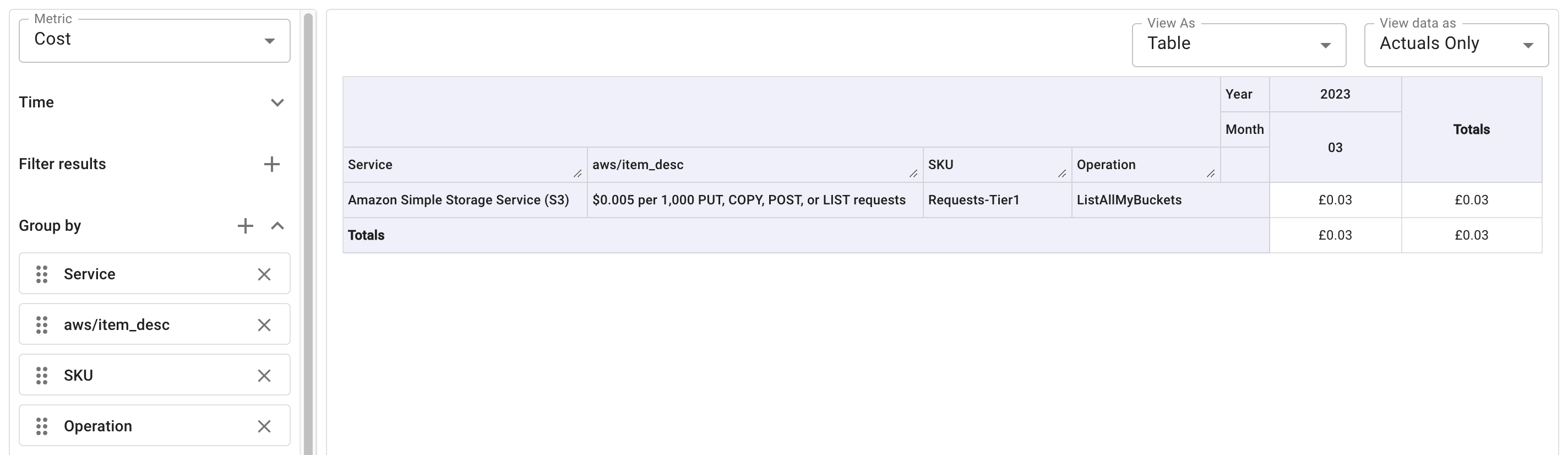
CloudHealth ロールによって発生するコストは通常は小額です。以下は、他の AWS サービスを利用していなかった架空の顧客に発行された請求書の例です。

コストと使用状況を把握するには、Cloud Analytics(クラウド分析)レポート を実行します。
-
Cost メトリクスを使用:
-
Usage メトリクスを使用: