Home page
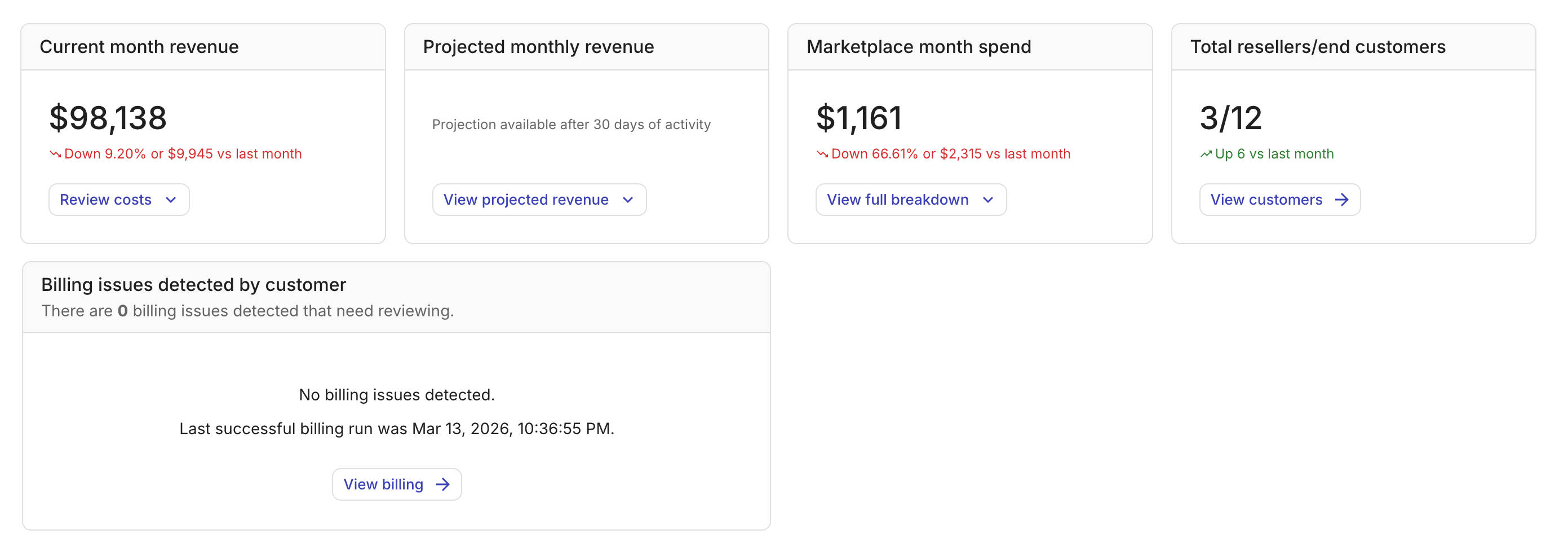
The Home page provides an at-a-glance view of key metrics and operational actions that require attention for distributors and resellers. Widgets on the Home page serve two main purposes:
-
Monitoring revenue and cost.
-
Monitoring customer status and billing issues.

Revenue and cost
The first three panes on the Home page display information about revenue and cost.
Current month revenue
The Current month revenue pane shows the aggregated cloud spend, including marketplace spend, across all customers linked to the reseller or distributor.
Select the Review costs dropdown for more options:
-
View monthly cost by service: Opens an analytics report that breaks down the current month's cost by service.
-
View monthly cost by account: Opens an analytics report that breaks down the current month's cost by account.
-
View full dashboard: Launches the Executive Pulse dashboard.
Projected monthly revenue
The Projected monthly revenue pane shows the forecasted revenue for the current month. Figures in this pane are populated after 30 days of activity.
Select the View projected revenue dropdown for more options:
-
View projected revenue: Opens an analytical report of monthly revenue projection with cloud provider and service breakdown.
-
Review invoices: Launches the Invoices page.
-
View revenue breakdown: Launches the Executive Pulse dashboard.
Marketplace month spend
The Marketplace month spend pane shows monthly marketplace spend.
Select the View full breakdown dropdown for more options:
-
View full breakdown: Opens an analytical report of monthly marketplace spend with month-over-month comparison.
-
View full dashboard: Launches the Executive Pulse dashboard.
Customer
The following panes on the Home page show customer status and billing issues if detected.
Total resellers and customers
-
For a distributor, this pane shows the total number of resellers and end customers, as well as net new accounts in the last 30 days.
-
For a reseller, this pane shows the total number of active Tier 3 customers (role-scoped), as well as net new customer accounts in the last 30 days.
You can select View customers to launch the Customers page for details.
Customer onboarding progress and statuses
Shows a list of customers who are in the onboarding process and their current stages.
This pane is empty if all customers have been successfully onboarded.
Billing issues detected by customer
Shows pipeline or rating issues detected during billing validation.
When there are no billing issues, this pane presents a View billing option to launch the Contracts page.