Custom Pricing configuration — Self-hosted 2.0
PerfectScale Pricing profile feature allows you to customize how your cluster's price is calculated for more accurate data. This can be especially helpful if you have special pricing conditions from your cloud provider.
PerfectScale allows you to create unlimited Custom Pricing profiles, but only one can be applied to each cluster.
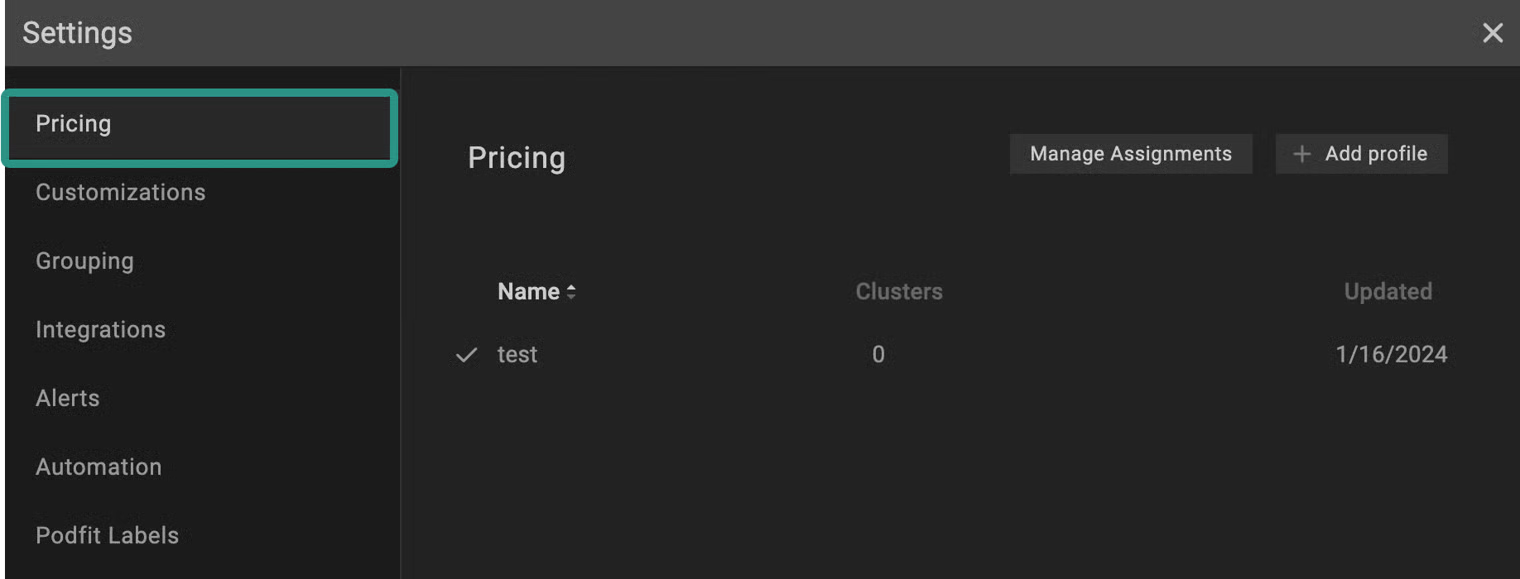
Pricing profile
Configuring Custom pricing with the profile
:tools: How to create Custom pricing profile
There are two options for creating a Profile: from the Settings tab or directly from the Overview.
From the Settings tab
Go to the Settings tab on the left panel -> select Pricing -> click the +Add Profile button -> select Custom -> name the profile and put the needed values in the relevant fields -> click Save button.
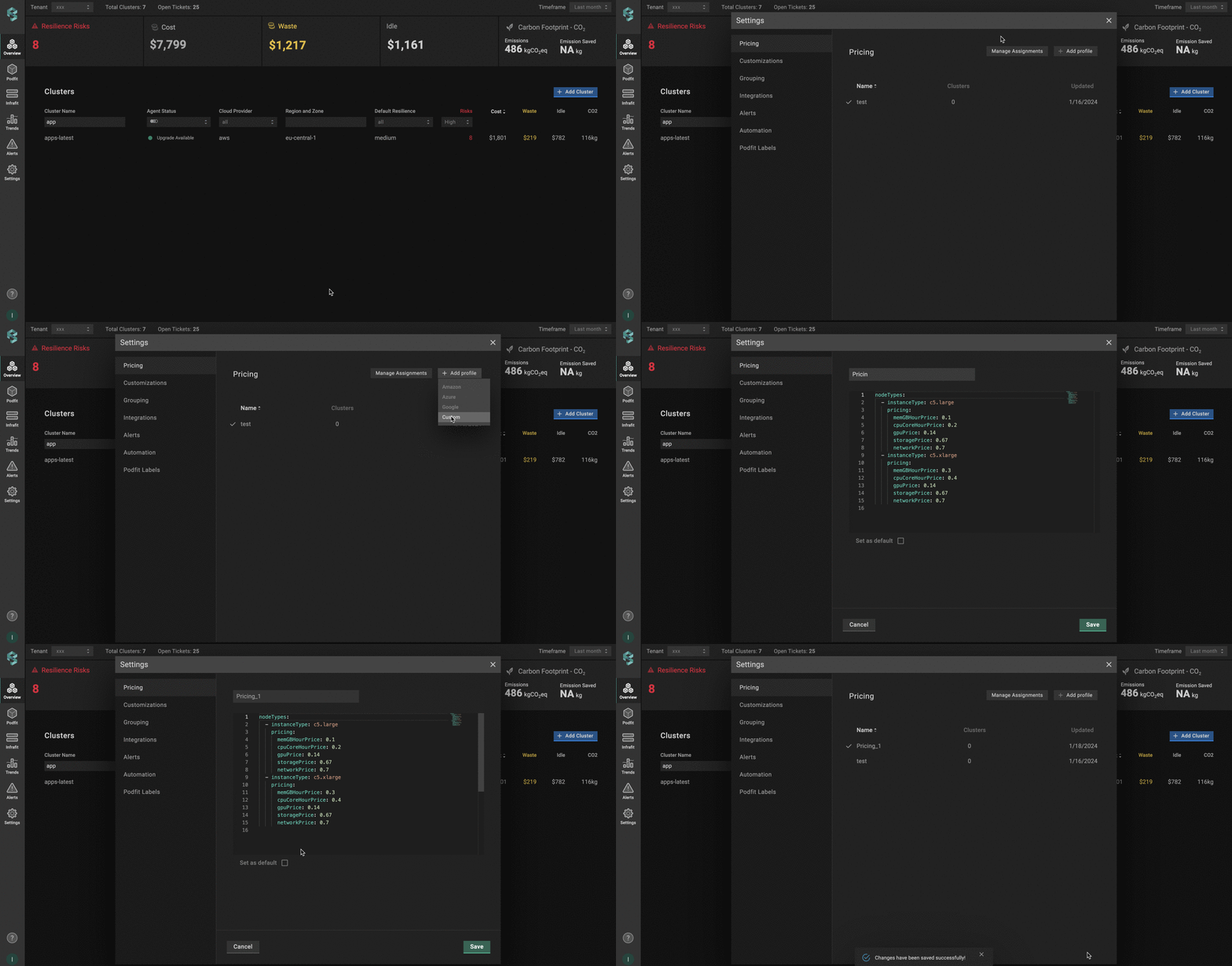
Pricing profile from settings
Tick Set as default checkbox to apply the profile as a default to all the clusters that have no specific profile attached.
From the Overview tab
Go to the Overview tab on the left panel -> find the cluster to which you want to apply the custom Pricing Profile and click gear button -> go to Customizations -> click on Add New Profile in the Pricing Profile drop-down list -> name and configure your profile -> click the Save And Apply button -> click the Save Changes button.
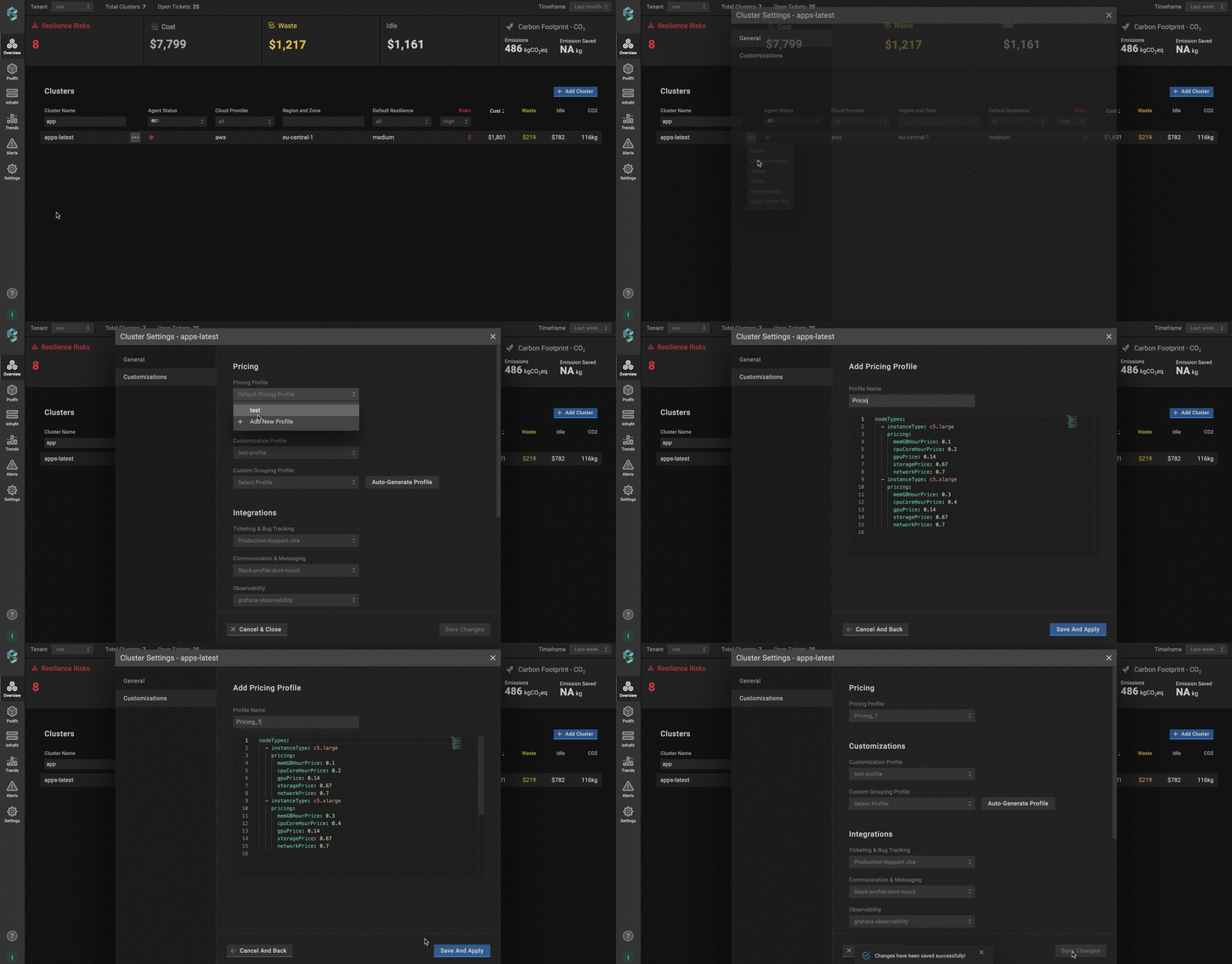
Pricing profile from overview
Custom pricing profile configuration
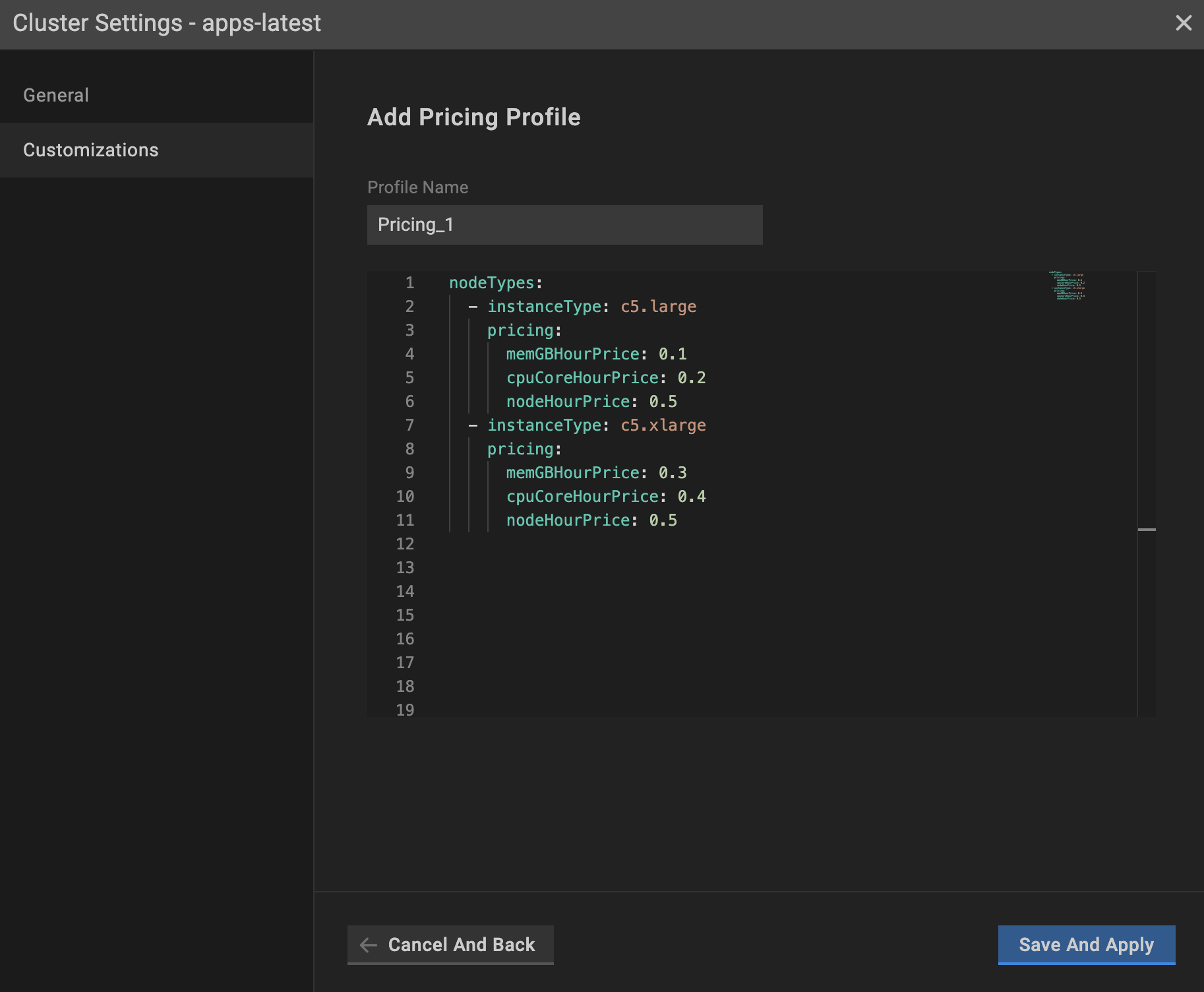
Pricing profile configuration
global_discount (optional block):
percentage- the percentage (0–100, floats supported) of the discount to apply on top of standard on-demand node pricing. This field is required whenglobal_discountexists.start_date(optional) - the effective start date for applying theglobal_discount. If this field is empty, it defaults to today.
If you change the percentage or start_date, only newly generated Trends report will reflect the update. Historical reports will not update automatically. Contact [email protected] if you need them recalculated.
instanceType - the name of the instance that is given by the provider.
memGBHourPrice - the price ($) of 1 GB of memory per hour.
cpuCoreHourPrice - the price ($) of 1 core per hour.
nodeHourPrice - the price ($) of a node per hour.
To incorporate a new instance, duplicate the element and input appropriate values.
PerfectScale provides two options for specifying custom pricing in the profile:
- Specify the cost of the resources (
memGBHourPriceandcpuCoreHourPrice) - Specify the cost of the node (
nodeHourPrice)
nodeHourPricetakes precedence over memGBHourPrice and cpuCoreHourPrice. If all the values are specified in the PricingProfile, PerfectScale will take nodeHourPrice into account only.
:tools: How to apply Custom pricing profile
Apply to a single cluster
To apply Pricing Profile to the cluster, go to the Overview tab on the left panel -> find the cluster to which you want to apply the custom Pricing Profile and click gear button -> go to Customizations -> select the needed profile in the Pricing Profile drop-down list.
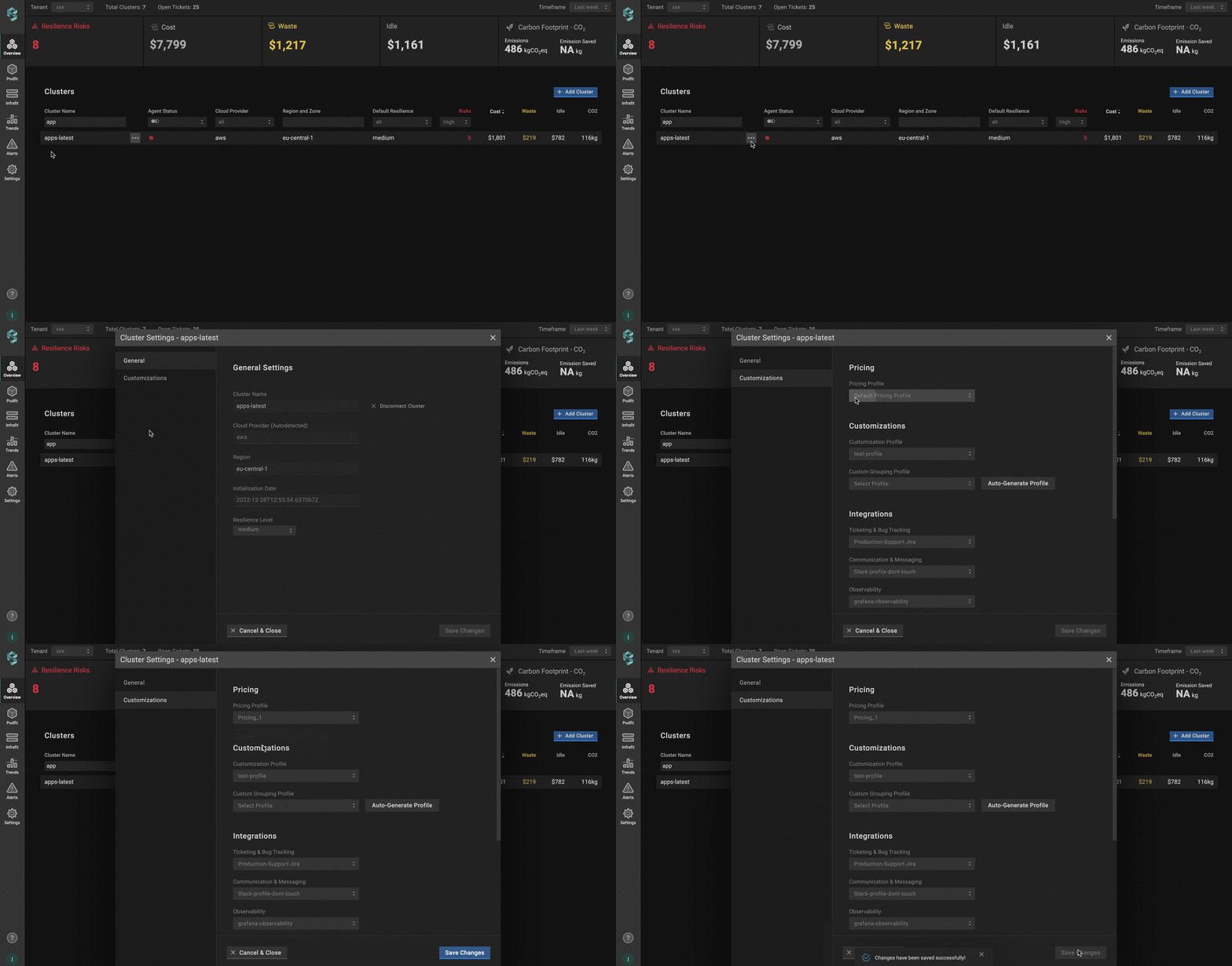
Applying pricing profile to a single cluster
Apply to multiple clusters
To apply the profile to multiple clusters from a single view, use the Manage Assignments feature.
Go to the Settings tab on the left panel -> select the Pricing -> click the Manage Assignments button -> apply the profiles for the needed clusters -> click the Save Changes button.

Applying pricing profile to multiple clusters
You can easily manage your profiles (create, delete), but deleting such profiles is impossible if the profile is already connected to the cluster. Change the profile to default or any other, and only after that, remove the current one.
Configuring Custom pricing with the CRD
To configure Custom pricing using a Custom Resource Definition (CRD), you’ll need to define and apply a Custom Resource (CR) that specifies your unique billing conditions. This approach allows you to manage pricing for specific instances directly through Kubernetes manifests.
The Custom Resource (CR) must be created in the perfectscale namespace.
Here is an example of the CR configuration:
apiVersion: perfectscale.io/v1
kind: ClusterSettings
metadata:
  name: cluster-settings-main
  namespace: perfectscale
spec:
  profiles:
    pricing:
      # Create and assign a custom pricing profile inline
      - type: custom
        name: my-custom-pricing
        assigned: true
        value:
          global_discount:
            percentage: 5
            start_date: 2025-31-12
          nodeTypes:
            - instanceType: c5.large
              pricing:
                cpuCoreHourPrice: 0.085
                memGBHourPrice: 0.0095
                nodeHourPrice: 0.0
            - instanceType: c5.xlarge
              pricing:
                cpuCoreHourPrice: 0.085
                memGBHourPrice: 0.0095
                nodeHourPrice: 0.0
            - instanceType: m5.large
              pricing:
                cpuCoreHourPrice: 0.096
                memGBHourPrice: 0.0096
                nodeHourPrice: 0.0
            - instanceType: m5.xlarge
              pricing:
                cpuCoreHourPrice: 0.096
                memGBHourPrice: 0.0096
                nodeHourPrice: 0.0
⚙️ CR parameters:
| Parameter | Description |
|---|---|
global_discount (optional block) | The discount to apply on top of standard on-demand node pricing.percentage - the percentage (0–100, floats supported) of the discount. This field is required when global_discount exists.start_date (optional) - the effective start date for applying the global_discount. |
instanceType | The instance name assigned by the provider. Example: m5.large, m5.xlarge, etc. |
cpuCoreHourPrice | The hourly cost ($) for each GB of memory. |
memGBHourPrice | The hourly cost ($) for 1 CPU core. |
nodeHourPrice | The hourly cost ($) of a node. |
If a global_discount percentage is provided without a start_date in the CRD profile, we won’t default to today’s date as we do for profiles configured in the UI, and the discount will not be applied. The pricing profile appears broken in the UI.