LimitRange and ResourceQuota — SaaS
LimitRange
For LimitRange, a minimum exporter version of v1.0.45 is required.
In some cases, you may want to constrain minimum and maximum computing resource usage per pod or container in a namespace by configuring LimitRange. PerfectScale respects your policy to constrain the resource allocations that you specified for your pods and containers in the namespace and doesn't contradict it.
When PerfectScale detects that its recommended resource allocation either exceeds or falls below the specified LimitRange for your pods and containers, the relevant indicator will be raised.
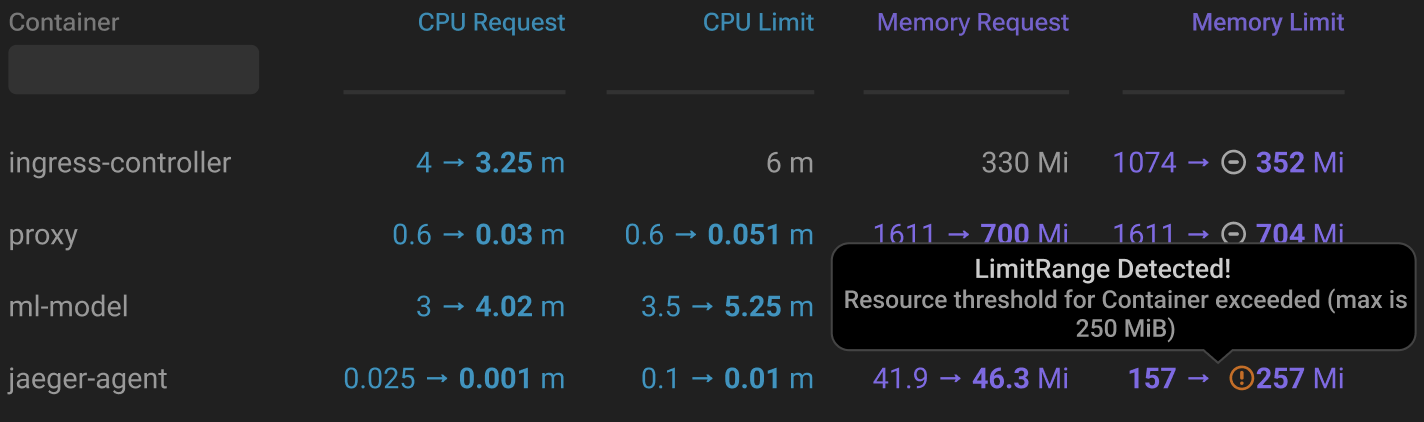
LimitRange detected
Hover over the indicator or click on the workload to view detailed information.
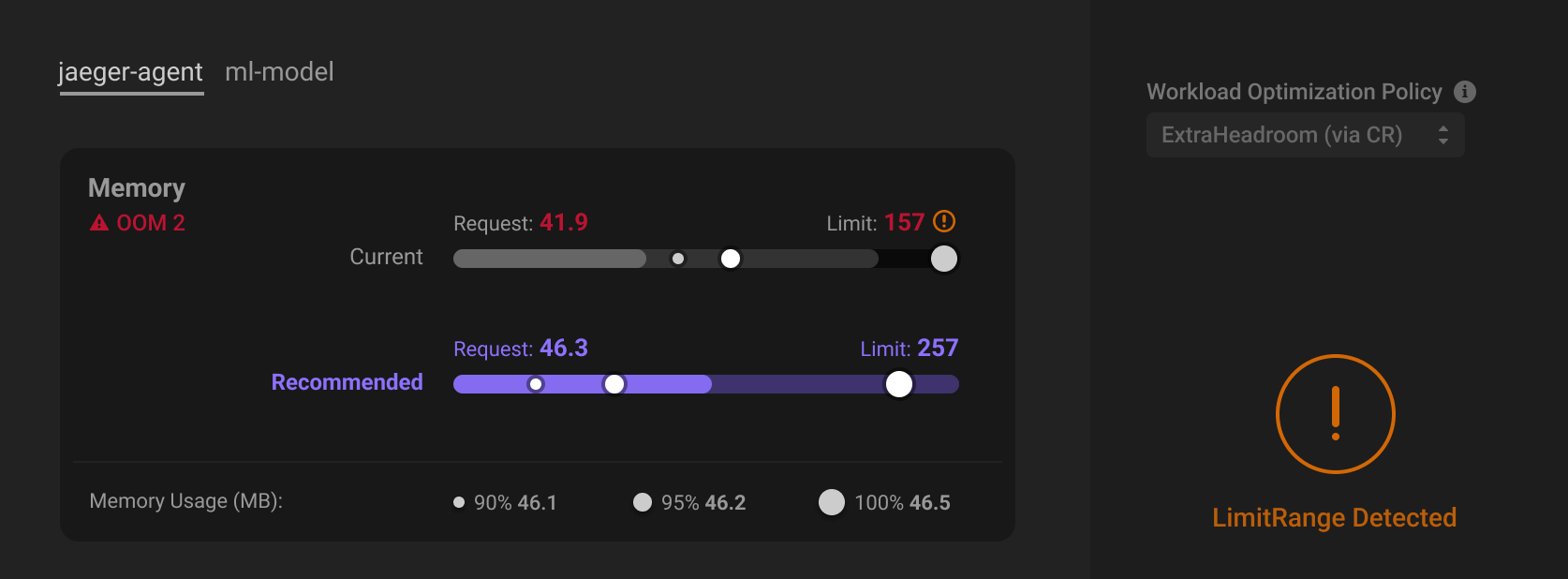
LimitRange details
For automated workloads, if the recommended resource allocation exceeds or falls below the specified LimitRange, PerfectScale will not apply the recommendation. Instead, it will automatically adjust the resource allocation to the maximum or minimum value the LimitRange allows, ensuring compliance with your predefined constraints.

When introducing or updating a LimitRange into an automated cluster, it is necessary to pause automation for at least 30 minutes to ensure that resource constraints are applied correctly before resuming automated operations.
ResoureQuota
Starting with v1.0.52, PerfectScale supports full mode for ResourceQuota handling: instead of blocking increases whenever an ResourceQuota is present, it checks whether actual headroom exists and allows increases that fit within it. Learn more about ResourceQuota headroom here.
In some scenarios, you might want to constrain the overall resource consumption within a namespace by ResourceQuota to ensure that the total usage across all workloads stays within specific limitations.
When PerfectScale detects a ResourceQuota configured for a namespace, automation respects the ResourceQuota when applying both resource increases and decreases. For the decrease-mode, PerfectScale applies the recommended lower resource values. However, for the full-mode, PerfectScale first checks the available ResourceQuota headroom to ensure the recommended resource increase can be safely accommodated within the namespace’s configured limits. Learn more about how to enable the full-mode here.
When PerfectScale detects the ResourceQuota configured, the relevant indicator will be raised.
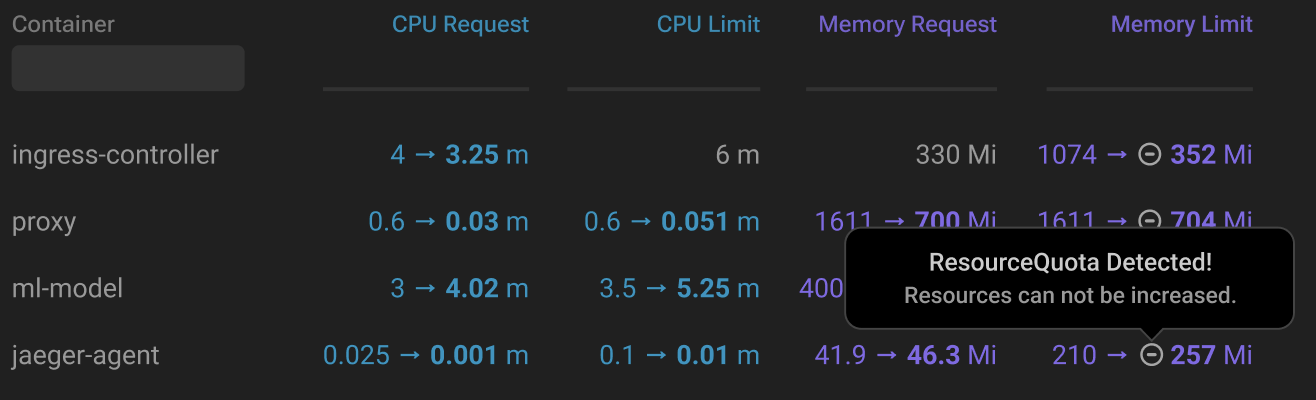
ResourceQuota detected
Hover over the indicator or click on the workload to access the details.
When introducing or updating a ResourceQuota into an automated cluster, it is necessary to pause automation for at least 30 minutes to ensure that resource constraints are applied correctly before resuming automated operations.
Enabling full-mode
To enable the full-mode automation you need to specify it in your workload, namespace, or cluster automation configuration by setting:
spec.automation.operational.resourceQuotaAwareAutomation: full
The setting is checked in this order: WorkloadAutomationConfig → NamespaceAutomationConfig → ClusterAutomationConfig. If it’s not set at one level, PerfectScale checks the next one. If it’s not set anywhere, or is set to anything other than full, the workload follows the pre-RQAA behavior: any ResourceQuota in the namespace blocks increases.
If you want to enable the full-mode for the entire cluster except for specific namespaces, enable full mode at the cluster level. Then, for any namespace that should use decrease-only mode, set resourceQuotaAwareAutomation: decreaseOnly in its NamespaceAutomationConfig.
If you need to enable a specific mode for many workloads in a large cluster, we recommend setting it at the namespace or cluster level rather than configuring each workload individually.
In full-mode, a workload "matches" an RQ based on the RQ's scope selectors, not simply on sharing a namespace.
How full-mode evaluates increases
- Each RQ independently tracks the resources of every workload it applies to, and each workload is checked against every RQ that applies to it.
- Only 4 resource types are tracked, and only if configured on the RQ:
cpu.requests,cpu.limits,memory.requests,memory.limits. If a workload is covered by two RQs and one has enough headroom but the other doesn't, the increase is blocked. - Requests and limits are evaluated as a pair for a given resource: if either lacks headroom, the increase is blocked.
- CPU and memory are evaluated independently: insufficient CPU headroom blocks the CPU increase without blocking a memory increase, and vice versa.
- Decrease-only recommendations are always allowed, with or without full-mode.
ResoureQuota headroom
To keep automation safe, PerfectScale considers more than just the ResourceQuota available right now. It takes into account what the namespace may need next, so changes are applied only when there is enough ResourceQuota headroom to execute them safely.
Before applying a resource increase, PerfectScale accounts for:
- HPA scale-up
HPA-managed workloads can scale up at any time, so PerfectScale keeps enough quota available for that growth. - In-flight rollouts
Resource updates are applied gradually, so PerfectScale considers the resources the workload will use after the rollout, not just the quota headroom available when the rollout started. - Safety buffer
PerfectScale keeps some quota in reserve to handle unexpected or temporary spikes. The margin is larger for small namespaces and smaller for larger ones.