Customization overview — SaaS
PerfectScale allows easy cluster management through profiles, increasing productivity with minimal effort. PerfectScale provides various customizations to help you create your own K8s optimization ecosystem, enhancing observability across your environment and simplifying alerting, ticketing, pricing management, etc., to ensure you achieve the best possible results.
To make your optimization process seamless and personalized, PerfectScale provides various out-of-the-box integrations, helping you to build your optimization ecosystem tailored to your business needs.
You can configure integrations using either UI profiles or CR-based inline profiles. However, we strongly recommend you configure the integrations via PerfectScale UI.
Profiles referenced via CR take precedence over profiles assigned in UI.
You can quickly configure integrations using Customization Profiles (YAML files) via UI, or customize your environment by configuring profiles with CRs.
You can apply multiple profiles to a single cluster, but only one profile of each type (Slack, Jira, etc.).
✨ Recommended path
- Create and test profiles in the UI first.
- Use refByID to reference the profile by its ID (case-sensitive).
- Ensure the profile type you are referencing matches the existing profile type.
apiVersion: perfectscale.io/v1
kind: ClusterSettings
metadata:
  name: cluster-settings-main
  namespace: perfectscale
spec:
  profiles:
    pricing:
      # Reference an existing pricing profile by ID
      # No assigned field needed - refByID is always assigned
      - type: custom
        refByID: "pricing-1"
Configuring integration profile via UI
You can seamlessly create an integration profile directly from the PerfectScale UI. Simply go to Settings, select the integration type, and click Add profile. This approach allows you to set up and manage integrations quickly and accurately. Detailed step-by-step instructions for each integration type are provided on their dedicated integration pages.
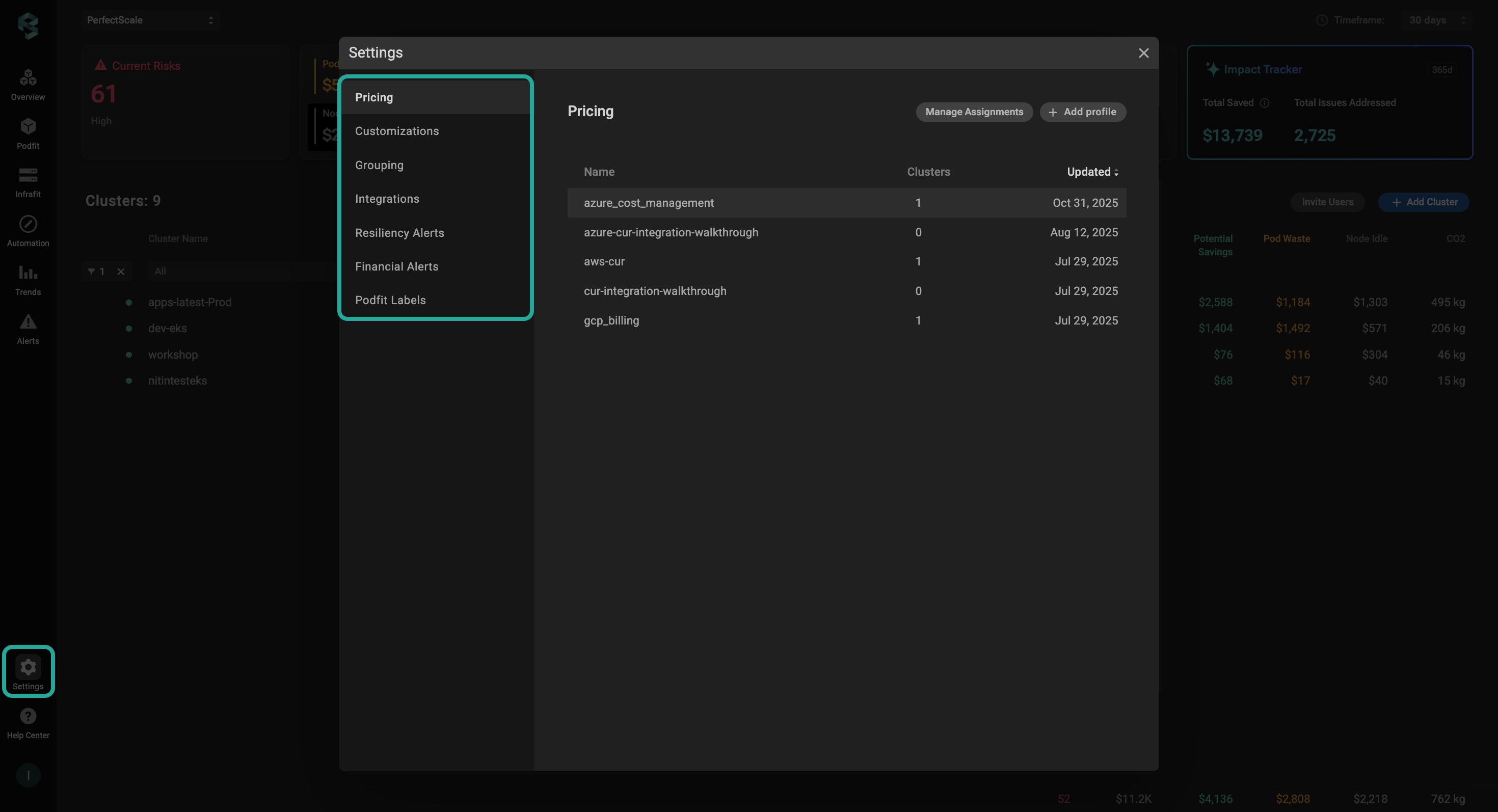
Settings
When a profile is created in the UI, its ID has the following format: {type|class}-N. Underscores in type/class names are converted to hyphens in IDs.
Examples: jira-1, slack-2, resiliency-alerts-1, etc.
Created profiles in the UI can be referenced in a CR using refByID.
Example:
- type: jira
        refByID: "jira-1"
Configuring inline integration profile via CR
Alternatively, you can configure an inline integration profile using a CR. This approach is ideal for teams that prefer GitOps workflows. Detailed step-by-step instructions for each integration type are provided on their dedicated integration pages.
The inline profile configured via CR is visible in UI and can be tested before activation with a single click. You cannot modify or delete a profile configured via CR in the UI. You can make temporary changes for testing, but these changes will not be saved.
Inline profiles will be displayed in the UI using the following name format: {your profile name}-{type/class}-{clusterUID}
Example: dev-team profile with the type Jira
dev-team-jira-1522a0a0-b363-4e6c-bc0d-cfd82c56402e
Inline profiles will be displayed in the UI using the following name format:
{your profile name}-{type/class}-{clusterUID}
You can seamlessly set assigned: false to create profiles without activating them immediately (for example, for testing). In that case, the profile will be visible in the UI but inactive. Only one profile per type (Slack, Jira, etc.) can have assigned: true.
Profiles created via CRD are cluster-specific and cannot be referenced by other clusters.
Prerequisites for configuring the integration profile via CR
The feature is supported starting from the exporter v1.0.80.
If psc-exporter (v1.0.80+) is newly installed, the required CRDs are installed automatically, allowing you to manage cluster settings using custom resources (CRs). However, CRDs are not installed automatically when running a helm upgrade. If you are upgrading, you must install the CRDs manually by running:
kubectl apply -f https://github.com/perfectscale-io/perfectscale-io.github.io/blob/main/charts/perfectscale-agent/crds/clustersettings.yaml
Combining refByID and inline integrations
We highly recommend creating profiles via UI and referencing them using refByID rather than inline profiles. If you prefer using inline profiles, you can test them in UI before activation, even when assigned: false.
You have the option to configure a CR that combines multiple integrations, allowing you to manage them with a single resource. Additionally, you can include existing profiles that were previously configured via the PerfectScale UI, giving you flexibility to mix and match inline and UI-based configurations in one setup.
You can combine both approaches by referencing profiles created in the PerfectScale UI directly in your CR using refByID (case-sensitive). However, refByID cannot reference profiles created via CR, and a CR cannot have both refByID and an inline profile with assigned: true for the same type.
Example:
- ✅ Valid:
refByID+ inline profiles withassigned: false(for testing) - ❌ Invalid:
refByID+ inline profile withassigned: true
When using refByID, ensure the profile type matches the existing profile's type: jira, slack, teams, etc.
Example
apiVersion: perfectscale.io/v1
kind: ClusterSettings
metadata:
  name: cluster-settings-main
  namespace: perfectscale
spec:
  profiles:
    # Pricing: Create inline custom pricing profile and assign it
    pricing:
      - type: custom
        name: production-pricing
        assigned: true
        value:
          nodeTypes:
            - instanceType: c5.large
              pricing:
                cpuCoreHourPrice: 0.085
                memGBHourPrice: 0.0095
            - instanceType: c5.xlarge
              pricing:
                cpuCoreHourPrice: 0.085
                memGBHourPrice: 0.0095
            - instanceType: m5.large
              pricing:
                cpuCoreHourPrice: 0.096
                memGBHourPrice: 0.0096

      # Create AWS CUR profile but don't assign it yet (for testing)
      - type: aws_cur
        name: aws-cur-backup
        assigned: false
        value:
          role_arn: "arn:aws:iam::your-account-id:role/your-role-name"
          aws_external_id: "your-unique-external-id-here"
          athena_database: athenacurcfn_perfectscale_cur
          athena_region: us-east-1
          athena_result_bucket: s3://perfectscale-cur-results/
          athena_table: perfectscale_cur_hourly
          aws_account_id: "your-aws-account-id-here"

    # Integrations: Mix inline Slack and referenced Jira
    integrations:
      # Create and assign inline Slack integration
      - type: slack
        name: team-alerts
        assigned: true
        value:
          channel: "perfectscale-production"
          routings:
            - label_alert
            - cost_waste_alert
          slack_token_from:
            secretKeyRef:
              name: slack-credentials
              key: bot-token

      # Reference existing Jira integration (created in UI)
      - type: jira
        refByID: "jira-1"

    # Resiliency Alerts: Create inline profile
    resiliency_alerts:
      - name: production-alerts
        assigned: true
        value:
          min_risk_level: high
          ignore_workload: "^(test-.*|dev-.*)"
          ignore_namespace: "^(kube-system|kube-public)$"
          ignore_container: "^(istio-proxy|envoy)$"
          ignore_indicator: ""

    # PodFit Labels: Reference existing profile
    podfit_labels:
      - refByID: "label-1"

    # Customization: Create inline profile
    customization:
      - name: app-labels
        assigned: true
        value:
          workload_labels:
            - app.kubernetes.io/name
            - app.kubernetes.io/component
            - team
            - cost-center
          node:
            spot_labels:
              label_cloud_google_com_gke_nodepool: pool-2
              label_spotinst_io_node_lifecycle: spot
            node_group_labels:
              - eks.amazonaws.com/nodegroup
              - kops.k8s.io/instancegroup
            architecture_labels:
              - kubernetes.io/arch
            os_labels:
              - kubernetes.io/os
            instance_type_labels:
              - node.kubernetes.io/instance-type
            region_labels:
              - topology.kubernetes.io/region
            availability_zone_labels:
              - topology.kubernetes.io/zone
          ignored_pod_labels:
            - uid
            - namespace
          ignored_node_labels:
            - uid
CR profiles (both refByID and inline) take precedence over UI-assigned profiles and will override them.
Deleting a profile
Profiles assigned to clusters cannot be deleted.
To delete a profile, it must first be unassigned from all clusters.
If the profile is still assigned to one or more clusters, deletion is blocked, and a pop-up message will inform you of the reason with the following instructions.
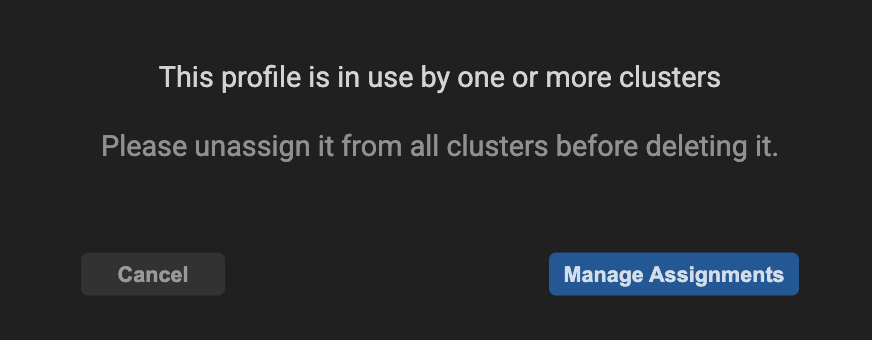
Unassign a cluster befor deleting
To unassign a profile from all clusters, navigate to Manage Assignments and deselect the relevant profile.
Profiles created via CR cannot be deleted in the UI, so the delete option is disabled.
Troubleshooting
CR creation failed
- Check if ClusterSettings already exists:
kubectl get clustersettings -n perfectscale - Review logs:
kubectl logs -n perfectscale -l app=perfectscale-exporter
Profile not applied
- Check logs for sync errors
- Verify secrets exist:
kubectl get secrets -n perfectscale - Check profile format matches the type
Secret not found
- Verify secret exists:
kubectl get secret <secret-name> -n perfectscale - Ensure the secret is in
perfectscalenamespace
Profile deletion failed
- Ensure the profile is unassigned from all clusters
- If it is still assigned, navigate to Manage Assignments and deselect the relevant profile.