Label customizations — SaaS
PerfectScale can recognize some labels automatically. However, it can be set up manually for advanced label configuration. This is particularly helpful when you are using custom labels to organize your K8s resources.
You can customize your labels for the workloads as well as for nodes. Currently, there are available the following options:
| Label | Description |
|---|---|
| workload_labels | Defines labels that can be applied to Kubernetes resources (pods, deployments, or stateful sets) to identify and manage workloads within a cluster. |
| spot_labels | Identifies spot nodes. |
| node_group_labels | Identifies the nodes group in a cluster. |
| architecture_labels | Specifies the architecture of the node (x86_64, arm64, etc.) |
| os_labels | Specifies the operating system running on a node within the Kubernetes cluster. |
| instance_type_labels | Specifies the type or configuration of VMs (instances) within a cloud infrastructure. |
| region_labels | Specifies the geographical region where a particular resource is located. |
| availability_zone_labels | Specify the availability zone where a particular resource is located. |
| ignored_pod_labels | Defines labels that Kubernetes components should disregard when making pod decisions. |
| ignored_node_labels | Defines labels that Kubernetes components should disregard when making node decisions. |
Label Formatting
Kube-state-metrics exposes labels following Prometheus conventions:
- Add the
label_prefix to the label - Replace non-alphabetic characters with underscores
- Convert camel case to snake case by using underscores to separate words
Example
kubernetes.azure.com/scalesetpriority: spot -> label_kubernetes_azure_com_scalesetpriority: spot
node:
  spot_labels:
    label_kubernetes_azure_com_scalesetpriority: spot
Configuring Custom Labels with the profile
:tools: How to create Customization Profile
There are two options for creating a Profile: from the Settings tab or directly from the Overview.
From the Settings tab
Go to the Settings tab on the left panel -> select Customizations -> click the +Add Profile button -> name and configure the profile -> click Save button.
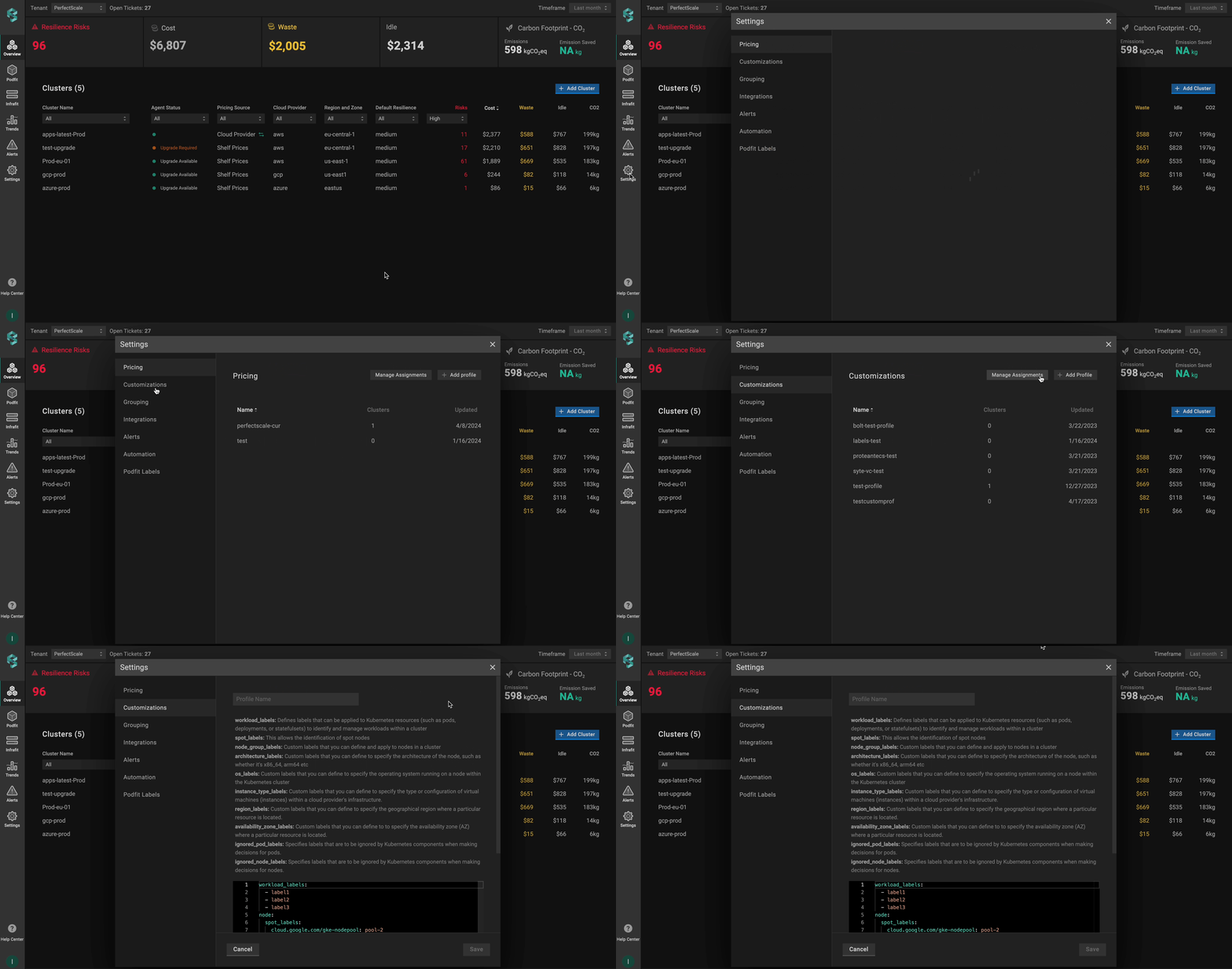
Customization profile from settings
From the Overview tab
Go to the Overview tab on the left panel -> find the cluster to which you want to apply the Customization Profile and click gear button -> go to Customizations -> click on Add New Profile in the Customization Profile drop-down list -> name and configure your profile -> click the Save And Apply button -> click the Save Changes button.
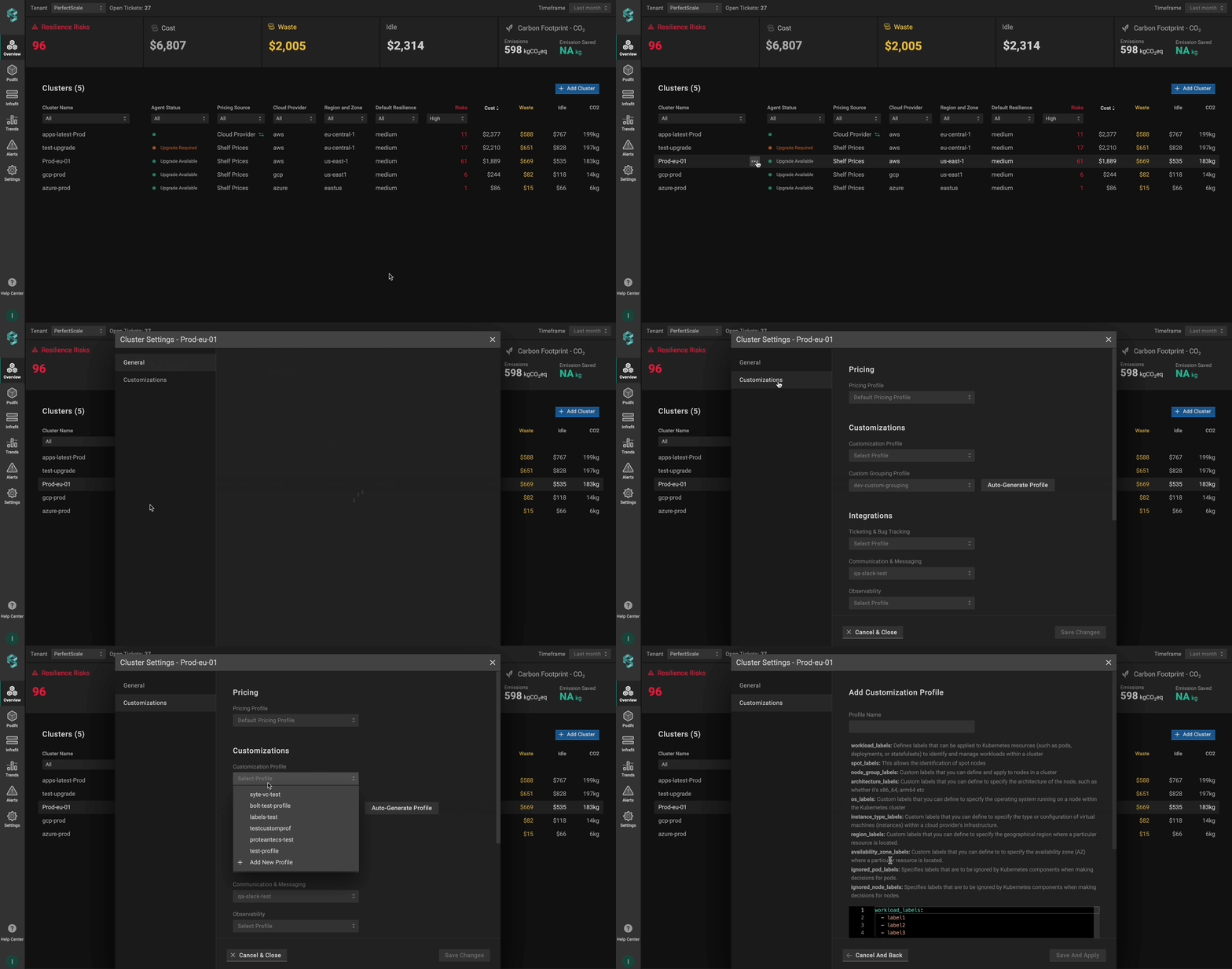
Customization profile from overview
Use Set as default checkbox to automatically assign the profile to the clusters.
💡 NOTE: The manually assigned profile takes priority over the default one.
:tools: How to apply Customization Profile
Apply to a single cluster
To apply Customization Profile to the cluster, go to the Overview tab on the left panel -> find the cluster to which you want to apply the Customization Profile and click gear button -> go to Customizations -> select the needed profile in the Customization Profile drop-down list.
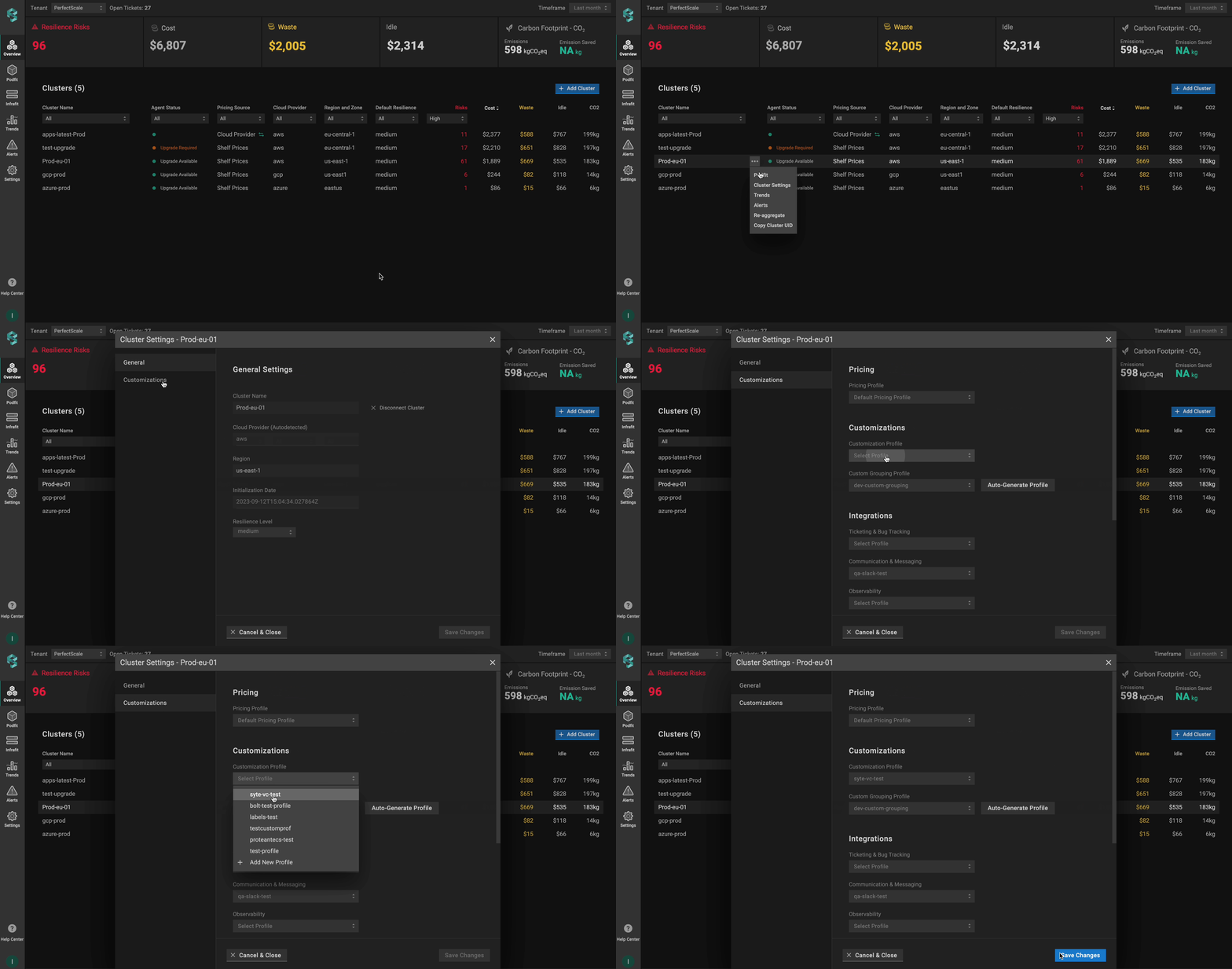
Applying customization profile to a single cluster
Apply to multiple clusters
To apply the profile to multiple clusters from a single view, use the Manage Assignments feature.
Go to the Settings tab on the left panel -> select the Customizations -> click the Manage Assignments button -> apply the profiles for the needed clusters -> click the Save Changes button.
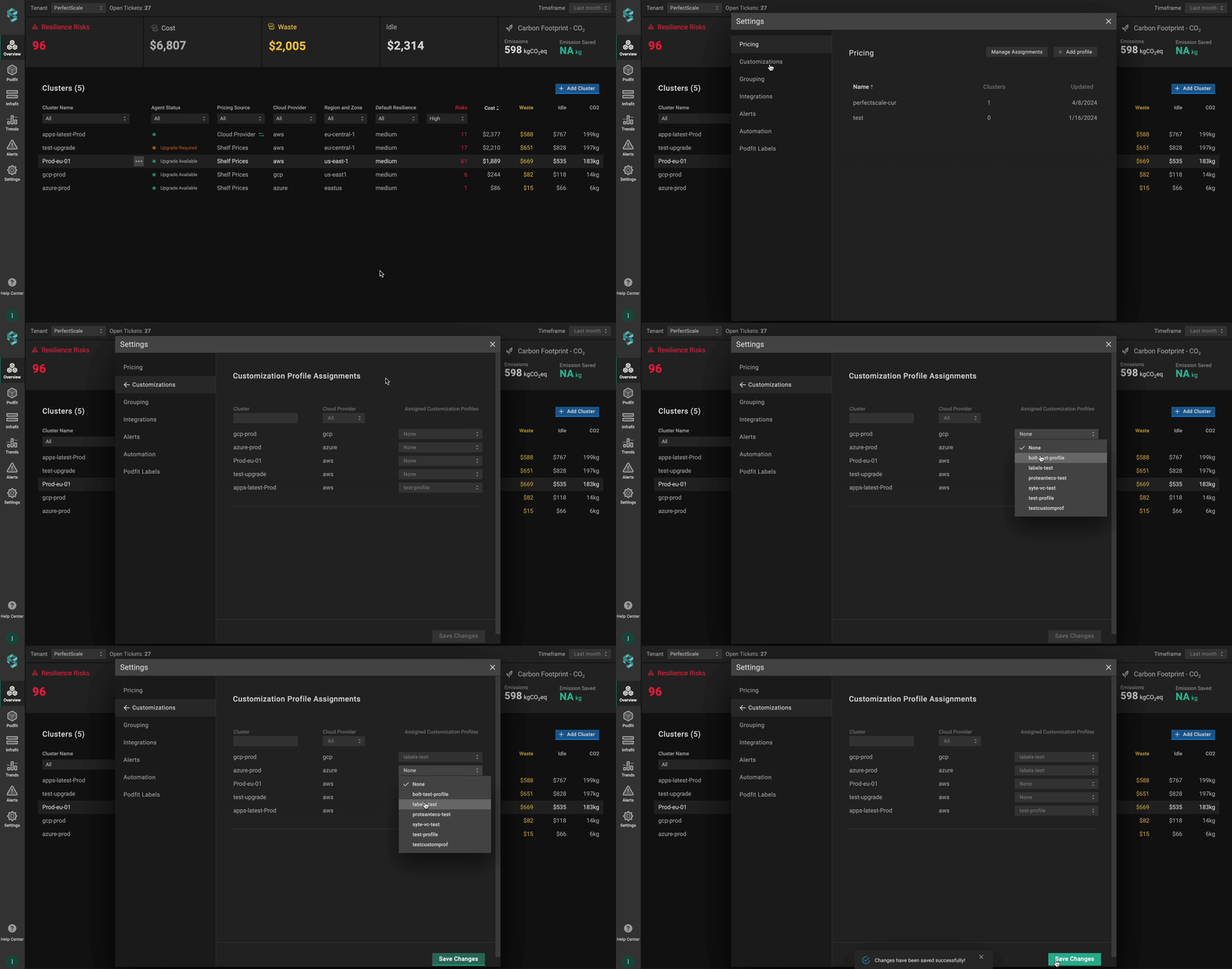
Applying customization profile to multiple clusters
Configuring Custom Labels with CR
To enable custom labels and node identification, you need to define and apply a Custom Resource (CR) with the required parameters. This approach allows you to manage Custom Labels directly through Kubernetes manifests.
The Custom Resource (CR) must be created in the perfectscale namespace.
Setup instructions
- Identify the labels used in your Kubernetes cluster to distinguish workloads.
- Identify the labels used for node properties such as spot instances, node groups, architecture, etc.
- Configure the fields below to match your cluster’s label structure.
- Configure the CR.
Ensure labels follow Prometheus conventions. Learn more about the format here.
apiVersion: perfectscale.io/v1
kind: ClusterSettings
metadata:
  name: cluster-settings-main
  namespace: perfectscale
spec:
  profiles:
    customization:
      - name: custom-workload-labels
        assigned: true
        value:
          workload_labels:
            - io.codefresh.pipelineName
            - app.kubernetes.io/name
            - app.kubernetes.io/component
            - app.kubernetes.io/version
            - app.kubernetes.io/part-of
          node:
            spot_labels:
              label_cloud_google_com_gke_nodepool: pool-2
              label_spotinst_io_node_lifecycle: spot
            node_group_labels:
              - eks.amazonaws.com/nodegroup
              - kops.k8s.io/instancegroup
            architecture_labels:
              - kubernetes.io/arch
              - beta.kubernetes.io/arch
            os_labels:
              - kubernetes.io/os
              - beta.kubernetes.io/os
            instance_type_labels:
              - node.kubernetes.io/instance-type
              - beta.kubernetes.io/instance-type
            region_labels:
              - topology.kubernetes.io/region
              - failure-domain.beta.kubernetes.io/region
            availability_zone_labels:
              - topology.kubernetes.io/zone
              - failure-domain.beta.kubernetes.io/zone
          ignored_pod_labels:
            - uid
            - namespace
            - pod
          ignored_node_labels:
            - uid
⚙️ CR parameters:
| Parameter | Description |
|---|---|
workload_labels | Defines labels that can be applied to Kubernetes resources (pods, deployments, or stateful sets) to identify and manage workloads within a cluster. |
spot_labels | Identifies spot nodes (key-value pairs). |
node_group_labels | Identifies the node groups in a cluster. |
architecture_labels | Specifies the architecture of the node (x86_64, arm64, etc.). |
os_labels | Specifies the operating system running on a node within the Kubernetes cluster. |
instance_type_labels | Specifies the type or configuration of VMs (instances) within a cloud infrastructure |
region_labels | Specifies the geographical region where a particular resource is located. |
availability_zone_labels | Specifies the availability zone where a particular resource is located. |
ignored_pod_labels | Defines labels that Kubernetes components should disregard when making pod decisions. |
ignored_node_labels | Defines labels that Kubernetes components should disregard when making node decisions. |