Multi-currency support — SaaS
ヒント
Don’t see your currency in the list? Reach out to your PerfectScale contact. New currencies are added based on customer demand.
You can set a tenant-level display currency so that costs shown throughout the product, including dashboards, Podfit and Infrafit tables, Zoom-In, and the Trends report, are converted to your team's preferred currency.
情報
Setting a display currency only changes how amounts are displayed, it does not change how they're calculated or stored.
How it works
- All costs are calculated and stored in USD.
- Conversion happens at display time, using exchange rates refreshed daily from FX markets.
- The display currency is a tenant-wide setting, so everyone on your team sees the same converted values.
- Changing the display currency requires settings-edit permission.
- Any page showing converted amounts includes a banner naming the currency and the exchange rate date.
Example: Amounts are shown in EUR, converted from USD at the Sep 8 exchange rate.
Setting the display currency
- Go to your account Settings in the left sidebar and select Display Currency.
- Select a currency from the list. The change takes effect immediately for everyone in your tenant.
情報
Changing the currency does not modify any underlying data. You can switch back to the default currency or select another one from the list at any time.
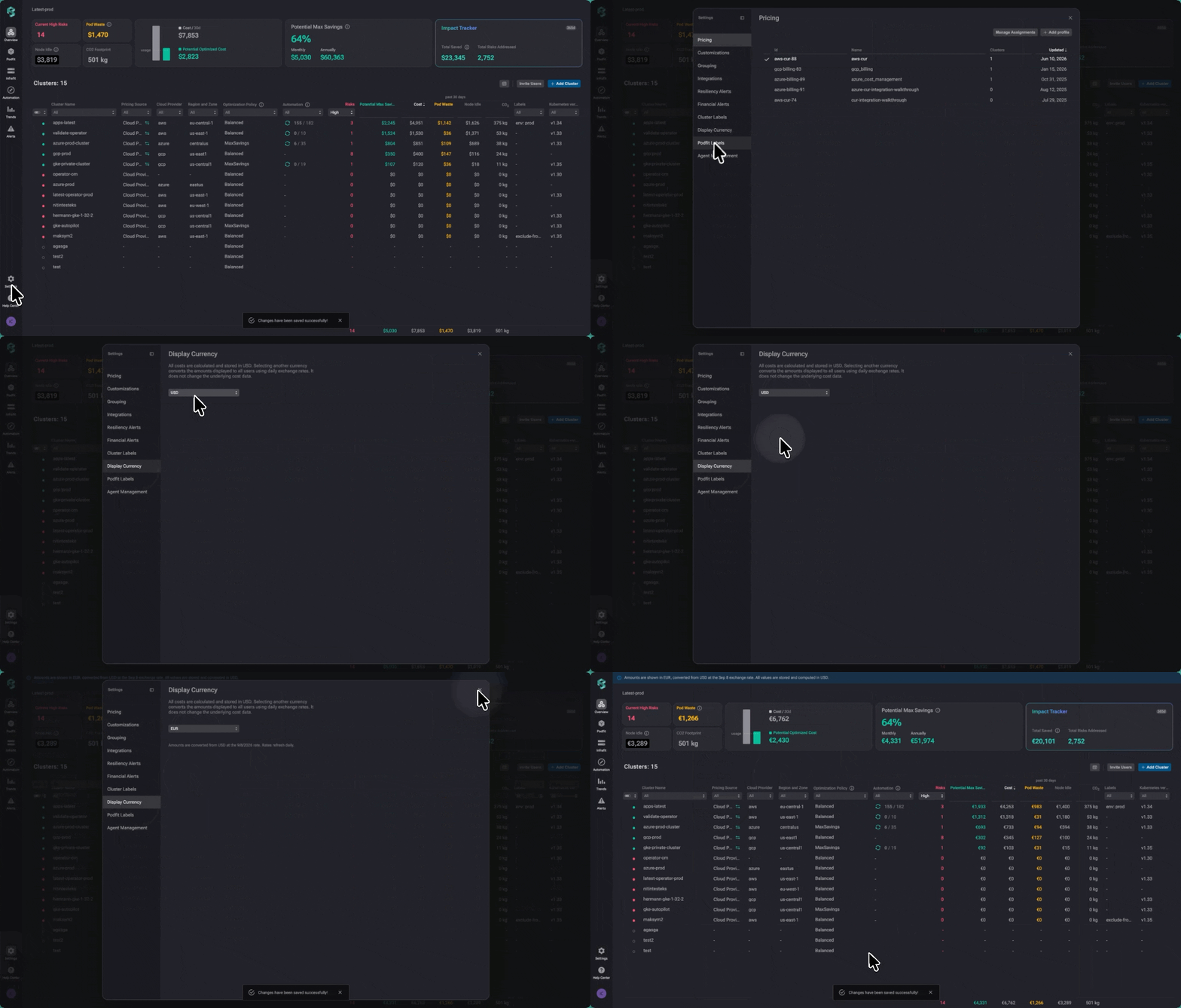
Set the display currency