DPMAs
DPMAs ページには、オンボーディング済みの Distributor Program Management Accounts(DPMA)がすべて一覧表示されます。このページを使用して、アカウントヘルスの監視、リセラー関係の追跡、および各 DPMA 全体のマッピング進捗の確認を行います。
必要な権限
- Distributor:お使いの DoiT アカウントに Admin ロールが付与されている必要があります。
DPMAs を表示
DPMAs ページを開くには、DoiT コンソール にサインインし、上部ナビゲーションのメガメニューから Billing transfer > DPMAs を選択してください。
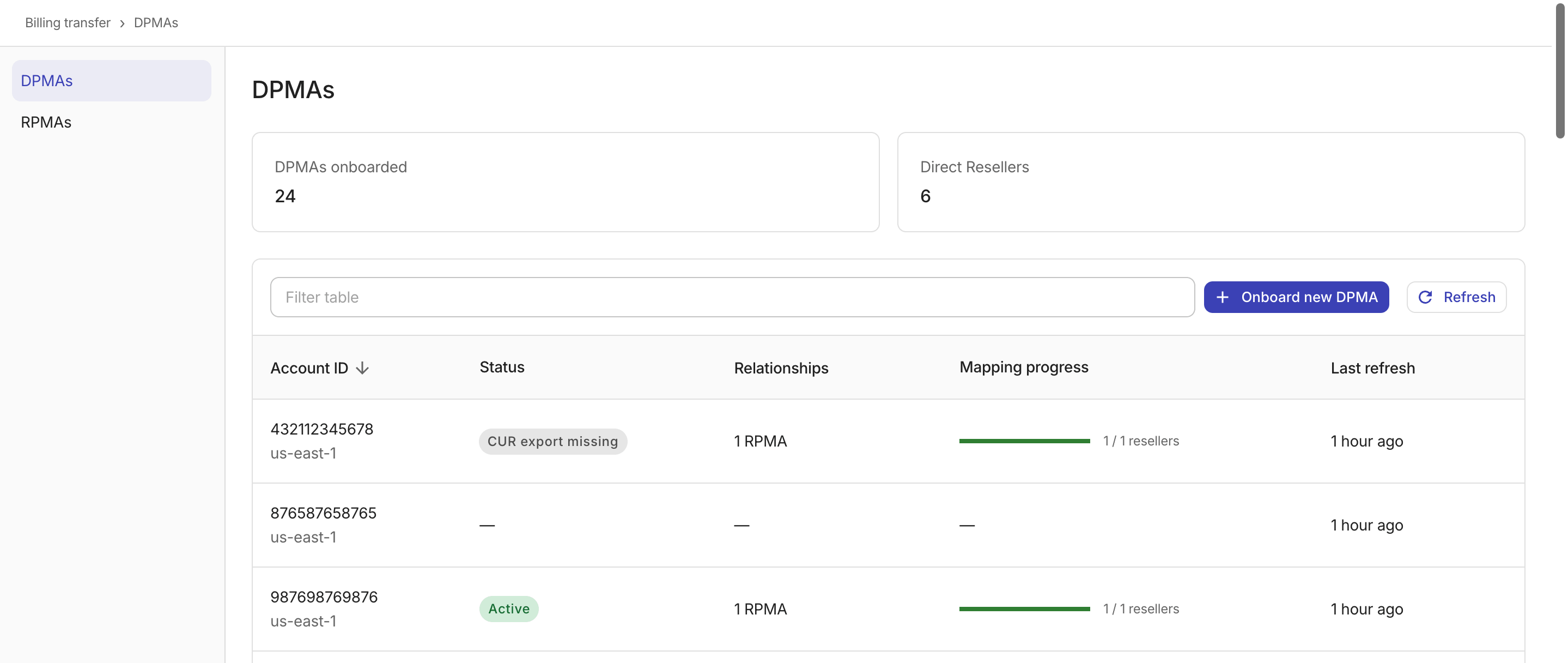
2 つのサマリーカードには、オンボーディング済みアカウントの集計メトリクスが表示されます。
-
DPMAs onboarded:システムに登録されている DPMA の総数
-
Direct Resellers:すべての DPMA にマッピングされているリセラーテナントの合計数
テーブルには、各 DPMA について次の情報が表示されます。
-
Account ID:DPMA の AWS アカウント ID(その下に地域が表示されます)。各 DPMA は、ある 1 つの地域に属するリセラーおよびエンドカスタマーからの Billing transfer データを受信します。
-
Status:DPMA の現在のヘルス状態。DPMA ステータス を参照してください。
-
Relationships:その DPMA に関連付けられている Reseller Program Management Accounts(RPMA)の数
-
Mapping progress:合計リセラー数のうち、マッピングを承諾済みのリセラー数の進捗を示すプログレスバー
-
Last refresh:アカウントデータが最後に更新された日時
テーブル上部のフィルターバーを使用して、ステータスやその他の列で結果を絞り込んでください。
DPMA ステータス
各 DPMA には、優先度順で評価された 5 種類のヘルスステータスのいずれかが表示されます。
-
Role validation failed:DPMA に関連付けられている IAM ロールに、権限不足・不要な権限の付与・ロールを引き受けられないなどの設定上の問題があります。AWS アカウント内で IAM ロール設定を修正してください。 -
CUR export missing:マッピングされているリセラーのうち少なくとも 1 つで Cost and Usage Report(CUR)エクスポートが待機中です。CUR 配信が正しく構成されていることを確認してください。 -
Active:マッピングされているすべてのリセラーがアクティブであり、データが正しくフローしています。 -
Handshake pending:1 つ以上のリセラーによるマッピングハンドシェイクの承諾待ち状態です。 -
—:この DPMA には、まだリセラーデータが関連付けられていません。
ステータスは、優先度が最も高い問題を反映します。例えば、IAM ロールに問題がある DPMA は、すべてのリセラーがアクティブであっても常に Role validation failed が表示されます。
アカウントデータを更新
Refresh ボタンを選択してリレーションシップ一覧を再取得してください。たとえば AWS 側で新しいハンドシェイクを承諾した後などに使用します(DPMA ごとに 1 分間のレートリミットが適用されます)。